
E-commerce is the buying and selling of goods or services over the internet. It runs through websites, mobile apps, online marketplaces and even social media. If you have ever ordered a pizza from an app, downloaded a template, or booked a consultant online, you have taken part in it.
This guide does three things most articles on the topic split apart: it explains what e-commerce is and how it works, it shows what you can sell online to make money (physical, digital and service ideas), and it answers a question that trips up many consultants and coaches: what category is a business consultant in e-commerce taxonomy?
What Is E-Commerce?
E-commerce (electronic commerce) is the exchange of goods, services and money over the internet. IBM describes it as buying and selling that can happen between businesses, consumers or both, delivered through websites, apps or marketplaces (IBM: What is e-commerce?). The U.S. Census Bureau uses a broader test: a sale counts as e-commerce when the order, or the price and terms, are agreed over an online system, even if the payment happens offline (Census Bureau e-commerce data).
In practice, an e-commerce business has four moving parts: something to sell, a place to sell it (store or marketplace), a way to get paid, and a way to deliver it (shipping, download link or a booked call). Everything else, from SEO to email, supports those four.
Why E-Commerce Matters in 2026
Online selling is no longer a side channel. According to the Census Bureau’s quarterly report, U.S. retail e-commerce reached about $340.2 billion in Q2 2026, roughly 17.1% of all retail sales, and grew faster than retail overall (about 12.2% year over year versus 6.7%).
For a new seller the appeal is simple: lower startup costs than a physical shop, a customer base that is not limited to your town, and sales that continue while you sleep. That same openness means competition is real, so choosing what to sell matters more than ever. We cover that below.
Types of E-Commerce (With Examples)
Knowing your model tells you who you are selling to, how long sales take and which tools you need.
| Model | Who sells to whom | Example |
|---|---|---|
| B2C | Business → consumer | A clothing brand with an online store. See our online shopping websites roundup. |
| B2B | Business → business | A supplier selling in bulk; see wholesale WooCommerce themes. |
| C2C | Consumer → consumer | Handmade items on Etsy or used goods in classifieds. |
| C2B | Consumer → business | A freelancer selling design work to a company. |
| B2G | Business → government | Bidding on a public procurement portal. |
| D2C / social / live commerce | Brand → shopper, often via social apps or livestreams | A skincare brand selling through TikTok or its own site. |
How E-Commerce Works
Whatever the model, a sale follows the same path.
The building blocks
- Online store or marketplace: your own site (for example WooCommerce or Shopify) or a marketplace such as Etsy.
- Payments: cards, digital wallets and bank transfers through a payment gateway.
- Logistics: shipping and inventory for goods, instant delivery for downloads, scheduling for services. Our guide to WooCommerce inventory management helps here.
- Marketing: SEO, email, social media and ads. Start with the beginner’s guide to on-page SEO.
- Security and trust: an SSL certificate, secure checkout and regular updates. Read how to install an SSL certificate and our WordPress security checklist.
What Can You Sell Online to Make Money?
Almost anything can be sold online, but the best starting point depends on your budget, skills and how hands-on you want to be. Here are the main groups, from lowest to highest operational effort.
1. Digital products (no inventory, no shipping)
You create once and sell repeatedly. Delivery is automatic, so margins are high. The honest caveat: “passive” only starts after you have built, packaged and marketed the product.
- Ebooks and guides: specific beats broad. “Land your first freelance client with no portfolio” outsells “make money online”.
- Templates: resumes, invoices, social media kits, Notion dashboards, spreadsheets, pitch decks.
- Online courses and mini-courses: one focused result in 3 to 5 modules. See our WooCommerce course booking and PHP learning management system posts.
- Printables and planners: low price, high volume, strong on Etsy.
- Stock assets: photos, music, fonts, icons and illustrations.
- AI prompt packs: curated prompts for a specific job such as product descriptions or sales emails.
- WordPress themes and plugins: you can browse our free WordPress themes to see what buyers expect.
2. Print-on-demand and dropshipping (low inventory risk)
A supplier prints or ships each order for you, so you do not hold stock. Margins are thinner and competition is higher, so a clear niche and good branding are essential.
- Print-on-demand: custom apparel, mugs and posters. Browse t-shirt store themes for design ideas.
- Dropshipping: pick a narrow niche and set up with a dropshipping WordPress theme.
3. Physical products you source or make
- Handmade goods: candles, jewelry, crafts. See handicraft themes and gift shop themes.
- Private label: a generic product with your branding and packaging.
- Subscription boxes: recurring revenue around one specific interest, such as pets or self-care.
- Eco-friendly and niche brands: reusable, organic or sustainable products with a clear story.
4. Services (sell your expertise)
- Consulting and coaching: business, finance, career, wellness or productivity. Our consultancy and coaching theme lists make a good starting point.
- Freelancing: writing, design, video editing, virtual assistance, web development. See freelancer themes.
- Tutoring and teaching: languages, music, coding and academic subjects.
5. Content and affiliate income
A blog, newsletter or channel earns through affiliate links, ads, sponsorships and memberships. It is slow to start but compounds. If this appeals, read how to start your own blog, grab ideas from content ideas for beginners and try an Amazon affiliate plugin.
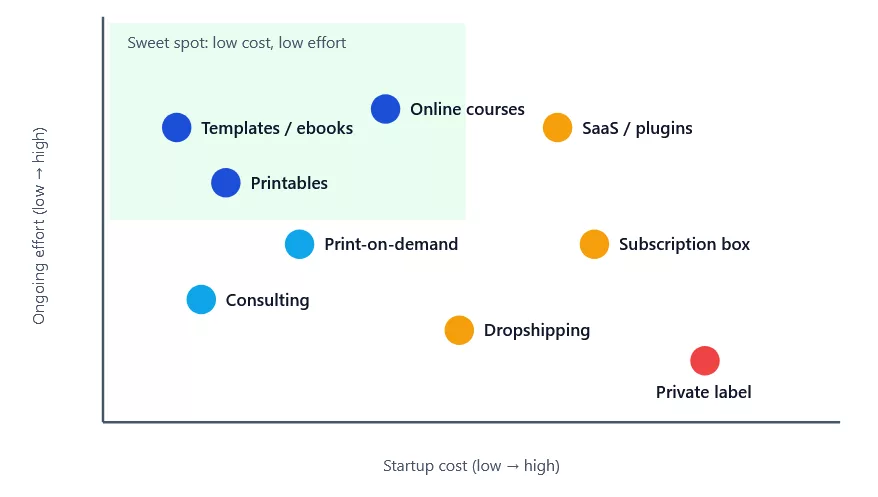
| Idea | Startup cost | Effort after launch | Best for |
|---|---|---|---|
| Ebooks, templates, printables | Very low | Low | Writers, designers, specialists |
| Online courses | Low to medium | Low | People with proven skills |
| Consulting, coaching, freelancing | Very low | High (you sell time) | Experienced professionals |
| Print-on-demand | Low | Medium | Creative, design-minded sellers |
| Dropshipping | Low | Medium to high | Marketers comfortable with ads |
| Handmade / private label | Medium | Medium to high | Makers and brand builders |
| Subscription box | Medium to high | High | Community-driven niches |
| SaaS, themes, plugins | Medium | Medium | Developers |
What Category Is a Business Consultant in E-Commerce Taxonomy?
This question comes up when consultants, coaches and agencies try to list their offer on a marketplace, a product feed or their own store. The short answer: a business consultant is a professional service, not a physical product, so it does not belong in a product category tree.
Google’s product taxonomy is a fixed list of roughly 5,500 categories built for items in a Merchant Center feed, and its “Business & Industrial” branch covers B2B and industrial supplies such as equipment and signage, not advisory work (see Google’s product category documentation). Here is where a consultant actually fits in each system:
| System | Where a business consultant goes |
|---|---|
| Industry classification (NAICS) | Code 541611, Administrative Management and General Management Consulting Services, within Professional, Scientific and Technical Services. It explicitly includes business management and business start-up consulting. Look it up in the Census NAICS search. |
| Your online store (WooCommerce) | Create a category such as Consulting Services or Business Consulting and sell each package as a virtual product (no shipping). Add bookable sessions with a booking tool. |
| Structured data (schema.org) | Mark up your business as ProfessionalService and each offer as a Service. |
| Local listings | Choose a services category such as Business management consultant as your primary category in your Google Business Profile. |
| Freelance marketplaces | List under the platform’s consulting or business services section, not a product category. |
| Consulting products (ebooks, templates, courses) | These are digital goods, so they use the media or software style branches of a product taxonomy, or a “Digital Products” category in your store. |
Building a consulting site? Start from a purpose-built consultancy WordPress theme and follow our guide to creating a WordPress website.
How to Choose What to Sell Online
- Start from skills and interests. You will need months of consistency, so pick something you can stay with.
- Find real demand. Check search suggestions, marketplace bestsellers and forum questions. Look for people already paying for the answer.
- Narrow your niche. “Notion templates for freelance designers” beats “templates”.
- Check the margin. Price minus product cost, fees, shipping and ad spend must leave real profit (use the calculator below).
- Validate before you build. Pre-sell, run a waitlist or sell a small first version. Then expand.
Free Profit Margin Calculator
Best Platform to Start Selling Online
You have two routes. Marketplaces (Etsy, Amazon, Gumroad) bring ready-made traffic but take fees and limit branding. Your own store costs more effort up front but you own the customers, the data and the brand.
- Compare options in our e-commerce platforms comparison.
- Want to own your store on WordPress? Start with what WordPress is, pick from the best free WooCommerce themes and add the essential WooCommerce plugins.
- Speed affects sales, so review the fastest WooCommerce hosting, and check the best platform for SEO.
- Need inspiration? See real WooCommerce website examples, successful WooCommerce sites and the most successful Shopify stores.
Common E-Commerce Mistakes to Avoid
- Choosing a niche that is too broad, so you cannot stand out.
- Ignoring margins. Revenue is not profit once ads, fees and returns are counted.
- Skipping trust signals: no SSL, no policies, no reviews.
- Weak product search and navigation. Fix it with a good product search setup.
- Waiting for a perfect launch instead of testing a small version quickly.
E-Commerce FAQ
What category is a business consultant in ecommerce taxonomy?
It is a professional service. Product taxonomies such as Google’s are built for goods, so classify consulting under NAICS 541611, a services category in your store, and ProfessionalService schema on your site.
What is e-commerce in simple words?
Buying and selling products or services over the internet.
What can I sell online to make money?
Digital products, print-on-demand, dropshipped items, handmade goods, subscription boxes, consulting, coaching and affiliate content are the most common starting points.
What is the cheapest e-commerce business to start?
Digital products and services, because there is no inventory or shipping. Print-on-demand is the cheapest physical-product model.
Do I need my own website to sell online?
No, but owning your store gives you control over branding, fees and customer data. WordPress with WooCommerce is a flexible option.
Final Thoughts
E-commerce is simply selling online, and the opportunity is wide: products you hold, products you create once, or expertise you package as a service. Pick one idea, validate it cheaply, check your margins, and build on a platform you control. If you are a consultant, remember that your offer lives in the services branch, not in a product category.
Ready to build? Start with our WordPress website guide, then explore minimalist e-commerce themes for your first store.

