Selling electronics online is a different game from selling T-shirts. Shoppers compare specs, filter by brand and price, check stock before they commit, and most of them do it on a phone. A theme that looks pretty but fumbles filters, search or the mobile cart will quietly burn your ad budget. So which theme actually gets an electronics store ready to sell: The9 Store Pro or Machic?
1. Introduction: The Quest for the Ultimate Electronics Store Theme
Electronics is one of the toughest niches for a WooCommerce theme. Catalogues are spec-heavy, prices change often, variations multiply (storage, colour, region, bundle), and the buyer is usually mid-research with six tabs open. The theme has to make comparing, filtering and checking out feel effortless, or shoppers bounce to a marketplace that does.
Overview: The9 Store Pro vs. Machic
The9 Store Pro is a multi-niche storefront theme from aThemeArt. It targets stores selling anything from gadgets and tools to fashion, furniture and beauty, and it leans on Elementor so you can shape the layout yourself. It costs $30.
Machic, from KlbTheme on ThemeForest, goes the other way. It is built specifically for electronics, phones, appliances and tech shops, with the storefront tools already baked in. At the time of writing, its listing shows 2,911 sales and a 4.99 rating from 156 reviews, with the latest update dated 8 October 2026.
Quick answer: choose The9 Store Pro if you want design freedom, a lower price and a store that may grow beyond electronics. Choose Machic if you want a ready-made gadget-store toolkit (AJAX filters, search, quick view, side cart) or you plan to run a multi-vendor marketplace.
Transparency note: The9 Store Pro is our own product, so we hold ourselves to a stricter standard here. Everything below comes from each theme’s published feature list, changelog, documentation and licensing terms. We did not run lab speed tests for this article. Where a feature is not listed on a product page, we say “not listed” rather than guess, and we show you how to verify it yourself in the demo.
Key Considerations for Tech & Electronics E-Commerce Platforms
Before comparing themes, get clear on what your store actually needs. These are the factors that separate a theme that sells from one that merely looks good in a demo:
- Spec-driven navigation: shoppers narrow by brand, price, RAM, screen size or colour. Filters must be fast and thumb-friendly.
- Search that forgives typos: model numbers and SKUs are the most common search terms in this niche.
- Variation handling: storage and colour options should be visible, not hidden in a dropdown.
- Mobile-first checkout: a sticky add-to-cart button and a slide-out cart reduce taps.
- Speed under load: big product grids and many images punish heavy themes.
- Marketplace readiness: some electronics shops want multiple sellers from day one.
- Total cost: theme price plus the plugins you must add to fill gaps.
2. At a Glance: Feature Comparison Matrix
Here is the direct comparison, based on each theme’s published listing. “Not listed” means the product page does not mention the feature, which is not the same as “does not exist”. Always confirm in the live demo.
| Feature | The9 Store Pro | Machic |
|---|---|---|
| Positioning | Multi-niche storefront (electronics, fashion, furniture, beauty and more) | Electronics and technology store, plus phones, appliances, tools |
| Price | $30 | $39 Regular License (Extended License listed at $2,200) |
| License model | GPL; listing states unlimited site usage | Envato Regular License: one end product per license |
| Page builder | Elementor, with custom Elementor elements | Elementor and Elementor Pro compatible |
| Ratings | 5.00 average from 5 ratings (small sample) | 4.99 from 156 reviews, 2,911 sales |
| AJAX shop filters | Not listed | Yes (plus mobile and category filters) |
| AJAX product search | Not listed | Yes (includes SKU, tag and category search) |
| Quick view, wishlist, side cart | Not listed | Yes, all three |
| Sticky add-to-cart bar | Not listed | Yes |
| Mobile approach | Described as optimized for m-commerce | Mobile bottom menu, mobile filters, mobile header search |
| Multi-vendor | Not listed | Dokan and WC Marketplace ready |
| Built-in compare table | Not listed | Not listed |
| Multilingual | WPML-ready, .po/.mo files included | WPML, Polylang, Loco Translate, .POT file, RTL |
| Support | Support forum, documentation, video guides, free install on one domain | Six months of support included, extendable; online docs and video tutorials |
| Demo import | One-click demo content | One-click demo data installer |
3. The9 Store Pro: In-Depth Overview
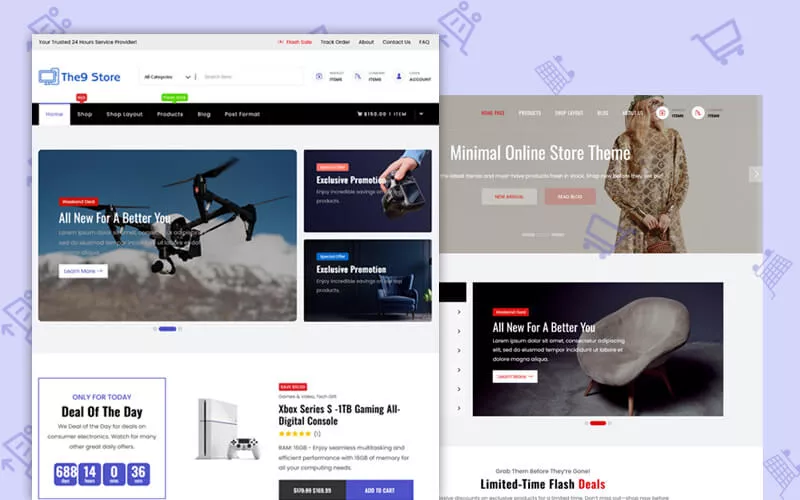
Core Philosophy & Aesthetic: Multi-Niche Versatility with Clean Modern Layouts
The9 Store Pro is a design-first, flexible storefront. Instead of locking you into a gadget-shop look, it gives you clean, modern layouts and expects you to arrange them. That suits electronics retailers who also sell accessories, home goods or lifestyle products, and agencies that want one dependable base for several client niches.
The vendor describes the code as clean PHP and SEO-friendly, which is a sensible foundation because less theme bloat leaves more room for product images and your own plugins. The theme is GPL licensed, has no footer copyright restriction, and ships with documentation and a custom WooCommerce development toolkit for those who like to extend things.
Key Features for Tech Stores
Custom Elementor integration & design flexibility
The product page highlights custom Elementor page builder elements. In practice that means you build home pages, category landing pages and campaign pages visually: a hero banner for a new phone launch, a deals strip for last year’s models, a brand row for your top five suppliers. No developer needed for every promotion. If you want to see how this approach stacks up against other builder-friendly shop themes, our roundup of the best Elementor shop themes puts it in context.
Modular product catalogue blocks
The listing mentions integrated product catalogues alongside customer accounts and analytics. Think of them as building blocks: a featured-gadgets grid here, a category carousel there, a bestsellers row beneath. Because you assemble the blocks yourself, you decide how spec-heavy or image-heavy each page feels.
Mobile-first m-commerce optimization
The9 is positioned for m-commerce, meaning layouts should hold up on small screens and checkout should stay smooth. The product page does not itemize mobile extras such as a bottom menu or filter drawer, so test those flows in the demo on your own phone before you decide.
Extras worth knowing
- Fully compatible with current WordPress and WooCommerce versions, per the listing.
- WPML-ready, with translation files included.
- Free installation and demo setup for one domain on paid items, plus video guides. One customer review mentions importing the demo and being ready in under ten minutes.
Pros & Cons of The9 Store Pro
Pros
- Lowest entry price of the two at $30, with GPL freedom.
- Layout freedom: custom Elementor elements let you design instead of adapt.
- Multi-niche: stays useful if your store expands beyond electronics.
- Beginner-friendly onboarding: demo import, docs, video guides, free install on one domain.
- No footer credit restriction, which matters for white-label client work.
Cons
- Fewer storefront tools listed: AJAX filters, AJAX search, quick view and sticky add-to-cart are not on the product page, so you may need plugins.
- Smaller track record: five ratings is a thin sample compared with Machic’s 156 reviews.
- No multi-vendor support listed for Dokan or WC Marketplace.
- Elementor-centric: great if you like the builder, less so if you prefer to stay in the block editor.
4. Machic Theme: In-Depth Overview

Core Philosophy & Aesthetic: Dedicated High-Tech Megastore & Gadget Ecosystem
Machic takes a very different stance. It assumes you are building an electronics megastore and hands you the tools such a store usually needs on day one. The author lists targets such as electronics stores, phone shops, TV and appliance shops, accessories, tools and electronics marketplaces. The look is the familiar “big tech retailer” layout: mega menu, category sidebar, dense product grids and promo banners.
It comes from KlbTheme, a Power Elite author on ThemeForest, and the changelog shows steady maintenance: WooCommerce and core-plugin updates through version 1.6.7, plus AI product-description tools, social login and a “lowest price in the last 30 days” display added over the past releases.
Key Features for Tech Stores
Native AJAX filter drawer & attribute filtering
Machic lists AJAX shop filters, product mobile filters, category filters and dedicated filtering by colour and brand. Shoppers narrow the grid without a page reload, which is what you want when someone is trying to find “a 6.7-inch phone under a given budget in black”. Swatch-style colour choices are a common request in this niche; if you want richer swatches on product pages, see our guide to WooCommerce variation swatches plugins.
Product-page tools built for gadgets
The feature list reads like an electronics checklist: sticky add-to-cart, stock progress bar, countdown timer, buy-now button, image zoom, product video, 360-degree view, order on WhatsApp, request-a-quote button, low-stock notice and a catalog mode for stores that only want to showcase. As for tech-spec comparison, the listing does not mention a built-in compare table, so verify it in the demo; for spec-style listings, a WooCommerce product table is a common add-on.
Multi-vendor readiness (Dokan & WC Marketplace support)
Machic is marked ready for both Dokan and WC Marketplace, two well-known multi-vendor plugins. If you plan to let several sellers list gadgets on your site, that is a real advantage. You can read more about the plugin side on the Dokan Lite plugin page at WordPress.org.
More built-in conveniences
- Quick view, wishlist, recently viewed products, side cart and AJAX remove-from-cart.
- Mobile bottom menu and a search field for the mobile header.
- Mega menu built from Elementor templates, free-shipping bar and newsletter popup.
- AI buttons that draft product descriptions inside the product editor.
- Multilingual support through WPML, Polylang and Loco Translate, plus RTL.
Pros & Cons of Machic
Pros
- Feature-rich out of the box: filters, search, quick view, wishlist, side cart and sticky add-to-cart are all listed.
- Multi-vendor ready with Dokan and WC Marketplace.
- Proven: thousands of sales and a near-perfect review average.
- Niche-aware: stock bars, countdowns, 360 view and quote button fit electronics merchandising.
- Active updates and a documented changelog.
Cons
- Pricier at scale: $39 covers one end product, so every additional store needs its own license.
- Older front-end stack: the listing mentions Bootstrap 4 and jQuery, and it is not marked as Gutenberg optimized.
- Theme plus core-plugin dependency: many features live in the Machic Core plugin, so switching themes later means rebuilding those pieces.
- Six months of support included; longer support is an extra purchase.
- More settings to learn, and some features you will want to switch off to keep pages lean.
5. Feature-by-Feature Head-to-Head Battle
5.1 Performance & Page Load Speed: Clean PHP vs. Minified Asset Architecture
No theme is fast on its own. Speed comes from the whole stack: hosting, image sizes, caching, the number of plugins and how many scripts load on each page. That said, architecture matters.
- The9 Store Pro sells itself on clean PHP and SEO-friendly code. A lean base with few built-in widgets means fewer scripts by default, but if you later add filter, search, wishlist and quick-view plugins, you rebuild that weight yourself.
- Machic bundles many interactive features, built on Bootstrap and jQuery. The upside is one consistent system instead of six plugins from six authors. The downside is that you carry the scripts for features you may not use, so disable what you do not need.
The honest answer is that a lean theme with five add-on plugins and a feature-rich theme with a tuned configuration can end up in the same place. Test your real setup. If your page-load numbers disappoint on either theme, start with the server: a fast host often beats any theme tweak, and our list of the fastest WooCommerce hosting options is a good place to begin.
Round verdict: a tie on paper. The9 starts lighter; Machic starts more complete. The better performer is the one that stays fast after you add the features you really need.
5.2 Customization & Page Builders: Flexibility vs. Built-in Niche Modules
The9 Store Pro is the more open canvas. Custom Elementor elements, clean layouts and no footer credit restriction make it a good fit for brands that care about a distinctive look, or agencies delivering the same base to different clients.
Machic is more opinionated, but it is far from rigid. It works with Elementor and Elementor Pro, and its changelog shows regular additions to customization: typography settings, colour settings for the mini cart, product detail and mobile bottom menu, custom icons for menu items, a mega menu driven by Elementor templates and several product-gallery layouts. You start closer to a finished electronics store, then adjust.
Round verdict: The9 wins on freedom; Machic wins on how little you must build before the store feels complete. If you love designing with a visual builder, lean The9. If you would rather configure than construct, lean Machic.
5.3 Mobile User Experience (UX): Off-Canvas Drawers & Touch Navigation
For electronics, mobile is where browsing starts and often where it ends. These three patterns do the most work on a phone: an off-canvas filter drawer, a sticky add-to-cart bar and a thumb-reach bottom menu.
Machic lists mobile filters, a mobile bottom menu, mobile-header search, a sticky add-to-cart bar and a side cart, so the mobile toolkit is largely handled in the theme. The9 Store Pro is described as optimized for m-commerce and uses responsive layouts, though the product page does not itemize individual mobile features. Open both demos on a real phone, tap through the filter, product page and cart, and see which one feels natural under your thumb. As a rule of thumb, aim for tap targets around 44 pixels so nobody mis-taps a colour option.
Round verdict: Machic has the clearer, documented mobile feature set. The9 could close the gap with plugins, but you would be assembling that experience yourself.
5.4 Niche Tech Tools: AJAX Search, Variation Swatches, & Compare Engines
This is where electronics stores win or lose. Here is how each theme handles the tools shoppers expect:
| Tool | The9 Store Pro | Machic |
|---|---|---|
| Live AJAX search | Not listed. Add a search plugin. | Built in, with SKU, tag and category search. |
| AJAX filters | Not listed. Add a filter plugin. | Built in, with colour, brand and category filters. |
| Variation swatches | Not listed. Works through WooCommerce variations and plugins. | Colour filtering listed; variations also show on archives. Richer swatches may need a plugin. |
| Compare engine | Not listed. | Not listed. |
| Wishlist and quick view | Not listed. | Built in. |
AJAX search. If you do not need live search on day one, The9 plus a good plugin is fine. Our guide to WooCommerce product search plugins shows the options. With Machic, you get it from the start, which saves a plugin and a configuration pass.
Filters and swatches. Electronics buyers filter by attributes, so build your attributes carefully either way. WooCommerce’s guide on managing product attributes explains how attributes and variations are structured, and our overview of WooCommerce product filter plugins covers the add-on route for themes that do not ship filters.
Compare engines. Neither listing names a built-in compare feature, so plan on a plugin for spec-by-spec comparison on both themes if comparison matters to your buyers.
Round verdict: Machic, clearly, if you want these tools without assembling plugins. The9 is perfectly workable if you prefer to pick your own tools one by one.
6. Pricing & Value for Money
Licensing, Lifetime Updates, & Extension Requirements
| Cost factor | The9 Store Pro | Machic |
|---|---|---|
| Theme price | $30 | $39 (Regular License, price includes buyer fee) |
| What the license covers | GPL; the listing says unlimited site usage | One end product per Regular License; Extended License is listed at $2,200 for products where end users are charged |
| Updates | Updates through your account | Future updates included |
| Support | Support forum and docs; free install and demo setup for one domain | Six months included; an extension to twelve months was listed as a paid add-on |
| Footer credit | No copyright restriction | Follows Envato terms and theme settings |
One licensing point deserves care. The9’s product page advertises GPL and unlimited site usage, while its FAQ says each site should be licensed with a valid license key. Before buying for multiple client sites, confirm with support exactly how keys, updates and support apply per site. GPL itself is a well-established model, and the GNU General Public License explains why it matters in the WordPress ecosystem.
Third-Party Plugin Costs: Which Theme Saves You More?
The sticker price is only part of the story. The real question is how many extra plugins you must buy, configure and keep updated.
- With Machic, filters, live search, quick view, wishlist, side cart and sticky add-to-cart are in the theme. The plugin bill is smaller, but you pay in extra license costs per additional store.
- With The9 Store Pro, the theme is cheaper and the license is friendlier, but you will probably add a filter plugin, a search plugin and perhaps a wishlist or quick-view plugin to reach the same shopper experience.
A simple way to decide: list every storefront feature you want, tick off what each theme lists, and price the gaps. For one store that needs most of these tools, Machic often works out as the better value. For an agency building many sites, or a store that needs only a handful of extras, The9 usually keeps the total lower.
7. Final Verdict: Which Theme Should You Choose?
Choose The9 Store Pro if…
Best for multi-category stores wanting design freedom.
- You sell electronics alongside accessories, home or lifestyle products.
- You enjoy building pages visually with Elementor.
- You want the lower price and GPL terms.
- You run an agency and need a flexible, white-label-friendly base.
- You are happy to choose your own filter, search and wishlist plugins.
- You value a vendor that offers free install and demo setup.
- You may expand into other niches later.
- You want fewer built-in features switched on by default.
Choose Machic if…
Best for dedicated gadget stores and multi-vendor marketplaces.
- Your store is purely electronics, phones, appliances or tools.
- You want AJAX filters, live search, quick view and side cart on day one.
- You plan a marketplace with Dokan or WC Marketplace.
- You want a theme with a large, proven buyer base.
- You like stock bars, countdowns, 360 view and request-a-quote features.
- You need RTL or multilingual support with WPML or Polylang.
- You are building one store, so per-license pricing is fine.
- You prefer configuring to constructing.
Real-World Scenarios
- A phone and accessories shop with a few hundred SKUs: Machic, because filters and mobile tools matter more than layout freedom.
- A general store with a tech corner: The9 Store Pro, so one flexible theme covers every category.
- A multi-seller gadget marketplace: Machic, thanks to its listed Dokan and WC Marketplace support.
- An agency delivering several client stores: The9 Store Pro looks stronger on licensing, after you confirm key terms with support.
- A gadget blog or review site rather than a shop: neither is the best fit. Our list of gadget review WordPress themes is a better starting point.
Mistakes to Avoid When Choosing an Electronics Theme
- Choosing from the demo’s desktop view only. Test on a phone first.
- Counting features without counting plugins. Price the whole stack.
- Ignoring switching costs. Features that live in theme-specific plugins are hard to move later.
- Importing the entire demo. Keep only the pages and widgets you will use.
- Skipping the staging site. Test updates there before touching a live store.
Bottom line: neither theme is universally better. Machic is the more complete ready-made gadget store; The9 Store Pro is the more flexible and economical canvas. Match the theme to your catalogue, your team’s skills and your growth plans, then prove it with the 30-minute test.
8. Frequently Asked Questions (FAQs)
Can I run a multi-vendor tech store with these themes?
Machic lists readiness for both Dokan and WC Marketplace, so it is the safer choice for a multi-seller electronics marketplace. The9 Store Pro does not list multi-vendor support on its product page. A multi-vendor plugin can still run on a standard WooCommerce theme, but you would need to test vendor dashboards, storefronts and checkout carefully on staging before launch.
Which theme is easier for beginners to set up?
Both offer one-click demo import and documentation. The9 Store Pro adds free installation and demo setup for one domain, video guides and a lighter feature set to learn. Machic gets you to a complete-looking store faster, but its larger settings panel takes longer to understand. If you want hand-holding, The9 is friendlier; if you want fewer plugins to manage, Machic is.
Do I need additional plugins for live AJAX search?
With Machic, no: AJAX product search is built in and covers SKUs, tags and categories. With The9 Store Pro, live search is not listed, so plan to add a search plugin. Pick one that supports SKUs and handles variable products, since model numbers are what electronics shoppers type.
Which theme is faster?
Without lab tests, we will not name a winner. The9 positions itself on clean code, while Machic bundles more features built on Bootstrap and jQuery. Real speed depends on hosting, caching, image size and your plugin stack. Run both demos on your actual host and compare mobile results.
Do both themes work with Elementor?
Yes. The9 Store Pro highlights custom Elementor elements, and Machic lists compatibility with Elementor and Elementor Pro. Check each theme’s documentation to see which widgets require Elementor Pro for your specific layout ideas.
Can I switch from one theme to the other later?
Yes, but expect rework. Products, orders and customers live in WooCommerce and stay put. Theme-specific pieces, such as Machic’s core-plugin features, Elementor templates and menus, need rebuilding. Plan a staging site and a full backup before you switch.
Is a $30 or $39 theme enough for a serious store?
For most small and mid-sized electronics shops, yes. Budget instead for quality hosting, good product photography and the few plugins that earn their keep. Those three usually affect revenue more than the theme price does.
Final Thoughts: The9 Store Pro vs Machic
Choosing between The9 Store Pro and Machic depends on your store setup. Both run on WooCommerce and Elementor, but they cater to different needs.
Machic is ideal for large tech catalogs needing out-of-the-box features like AJAX search, filters, quick view, wishlist, and multi-vendor support—saving you from extra plugins.
The9 Store Pro works best if you prioritize design freedom, affordability, and multi-niche growth with custom Elementor elements, letting you add specialist plugins as you scale.
Before buying, test both live demos for mobile UX, search, and checkout performance, and verify current license and support terms.
Looking for a versatile WooCommerce theme? Explore The9 Store Pro to see its design options. If built-in electronics tools and marketplace support are essential, check out Machic on ThemeForest.