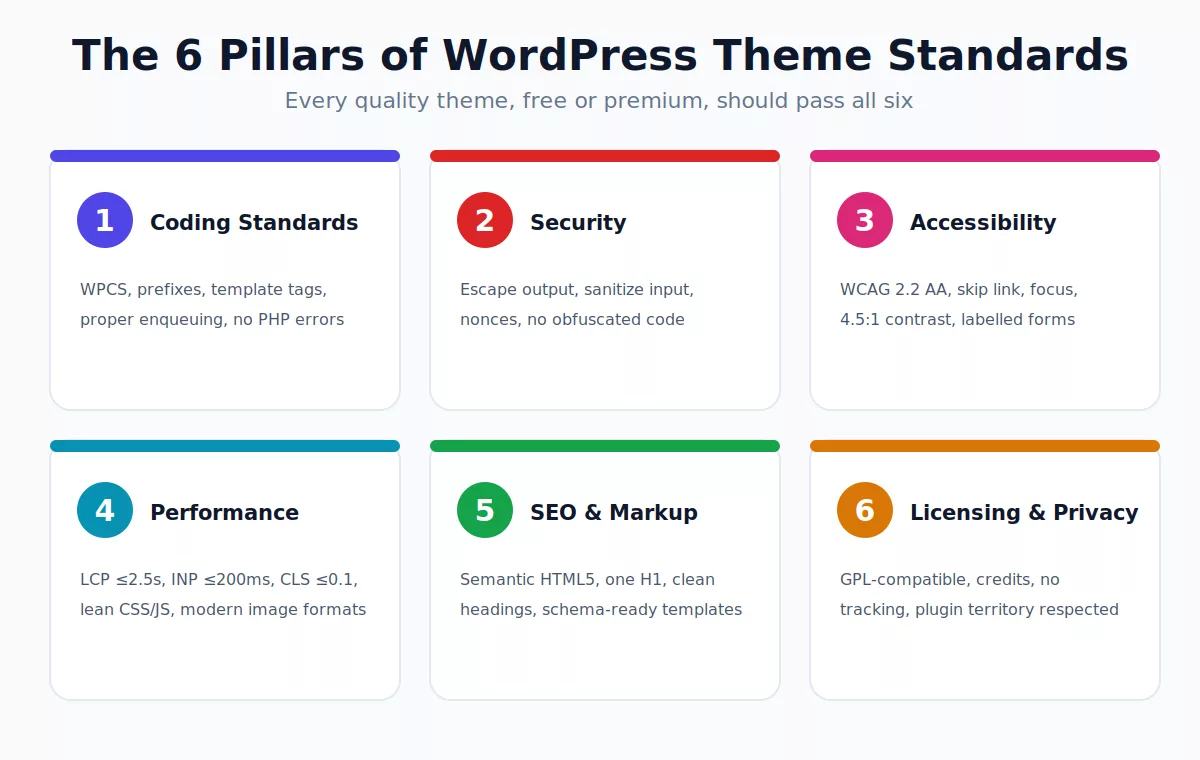
WordPress theme standards are the rules that decide whether a theme is safe, fast, accessible and easy to maintain. They cover how a theme is coded, how it handles security and privacy, how it behaves for keyboard and screen-reader users, how quickly it loads, and how it is licensed and documented. The official Theme Review requirements are mandatory for the WordPress.org directory, and they are also the best baseline for any premium or custom theme.
Most guides stop at “install Theme Check and fix the errors.” That is only one slice. In this guide you will get the full picture: the 15 official review categories, modern block-theme and theme.json rules, accessibility and Core Web Vitals targets, SEO-friendly markup, a five-step testing workflow, and a printable pre-launch checklist.
What Are WordPress Theme Standards?
A WordPress theme is a set of templates, styles and scripts that control how your site looks and behaves. If you are new to the platform, start with our guide to what WordPress is, then see how themes are organised in WordPress theme architecture.
Theme standards are the agreed quality bar for that code. They come from four places:
- The Theme Review Handbook, which lists required and recommended rules for the WordPress.org directory.
- The WordPress Coding Standards (WPCS), which define PHP, CSS, JavaScript and HTML style. Read them here.
- Web standards such as WCAG for accessibility and Core Web Vitals for performance.
- The GPL license that WordPress itself uses, which shapes how themes can be distributed.
Why Theme Standards Matter
Following the standards is not box-ticking. It directly affects your results:
- Security: unescaped output is a leading cause of cross-site scripting bugs. See our guide to sanitizing, escaping and validating and the WordPress security checklist.
- Compatibility: themes that use core APIs survive WordPress updates. Poor themes cause the issues listed in our common WordPress errors guide.
- Speed and SEO: lean, semantic templates load faster and are easier for search engines to understand. Pair this with our on-page SEO guide.
- Accessibility and reach: an accessible theme serves more visitors and reduces legal risk.
- Maintenance: clean, standard code is cheaper to update, extend and hand over.
Who Actually Has to Follow Them?
This is the point most competitor articles bury, so here it is plainly:
| Theme type | Must pass Theme Review? | Our recommendation |
|---|---|---|
| Free theme on WordPress.org | Yes, required | Pass every required check and aim for the accessibility-ready tag. |
| Freemium (Lite on WordPress.org, Pro elsewhere) | The Lite version, yes | Keep the Pro version on the same standards to avoid code drift. |
| Premium theme sold on a marketplace or own site | No, but marketplaces have their own rules | Follow the same security and accessibility rules anyway. |
| Custom or client theme | No | Use the standards as your QA checklist and contract baseline. |
In short, the review rules are not laws of WordPress itself. But themes that ignore them tend to break, get hacked or fail audits. If you are choosing a theme rather than building one, read our notes on WordPress theme providers and browse free WordPress themes that follow modern practice.
The 15 Official Theme Review Categories
The WordPress.org Theme Review Handbook groups its requirements into the categories below. Since the review moved toward automation in 2018, reviewers concentrate on security, licensing, malicious code and content creation, so passing the automated checks cleanly matters more than ever.
| Category | What it means in practice |
|---|---|
| Accessibility | Keyboard navigation, skip links, contrast, labelled forms. See the accessibility requirements. |
| Code | No PHP errors or notices, no obfuscation, correct use of core functions. |
| Core functionality and features | Support title-tag, post thumbnails, navigation menus, comments and pagination properly. |
| Presentation vs functionality | Themes handle design; content-creation features belong in plugins. |
| Documentation | A clear readme.txt with setup, changelog and resource credits. |
| Language | All strings translatable, correct text domain, RTL support where relevant. |
| Licensing | GPL-compatible license for code and bundled assets. |
| Naming | Unique, non-misleading theme name and prefixes. |
| Options and settings | Use the Customizer or Site Editor; sanitize every saved option. |
| Plugins | No bundling of plugins inside the theme; recommend them responsibly. |
| Screenshot | An accurate screenshot.png (1200 x 900 recommended). |
| Privacy | No tracking or data collection without clear consent. |
| Selling, credits and links | No hidden or forced links, no upsell nags in the admin. |
| Stylesheets and scripts | Enqueue everything; no inline hard-coded <script> or stylesheet links. |
| Templates | Required template tags such as wp_head(), wp_footer(), body_class() and post_class(). |
Coding and Security Standards
Follow the WordPress Coding Standards
Use consistent indentation, spacing and naming, and prefix every function, class, global and handle with a unique theme prefix to avoid collisions. Use child themes for customisations rather than editing a parent directly; our child theme guide shows how.
Escape late, sanitize early
Every dynamic value printed to the page must be escaped for its context. Every value saved from a user must be sanitized or validated first.
// Escaping output
echo esc_html( get_the_title() );
echo '<a href="' . esc_url( get_permalink() ) . '">' . esc_html__( 'Read more', 'my-theme' ) . '</a>';
echo wp_kses_post( get_the_content() );

// Sanitizing a Customizer setting
function mytheme_sanitize_checkbox( $value ) {
    return ( isset( $value ) && true === (bool) $value );
}
Enqueue scripts and styles correctly
function mytheme_scripts() {
    wp_enqueue_style( 'mytheme-style', get_stylesheet_uri(), array(), wp_get_theme()->get( 'Version' ) );
    wp_enqueue_script( 'mytheme-nav', get_theme_file_uri( '/assets/js/nav.js' ), array(), '1.0.0', array( 'in_footer' => true, 'strategy' => 'defer' ) );
}
add_action( 'wp_enqueue_scripts', 'mytheme_scripts' );
Other must-follow code rules
- Never use obfuscated or encoded code, and avoid
eval(). - Add the required header fields in
style.css: Theme Name, Version, License, License URI, Text Domain, Requires at least and Requires PHP. - Call
wp_head(),wp_body_open()andwp_footer()in the right places. - Use nonces and capability checks for any form or admin action. If your site is ever compromised, our hacked WordPress recovery guide explains what to do.
- Use
WP_DEBUGduring development and fix every notice and deprecation. Handy snippets live in our WordPress code snippets post.
@import in style.css and do not hard-code URLs. Use get_theme_file_uri(), home_url() and the enqueue functions instead.Block Theme and theme.json Standards
Modern WordPress is block-first, and the standards now expect themes to work well with the block editor. Most competitor posts ignore this section, yet it is where the platform is heading. If you are comparing options, see our list of Gutenberg-compatible themes.
- Block themes need
style.cssandtemplates/index.html, with parts inparts/and optional patterns inpatterns/. theme.jsonis the single source of truth for colour palettes, font sizes, spacing, layout widths and per-block styles. Read the official theme.json documentation.- Classic themes need
style.cssandindex.php, and should add editor styles andadd_theme_support()flags so blocks render the same in the editor and on the front end. - Prefer block patterns and global styles over shortcodes and bespoke page-builder lock-in.
{
  "$schema": "https://schemas.wp.org/trunk/theme.json",
  "version": 3,
  "settings": {
    "color": { "palette": [
      { "slug": "primary", "color": "#1d2a5b", "name": "Primary" },
      { "slug": "accent",  "color": "#4f46e5", "name": "Accent" }
    ] },
    "typography": { "fluid": true },
    "layout": { "contentSize": "720px", "wideSize": "1200px" }
  }
}
Want to understand the differences better? Our guide on customizable WordPress themes compares real-world flexibility.
Accessibility Standards
Accessibility is a formal part of Theme Review, and the optional accessibility-ready tag requires extra checks. Aim for WCAG 2.2 level AA as your target.
- Colour contrast: at least 4.5:1 for normal text and 3:1 for large text. Test with the WebAIM contrast checker. Need palette ideas? See web colour palettes.
- Keyboard access: every menu, modal and slider must work without a mouse, with a visible focus outline.
- Skip link: a “Skip to content” link as the first focusable element.
- Forms: every input has an associated
<label>; placeholders are never a replacement for labels. - Links and buttons: descriptive text (avoid “click here”) and clear visited and unvisited styles. The official UI best practices chapter goes deeper.
- Readable type: comfortable base font size and line height. Browse our clean fonts for websites for readable options.
- Images: meaningful alt text and decorative images marked with empty alt.
Performance Standards
Google measures real-user experience through Core Web Vitals. A theme should help sites hit the “good” thresholds, not fight them.
| Metric | Good target | How a theme helps |
|---|---|---|
| LCP (Largest Contentful Paint) | 2.5 seconds or less | Preload the hero image, avoid render-blocking CSS and heavy sliders. |
| INP (Interaction to Next Paint) | 200 ms or less | Ship less JavaScript, defer non-critical scripts, avoid long tasks. |
| CLS (Cumulative Layout Shift) | 0.1 or less | Set width and height on images, reserve space for ads and embeds. |
- Load only the CSS and JS each template needs; avoid shipping a whole icon or animation library for two icons.
- Serve modern image formats. Our WordPress WebP guide walks through it.
- Use system or self-hosted fonts and preload critical ones.
- Test hosting-level caching too: see optimising performance with Nginx, and compare options in fastest WordPress themes.
SEO and Markup Standards
Search-friendly themes are not about stuffing keywords. They are about clean structure that crawlers and assistive tech can both parse.
- Use semantic HTML5:
<header>,<nav>,<main>,<article>,<aside>,<footer>. - Output exactly one
<h1>per page and keep heading order logical. - Add
add_theme_support( 'title-tag' )and never hard-code a<title>. - Support breadcrumbs and structured data without conflicting with SEO plugins.
- Keep canonical, pagination and archive templates clean so SEO plugins can do their job. See the best platform for SEO and our Yoast readability fixes.
- Make sure sidebars and widgets render accessible, crawlable markup. See WordPress sidebars and displaying a WordPress widget.
Licensing, Naming and Privacy
- License: WordPress is GPL, so themes distributed on WordPress.org must use a GPL-compatible license, and so must bundled fonts, images and libraries. Check the WordPress license page.
- Plugin territory: custom post types, shortcodes that create content and SEO features should live in plugins so users keep their content when they switch themes. Our shortcode fundamentals explains why.
- Credits: never force a footer link or hide a sponsor link; optional credits must be removable.
- Privacy: no analytics, fonts from third-party CDNs or tracking without clear disclosure and consent.
- Translation and RTL: make strings translatable and include RTL styles. See multilingual themes and RTL themes.
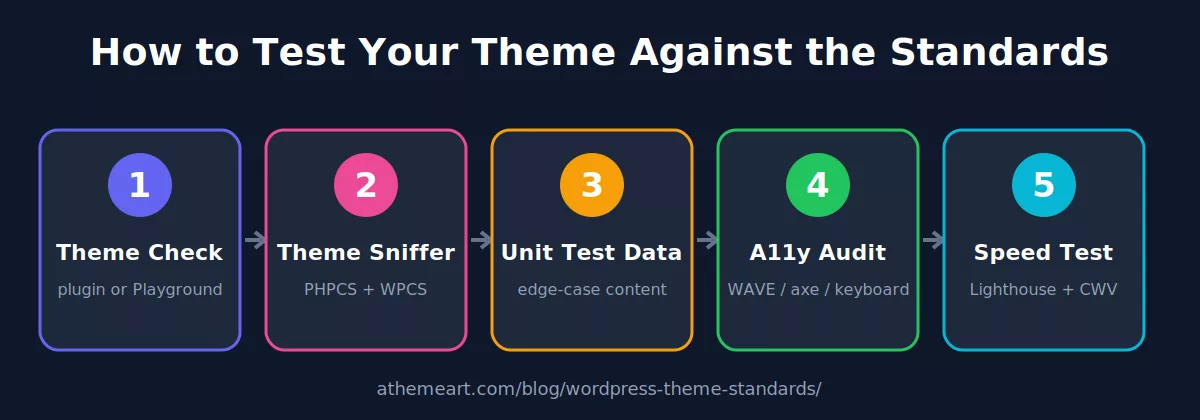
How to Test Your Theme Step by Step
Step 1: Run Theme Check
The Theme Check plugin runs automated tests against the Theme Review requirements. Install it, open Appearance > Theme Check, choose your theme and run it. Results are grouped as Required, Warning, Recommended and Info. Required items must be fixed for the directory. You can also try it in WordPress Playground without touching a live site.
Step 2: Lint with Theme Sniffer and PHPCS
Theme Sniffer applies the WordPress Coding Standards and PHP compatibility checks to your code. For command-line or CI use:
composer require --dev wp-coding-standards/wpcs dealerdirect/phpcodesniffer-composer-installer
vendor/bin/phpcs --standard=WordPress-Extra --extensions=php ./
Step 3: Import the Theme Unit Test data
Import the official Theme Unit Test content on a local site to stress-test long titles, nested comments, galleries, tables, embeds and pagination. Setting up a local site is easy with our WordPress localhost guide, and you can track your work with version control.
Step 4: Audit accessibility
Tab through every page using only the keyboard, run WAVE or axe DevTools, and test with a screen reader such as NVDA or VoiceOver. Fix contrast, focus and label issues.
Step 5: Measure performance
Run Lighthouse and PageSpeed Insights on the home page, a single post, an archive and a search page, on mobile settings. Compare the field data to the Core Web Vitals targets above.
Common Theme Check Errors and Fixes
| Flag | Likely cause | Fix |
|---|---|---|
| Text domain missing or mismatched | Header or function strings use a different text domain than the theme slug | Set Text Domain in style.css and use it in every __() and _e(). |
Required wp_head() / wp_footer() missing |
Hook calls removed from header or footer | Add them back before </head> and </body>. |
| Hard-coded script or stylesheet | Direct <link> or <script> tags in templates |
Move to wp_enqueue_style() and wp_enqueue_script(). |
| Unescaped output | Echoing values without esc_* |
Wrap with esc_html(), esc_attr(), esc_url() or wp_kses_post(). |
| Plugin-territory functionality | Theme registers post types or content shortcodes | Move the feature to a companion plugin. |
| Non-GPL asset | Bundled font, icon or image with a restrictive license | Replace it or document a compatible license. |
| Recommended: screenshot size | Image is smaller than recommended | Use 1200 x 900 pixels (4:3). |
Do not panic about warnings. Even well-known premium themes can produce flags, because they are built for their own rules. What matters is that Required items are resolved if you target WordPress.org, and that security and accessibility issues are fixed no matter where you sell.
Pre-Launch WordPress Theme Standards Checklist
- Theme Check shows no Required errors
- Theme Sniffer / PHPCS passes with WordPress-Extra
- All output escaped, all input sanitized, nonces on forms
- Scripts and styles enqueued with versions
style.cssheader complete (license, text domain, requires)- Block editor styles and
theme.jsonin place - Keyboard navigation, skip link, visible focus verified
- Contrast ratios meet 4.5:1 / 3:1
- LCP, INP and CLS in the “good” range on mobile
- One H1, logical headings,
title-tagsupport - All strings translatable, RTL tested
- GPL-compatible assets and clear credits
- No tracking without consent; no forced links
- Screenshot 1200 x 900 and complete
readme.txt - Tested with Theme Unit Test data on a staging site
- SSL active on the live site (see how to install an SSL certificate)
Frequently Asked Questions
What are WordPress theme standards?
They are the coding, security, accessibility, performance, licensing and documentation requirements a theme should meet. The official Theme Review requirements apply to every theme in the WordPress.org directory, and responsible developers apply them to premium and custom themes as well.
How do I check if my WordPress theme meets the standards?
Run Theme Check, scan with Theme Sniffer or PHPCS, import the Theme Unit Test data, audit accessibility with WAVE or axe, and measure speed with Lighthouse.
Do premium themes have to follow WordPress.org theme review rules?
Not strictly. Only themes hosted on WordPress.org must pass the review. Still, following the standards improves security, compatibility and update safety for premium themes.
What is an accessibility-ready WordPress theme?
It is a theme that passes the extra accessibility requirements, such as keyboard navigation, skip links, visible focus, sufficient contrast and properly labelled forms, and earns the accessibility-ready tag on WordPress.org.
Do I need theme.json?
Block themes use theme.json to define colours, typography, spacing and layout, and it is strongly recommended. Classic themes can be valid without it, but adding one helps blocks render consistently.
Where can I learn more?
Start with the Theme Developer Handbook, then read the recommended review practices.
Final Thoughts
WordPress theme standards are best treated as a quality system, not a hurdle. Build to the Theme Review requirements, add modern block-theme, accessibility and Core Web Vitals practices on top, and verify with the five-step workflow above. You will ship a theme that users trust, search engines understand and that survives the next WordPress update.
Looking for ready-made, well-built themes? Explore our picks for portfolio themes, free WooCommerce themes and free Elementor themes.
Browse the Athemeart collection of modern, fast and accessible WordPress themes.
Explore Athemeart Themes