
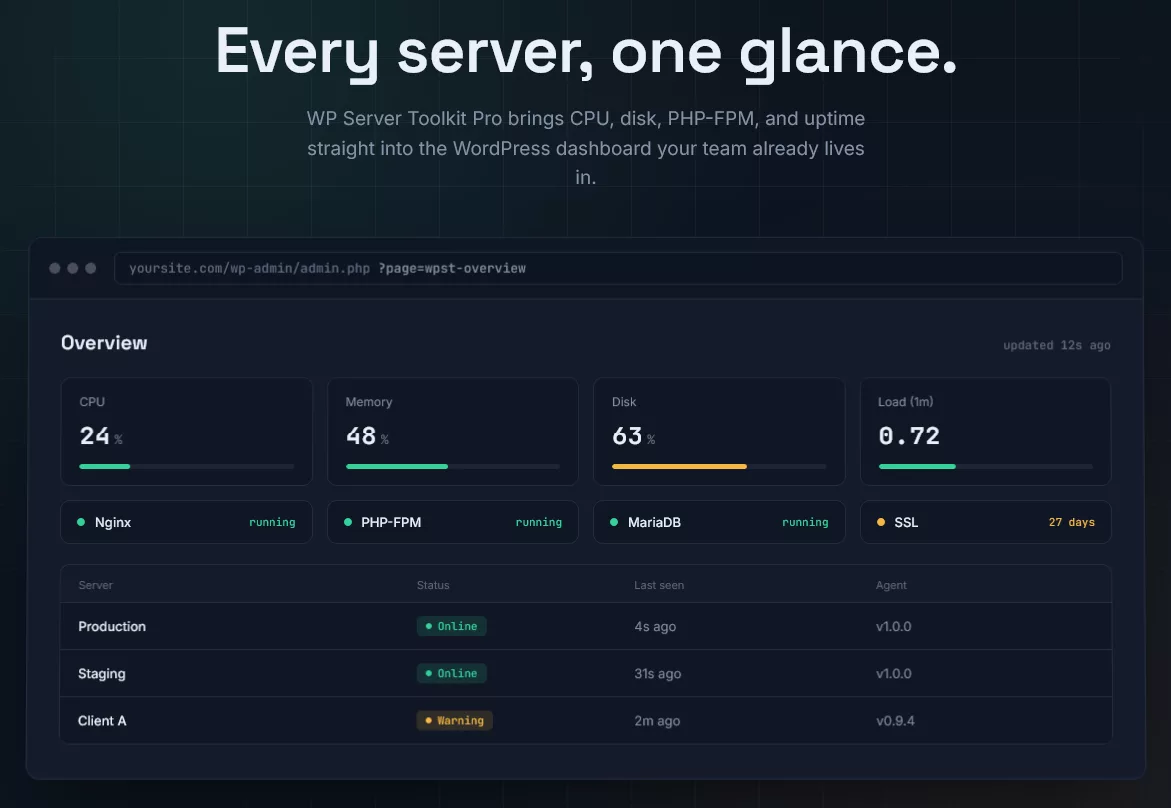
Know when your server struggles, before your visitors do
WP Server Toolkit is a WordPress uptime monitor plugin and server status checker in one. It shows how your server is doing right inside wp-admin. CPU, memory, disk, PHP-FPM, Nginx, MySQL and SSL. All on one screen.
No more logging in over SSH just to see if the disk is full. No more finding out from a customer that the site is down.
What is WP Server Toolkit?
It is two small pieces that work together.
- A WordPress plugin that gives you the dashboard, alerts and settings.
- A light Linux agent written in Bash. It reads your server’s vital signs and sends them to your site over HTTPS.
The plugin also checks WordPress itself without any agent. That includes debug errors, WP-Cron, file permissions and your SSL certificate. So you get value from the first minute.
Run one server or twenty. Each one gets its own secure connection and its own status.
Key features
Server status and website availability tracking
Every connected server reports in on a schedule. WP Server Toolkit marks it Online, Warning or Offline and shows when it was last seen. If a server goes quiet, you get an alert. It works like a website down detector for the usual causes: a dead server, a stopped web service, a full disk or an expired certificate.
Stale numbers are never passed off as live. When a server is offline, the dashboard says so and shows the last known readings.
Check CPU usage in your WordPress dashboard
See current CPU percentage, the number of cores and the 1, 5 and 15 minute load averages. You also see the server’s uptime. Spot a runaway process early, before it slows your checkout or your editors down.
Memory and server resource usage
Track total, available and cached RAM plus swap use. Swap climbing steadily is often the first sign a site needs more memory. You will see it here, with a clear Healthy, Warning or Critical label.
WordPress disk space monitoring
Disks fill up quietly. Logs grow, backups pile up and uploads add up. This WordPress disk space monitoring plugin reads usage for the root disk and common mount points such as /home, /var and /tmp. You get warned while there is still room to fix it.
Monitor PHP-FPM status in WordPress
PHP-FPM runs your PHP code. If it stops, your site stops. WP Server Toolkit finds your PHP-FPM service automatically, even when the name changes between PHP versions such as php8.2-fpm and php8.3-fpm. It tells you whether it is running and alerts you the moment it is not.
PHP process monitoring and server health
Keep an eye on the total process count and on zombie processes across the server. Pair that with PHP-FPM status and PHP settings such as memory limit, max execution time and OPcache, and you get a clear picture of how PHP is behaving.
Nginx and MySQL or MariaDB status
See at a glance whether Nginx is running, which version it is, and whether your database service is up. MySQL and MariaDB are both supported. Learn about a stopped service from an alert, not from a support ticket.
SSL certificate expiry
An expired certificate takes a site offline for most visitors. WP Server Toolkit reads your certificate and shows the days remaining. It warns you at a threshold you choose, 30 days by default.
WordPress health checks
- Debug log errors, grouped so one repeating warning is one line with a count, not thousands of rows
- WP-Cron status and overdue events
- File and folder permission checks, including world-writable paths
- Security findings such as debug display, the file editor and XML-RPC
- Linux findings such as SSH root login, password login and firewall status
Smart alerts through Email, Telegram and webhooks
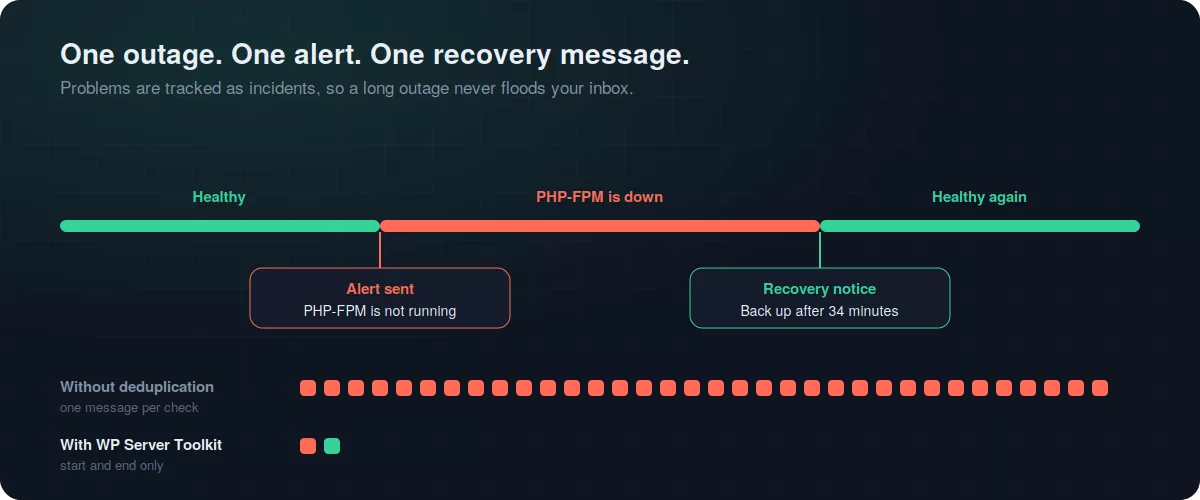
Choose your thresholds. Pick your channels. When a problem starts you get one alert. When it ends you get one recovery message with the duration. No flood of repeat emails during a long outage.
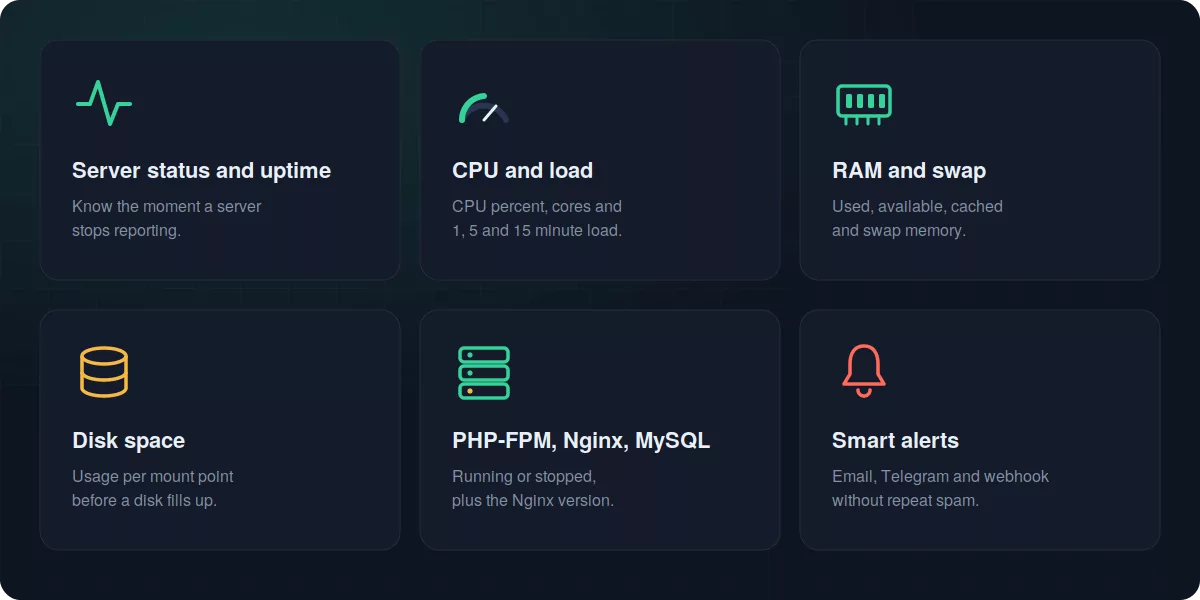
What you can monitor
| Area | What you see | Alert |
|---|---|---|
| Server availability | Online, warning or offline, last seen time, agent version | Server stops reporting |
| CPU | Usage, cores, 1, 5 and 15 minute load, uptime | Above your CPU threshold |
| Memory | Total, available, cached, swap used | Above your RAM threshold |
| Disk | Usage per mount point | Above your disk threshold |
| Services | Nginx, PHP-FPM, MySQL or MariaDB status | Service stopped |
| Network and processes | Established and TIME_WAIT connections, process and zombie counts | Shown on the server screen |
| SSL | Days remaining until expiry | Expiring soon or expired |
| WordPress | Version, debug state, WP-Cron, permissions, grouped debug log errors | Shown in the dashboard |
| Security | SSH root login, password login, firewall, XML-RPC, file editor, pending updates | Findings list |
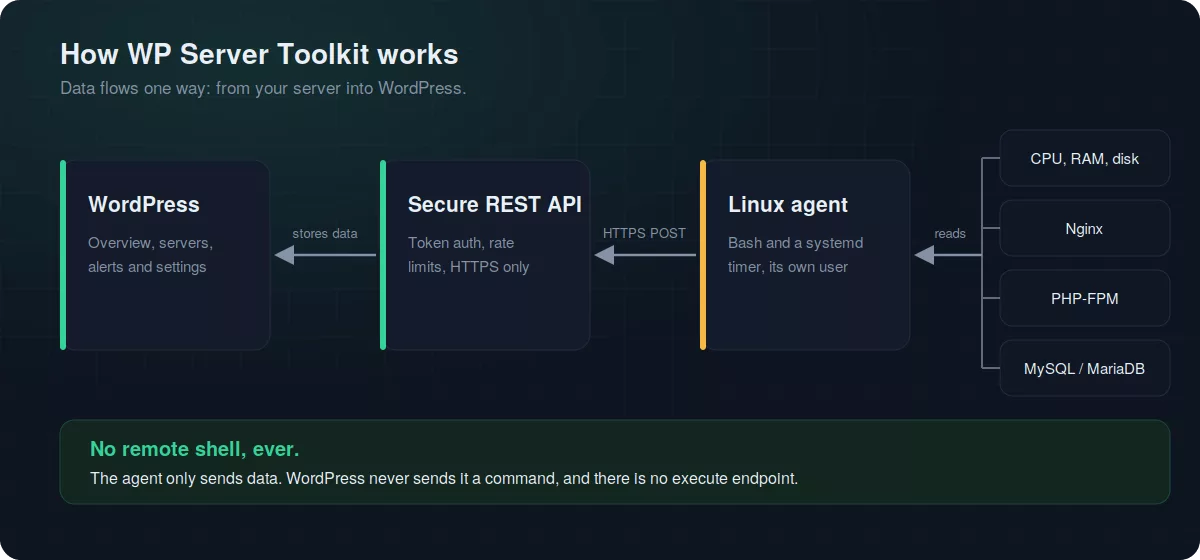
How it works
The agent runs on your server. It reads data and sends it to your WordPress site. Your site never sends commands back.
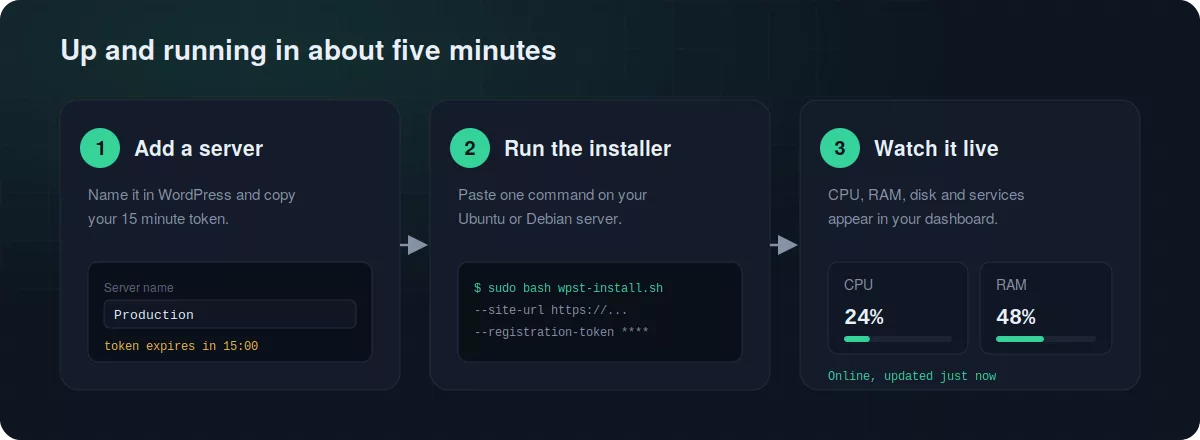
Set up in three steps
- Add a server. Name it in WordPress. You get a registration token that expires in 15 minutes.
- Run the installer. Paste one command on your Ubuntu or Debian server. It swaps the token for a private credential and starts a systemd timer.
- Watch it live. CPU, RAM, disk and services show up in your dashboard within a minute.
Want to read the script before you run it? You can. Download it, open it, then run it. The agent is plain Bash. Remove it any time with the included uninstall script.
Built for safe monitoring
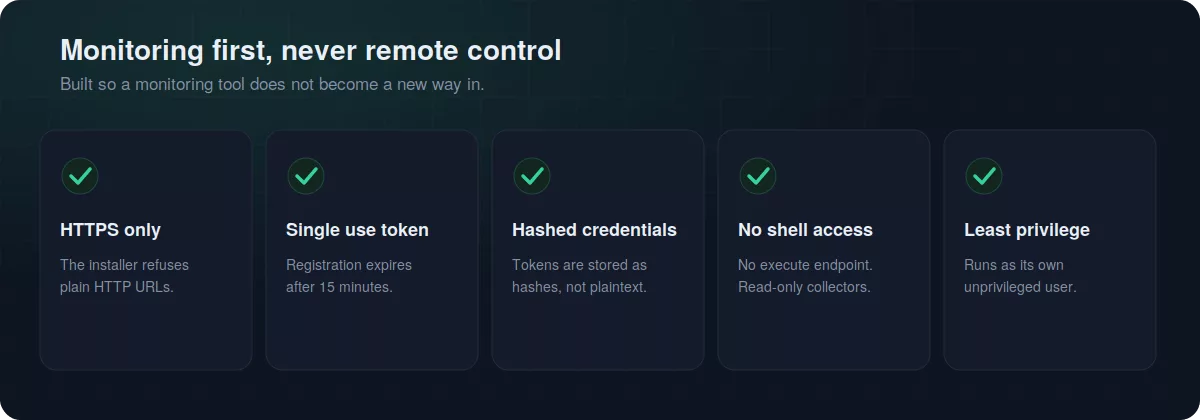
A monitoring tool should never become a new way in. So the design is strict.
- The installer only accepts HTTPS site URLs.
- Registration tokens are single use and expire in 15 minutes.
- Server credentials are stored as hashes in your database.
- There is no “run a command” feature. The agent only sends data.
- The agent runs as its own unprivileged system user.
- Every dashboard action checks permissions and a nonce.
Pair it with our free WordPress Security Checker and keep our WordPress security checklist close. Monitoring tells you something changed. A checklist tells you what to harden.
One outage, one alert
Say PHP-FPM stops at 13:00 and comes back at 13:34. With many tools that is 34 emails. Here it is two messages: one when it breaks and one when it is fixed.
How it compares
| WP Server Toolkit | Hosted uptime services | PHP-only server stats plugins | |
|---|---|---|---|
| Needs an outside account | No | Usually yes | No |
| CPU, RAM and disk data | Yes, from a Linux agent | Limited | Yes |
Needs PHP shell_exec() |
No | No | Often yes |
| PHP-FPM, Nginx and database status | Yes | No | Rarely |
| Alerts by Email, Telegram and webhook | Yes | Varies by plan | Rarely |
| Multiple servers in one dashboard | Yes | Yes | No |
| Your data stays on your site | Yes | No | Yes |
Hosted services such as uptime monitoring plugins are great at checking a page from the outside. WP Server Toolkit looks from the inside, at the server that runs the page. Many teams use both. Simple stats plugins like WP Server Stats show a snapshot but do not keep watch and alert you.
Who is it for?
- Agencies that look after several client servers and want one place to check them.
- WooCommerce store owners who cannot afford a quiet outage during a sale. See our guide to essential WooCommerce plugins.
- Developers and sysadmins running their own VPS. If you are still building your stack, start with our Nginx, PageSpeed, MariaDB and PHP install guide and see Nginx vs LiteSpeed.
- Anyone recovering from a bad day. If your site was ever compromised, read how to recover a hacked WordPress site, then add monitoring so you hear about trouble first.
Requirements
| WordPress | 6.0 or newer |
|---|---|
| PHP | 8.1 or newer |
| Database | MySQL 8+ or a current MariaDB |
| Linux agent | Ubuntu or Debian with Bash, curl and systemd |
| Web server | Nginx detected automatically |
| HTTPS | Required for the agent connection |
The agent needs root access once, to install. Shared hosting without shell access can still use the WordPress health and SSL checks. Full server metrics need a VPS or dedicated server.
Frequently asked questions
Do I have to install anything on my server?
For CPU, RAM, disk and service data, yes. You install the small Linux agent. WordPress health, SSL and error checks work without it.
Will it slow my site down?
No. The agent runs briefly once a minute by default. The plugin loads its scripts only on its own admin screens, and heavy work runs in the background through WP-Cron.
Does it check my homepage from the outside?
Not yet. Version 1 watches from inside your server. It tells you when the server stops reporting or when a service your site needs stops. HTTP response checks are on the roadmap.
Does it use PHP shell_exec()?
No. The Linux agent collects the data, so your PHP stays locked down.
Can I monitor more than one server?
Yes. Add as many as you need. Each server has its own token, status and alerts.
How do alerts work?
Set your thresholds, then pick Email, Telegram, a webhook or all three. You get one alert when a problem begins and one recovery message when it ends.
Is it safe to install on a production server?
The agent is read-only and cannot run commands sent from WordPress. It uses HTTPS, a single use install token and a dedicated unprivileged user. You can also read the script before you run it.
Which Linux systems are supported?
Ubuntu and Debian today. More distributions are planned.
How do I remove it?
Run the included uninstall script on the server. It stops the timer and deletes the files and stored credential. Then remove the server in WordPress.
What is coming next
We are working on HTTP uptime checks with response times, history charts, deeper PHP-FPM worker details, PDF reports and a client-friendly dashboard. Your feedback shapes the order.
Monitor smarter today
Stop guessing what your server is doing. Install WP Server Toolkit, connect your first server and see your server resource usage in minutes.
Developed by Saiful Islam, aThemeArt.