The best ecommerce WordPress themes do not have to cost a cent. A good free WooCommerce theme gives you a clean product grid, a cart that behaves on a phone, a checkout that stays out of the customer’s way, and enough layout control to look like your brand instead of a template. The hard part is knowing which free WordPress ecommerce themes really deliver that, and which ones are a homepage banner with a shop link bolted on.
This guide rounds up 20 themes you can download today: eight from aThemeArt, ten from the WordPress.org directory, one from the WooCommerce Marketplace and one from Colorlib. We build the first eight, so we are biased. We have tried to describe them the way we would describe a competitor’s theme, including what the free edition leaves to the Pro version. Install counts, ratings and update dates were taken from the theme listings in November 2026, and they move quickly, so treat them as a snapshot.
Selling online is no longer a side channel. The U.S. Census Bureau’s Quarterly Retail E-Commerce Sales report found that online sales accounted for 17.1% of total U.S. retail sales in the second quarter of 2026, up from 16.3% in the same quarter a year earlier. Australians spent a record A$82.6 billion online in 2025, roughly 14% more than the previous year, according to the Australia Post eCommerce Report 2026. In Germany, online goods sales reached approximately €83.1 billion in 2025, growing 3.2% year over year, according to figures from the German E-Commerce and Distance Selling Trade Association (BEVH), cited in a 2025 annual report. Shoppers are there. Your theme decides whether they stay long enough to buy.
Short on time? Quick picks
- Fastest launch with a modern layout: Prime Shopping Cart
- Dark, premium look for fashion, jewelry and watches: The8 Shop
- Best for builder-style flexibility: Kadence
- Best block-editor (Site Editor) store: Tyche and YITH Wonder
- Best for art prints and homewares: Kiosko
- Best for groceries and everyday goods: Grocery Store and Shoper
- Most ready-made demos: Phlox (19 importable demo sites)
- Best for marketplace-style catalogs: Envo One
Why a free ecommerce theme can be enough
Here is the part most theme roundups skip: the theme is not your store. Products, orders, customers, coupons, taxes and shipping all live in WooCommerce, and they stay put if you change themes later. The theme controls how the shop looks and how pleasant it is to move through. That is a smaller job than it sounds, and a well-built free theme can do it properly.
A freebie WordPress ecommerce theme is usually enough when you are launching a first store, selling a catalog of up to a few hundred products, or testing a niche before you invest. It is also enough for agencies prototyping a client shop. Where free themes fall short is in the extras: advanced live search, built-in wishlists, countdown deals, one-click demo libraries and priority support often sit in the Pro edition. We point out where that line falls for each theme below, so there are no surprises after you install.
One warning before the list. Skip “nulled” or cracked copies of paid themes that float around the web. They are the opposite of free: they commonly ship with hidden spam links or backdoors, and on a store that handles customer data that is a risk you cannot afford. Every theme in this guide is a legitimate free download.
How we picked these 20 themes
We looked for themes that work as an ecommerce website WordPress theme out of the box, not general-purpose themes that merely tolerate WooCommerce. For each one we checked the same things:
- WooCommerce support: shop, product, cart and checkout pages styled, not just functional.
- Selling features in the free version: quick view, filters, swatches, mini cart, wishlist and compare, and which of them need Pro.
- Editing experience: Customizer, Site Editor, or a page builder such as Elementor.
- Ready-made starting points: demo imports and pre-built layouts that save hours.
- Maintenance signals: active installs, recent updates and ratings on the official listing.
- Language and region readiness: translation-ready files, RTL support and available translations for stores selling in more than one market.
Themes were also chosen to cover different kinds of stores, from fashion and grocery to art prints and large catalogs, so you can find a close match instead of scrolling through 20 near-identical layouts.
Quick comparison table
| Theme | Source | Best for | Standout |
|---|---|---|---|
| ShopStore (Free) | aThemeArt | Startup retail stores | Compare, wishlist and brand/color filters |
| Prime Shopping Cart | aThemeArt | Fashion, tech, grocery, gifts | Quick view, fly cart, swatches and filters |
| The8 Shop | aThemeArt | Jewelry, watches, beauty | Dark design, one-click demo import |
| The9 Store | aThemeArt | Multi-category shops | Multiple layouts and header/footer combos |
| eMart | aThemeArt | Energetic, promo-led stores | Bold layouts built for Elementor |
| Joyas | aThemeArt | Boutiques and cosmetics | Clean, content-first design |
| Shoper | aThemeArt | Almost any product line | Mini cart, fly cart, swatches |
| Grocery Store | aThemeArt | Grocery and supermarkets | Wide page-builder compatibility |
| Startup Shop | WordPress.org | Sports, toys, food, tech | Live search, wishlist, compare buttons |
| Fastest Shop | WordPress.org | Fashion, beauty, wine | Three demos, device-specific settings |
| Kadence | WordPress.org | Flexible custom stores | Free header and footer builders |
| Phlox | WordPress.org | Store plus portfolio or blog | 19 importable demo sites |
| Envo One | WordPress.org | Marketplace-style shops | Works with YITH wishlist, compare and swatches |
| YITH Wonder | WordPress.org | Site Editor fans | Block patterns and 8 style variations |
| Futurio Storefront | WordPress.org | Pure WooCommerce stores | Store-focused with a free demo |
| Kiosko | WooCommerce.com | Art prints and homewares | High-contrast black and white design |
| Zakra | WordPress.org | Beginners | Free header and footer builders |
| Total | WordPress.org | Business site with a shop | Shop archive demo, importable starters |
| Tyche | Colorlib | Block-editor WooCommerce stores | Six shop starters and ten palettes |
| Enwoo | WordPress.org | Simple catalogs you will restyle | Two free demos with full catalogs |
01. ShopStore (Free)

ShopStore (Free) was built for startup retail stores and small online businesses that want a free WooCommerce theme with the buttons shoppers expect. It is responsive, clean and lightweight, and it works with WordPress, WooCommerce and the Elementor page builder. The Customizer shows changes in a live preview, so you can adjust colors, fonts and layout without guessing how it will look.
The shop features are where it earns its place on this list: Add to Cart, Compare and Wishlist buttons, an advanced search bar, a New Arrivals section, product filters by brand and color, and a block for top-rated products. You also get two home pages, four shop pages and more than 600 Google Fonts. It suits fashion stores, watches, toys, photography shops and blogs that sell a few products.
- Scope of use: small retail shops, niche product stores, blog-plus-shop sites
- Best for: first-time store owners who want compare and wishlist buttons without extra plugins
02. Prime Shopping Cart
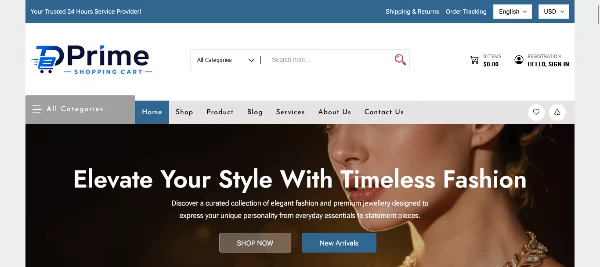
Prime Shopping Cart is our newest free ecommerce theme, released in August 2026, and it is the one we would point most beginners to first. It lays out products cleanly, supports the live Customizer, and plays well with Elementor, Beaver Builder and Brizy. It is retina-ready and translation-ready, so a store can sell across borders with the same design.
The free version already includes interactive product swatches and filters (color, size, category, price), Quick View, and a sliding Fly Cart so shoppers can check the basket without leaving the page. The Pro edition adds a one-click premium demo importer, live Ajax search, built-in wishlist and compare, product deal countdown timers, 30+ custom blocks and priority support. Use it for fashion boutiques, tech gadgets, home decor, beauty, specialty food, crafts, bookstores and digital downloads.
- Scope of use: general stores across fashion, electronics, home, beauty and food
- Best for: anyone who wants a modern ecommerce website template with filters and quick view on day one
Check It Now ( Prime Shopping Cart )
03. The8 Shop

The8 Shop is a free dark-style WooCommerce theme with a fresh, minimal layout and a black background option that makes product photos pop. It is fully responsive and built around Elementor, so you can change colors, typography, header styles and footer layouts by dragging and dropping instead of writing code. A one-click demo import and pre-designed pages get you to a working store quickly.
It is SEO optimized, translation ready and RTL-friendly, and it works with plugins such as WooCommerce, Elementor, Yoast SEO and Contact Form 7. Shop tools include a shopping cart, product variations, a product catalog layout and a LookBook module for editorial-style product storytelling. It is GPL licensed and can be used on unlimited domains.
- Scope of use: jewelry, watches, beauty, fashion, handmade crafts, flowers, gifts and even used items
- Best for: premium-feeling stores that want a WordPress ecommerce design with a dark theme
04. The9 Store

The9 Store is a sleek multipurpose theme for shops that sell across several categories: fashion, electronics, beauty, jewelry and even car parts. It offers multiple layout options and flexible template settings, with tabbed product carousels and category layouts that keep a larger catalog easy to browse. Several header and footer combinations let you match the store to your branding.
The theme page highlights quick view, AJAX search and product filters, plus compatibility with Elementor, Beaver Builder and Divi. Its code is SEO-optimized and the layout is built for mobile shoppers. If you outgrow the free edition, a Pro version is available from the same page. It works well when you want one theme to cover a catalog with very different product types.
- Scope of use: multi-category stores, electronics, auto parts, beauty and jewelry
- Best for: developers and store owners who like tweaking layouts through the live Customizer
05. eMart

eMart is built for stores that want energy on the page. Bold presentation, smooth transitions and animated slideshows move the visitor’s eye from one section to the next, which suits promotional stores that run frequent campaigns. Building with Elementor is quick, and your own product photos drop straight into the layouts.
Practical features are covered too: secure payment support through WooCommerce, contact forms, social links and newsletter sign-up areas, plus a blog section to share how-to content and brand stories that build trust. The theme is Gutenberg compatible, WPML ready with .po files included, and licensed under the GPL for unlimited sites. It works for clothing, accessories, tools and electronics alike.
- Scope of use: promo-heavy stores, clothing, accessories, tools and electronics
- Best for: shops that want a lively wordpress ecommerce template and plan to build pages with Elementor
06. Joyas

Joyas keeps things simple. Its clean, sleek design puts content first, so visitors stay focused on products and the story around them. It ships with a unique homepage and landing page, a blog template, a portfolio template, an About page and a Contact page, which makes it a good fit when your store needs to sit inside a fuller brand website.
Customization is straightforward: colors, fonts, logos, background images and sidebars change with a few clicks, and widget areas in the sidebar and footer handle extra content. It works alongside plugins such as Smart Slider 3, Contact Form 7 and WPForms, and with WooCommerce it can sell jewelry, cosmetics, beauty goods, boutique items, footwear, wedding dresses, flower gifts and branded T-shirts.
- Scope of use: boutiques, cosmetics, jewelry and gift shops with a blog or portfolio
- Best for: small brands that want a calm, content-led ecommerce wordpress theme
07. Shoper

Shoper (also listed as Shopper) is a flexible free shop theme that adapts to a long list of store types: watches, gifts, clothing, grocery, liquor, coffee, electronics, jewelry, furniture and cosmetics. You can switch product columns, add filters and pick fonts and colors in a live Customizer, and it connects with drag-and-drop builders such as Elementor, Beaver Builder and Brizy.
The built-in selling tools are generous for a free theme: Quick View on product listings, product grids and carousels, swatches and filters for categories, prices or attributes, a header Mini Cart and a Fly Cart that shows the item count with View Cart and Checkout buttons. It also supports a hero section, multiple page layouts and translation with .po files, and is WPML ready and Gutenberg compatible.
- Scope of use: general stores, supermarket-style shops, organic food, fashion and furniture
- Best for: store owners who want swatches, quick view and a mini cart without paying for plugins
08. Grocery Store

Grocery Store is a modern, multipurpose theme with strong product presentation options and full responsiveness. It was built to meet WordPress and WooCommerce coding standards, and it works with Gutenberg and the most common page builders, including Elementor, WPBakery, Brizy, Beaver Builder, Visual Composer, SiteOrigin and Divi. Despite the name, it also adapts to fashion, sport, technology, furniture, beauty and health stores.
Be clear about what the free edition includes: a lite Customizer, basic WooCommerce styling, and free-version-only plugins for AJAX product search, the modal fly cart and variation swatches. Pro unlocks a full theme options panel, its own Elementor add-ons and fully customizable WooCommerce layouts. If food is your niche, our guide to the best WooCommerce grocery store themes for local delivery businesses goes deeper on delivery slots, categories and layouts.
- Scope of use: grocery, supermarkets, organic and specialty food, plus general stores
- Best for: teams that already know a page builder and want a free starting point for a food store
Check It Now ( Grocery Store )
09. Startup Shop

Startup Shop is a free multipurpose shop theme in the WordPress.org directory, with a modern layout and complete responsive design. It is aimed at people who want to sell products or services without learning to code. The feature list covers Live Search, category and archive layouts, a Buy Now button, discount badges, and Add to Cart, Wishlist and Compare buttons so shoppers can save items for later or weigh options.
Sliders, smart filters, Ajax loading, RTL support, translation files and color options round it out. It works with Brizy, Divi, SiteOrigin, WPBakery and Elementor, and the listing shows version 1.3.9, updated in September 2026, with 200+ active installs. It suits sports gear, toys, food, shoes, clothes and tech.
- Scope of use: small and mid-sized catalogs, sports, toys, food, fashion and tech
- Best for: buyers who want wishlist and compare buttons in a free WordPress shop theme
10. Fastest Shop

Fastest Shop is an elegant free WooCommerce theme for fashion, beauty, cosmetics and jewelry stores, and it ships with three demos: a fashion shop, a beauty and cosmetic store, and a wine shop. You get several shop-front layouts, easy product column controls and product filters, along with typography and color schemes that make products quick to scan.
Two details stand out. First, you can adjust settings separately for desktop, tablet and mobile, which matters when most of your visitors shop on a phone. Second, the theme is available in German (including Swiss and Austrian variants), Mexican Spanish, Dutch and other languages, handy if you sell in more than one market. It supports Elementor and other builders, and the listing shows version 1.3.9, updated October 2026.
- Scope of use: fashion, beauty, cosmetics, jewelry and wine stores, plus affiliate or blog-led shops
- Best for: sellers who want device-specific control and translated interfaces
11. Kadence

Kadence is one of the most popular free themes in the WordPress directory, with more than 500,000 active installs, and it is a strong base for a custom store. The free theme includes drag-and-drop header and footer builders, which is exactly what a shop needs: search, account, cart and category menus all have to sit in the header and stay usable on a phone.
Starter templates give you a finished layout to edit, including store-focused options, and the theme is known for keeping page weight low. It works with the block editor, so you can build landing pages, category intros and promo sections without a separate page builder. Some starter templates and advanced shop modules sit behind Kadence’s paid plans, so check what a demo uses before you copy its look.
- Scope of use: custom-designed stores, agencies, stores that will grow into a larger site
- Best for: store owners who want control over the header and a lightweight ecommerce website WordPress theme
12. Phlox

Phlox is a lightweight, customizable theme from the team behind the Master Slider project, and it supports a WooCommerce storefront alongside blogs, portfolios, business sites, news and food sites. The headline number is 19 demo sites you can import in one click, plus 30 exclusive widgets and elements, and integration with Elementor, Visual Composer and SiteOrigin. It is WPML ready and has RTL support.
The WordPress.org listing shows more than 30,000 active installs and a 4.8 average from roughly 870 reviews, with version 2.17.22 released in August 2026. Because Phlox covers so many site types, it is a smart pick when the shop is one part of a larger brand website, for example a studio that sells prints and also runs a portfolio and a blog.
- Scope of use: store plus portfolio, blog or business pages; many languages supported
- Best for: people who want to pick from lots of wordpress ecommerce template demos before committing
13. Envo One

Envo One is a fast, clean and lightweight free WooCommerce theme for clothing, fashion, electronics, ebooks, dress stores, sports shops, equipment and marketplace or multivendor sites. It works with the block editor and with page builders including Elementor, Beaver Builder, SiteOrigin, Thrive Architect, Divi and Brizy.
Its practical advantage is plugin compatibility: the listing names YITH WooCommerce Wishlist, YITH WooCommerce Compare and WooCommerce Variation Swatches as supported, so you can add those features without fighting the theme. It is SEO friendly, WPML and RTL ready, and translated into German, Danish, Dutch, Swedish and Mexican Spanish among other languages. It has more than 20,000 active installs. Note that the latest listed release is from August 2025, so skim the changelog before relying on very new WooCommerce features.
- Scope of use: clothing, electronics, ebooks, sports, equipment, marketplace and multivendor stores
- Best for: stores that plan to add wishlist, compare and swatches through plugins
14. YITH Wonder

YITH Wonder is a block-based, multipurpose theme built around Full Site Editing. You compose pages with the Site Editor and a wide range of block patterns, use pre-built pages as starting points, and switch between eight style variations such as blue, pink, orange, black, red, gold and orchid shades. Colors and font pairings are easy to customize without touching code.
It has more than 40,000 active installs and requires WordPress 6.5 or newer. The most recent listed release is from April 2025, and the listing carries only a couple of reviews, so test it on a staging site with your real products before you commit. If you are not sure whether a block theme suits you, our comparison of block themes vs classic themes explains the trade-offs for WooCommerce stores.
- Scope of use: stores and brand sites built entirely in the Site Editor
- Best for: people who prefer block patterns over the Customizer and want a freebie ecommerce theme download with style variations
15. Futurio Storefront
Futurio Storefront is a WooCommerce-focused free theme with more than 10,000 active installs. Where multipurpose themes try to cover blogs, portfolios and landing pages, Storefront-style themes keep attention on the shop, and that restraint keeps the options screens simple. The free demo shows sale badges, a product grid and a working cart, which gives you a realistic preview of how a catalog will look.
It is a good option when you are sure the site is a store and nothing else. Pair it with a lightweight caching setup and an image optimization routine and it will feel quick even on modest hosting. As always, check the release history on the directory page before you commit, so you know how actively it is maintained.
- Scope of use: stores with no blog or business-site layouts in the way
- Best for: shop owners who want a no-frills Free WooCommerce theme with a free demo
Check It Now ( Futurio Storefront )
16. Kiosko

Kiosko is an Automattic theme listed on the WooCommerce Marketplace at $0, designed for online stores that sell art prints and homewares. Its high-contrast black-and-white look is deliberately minimalist, so product photography does the talking. It has more than 20,000 active installs and a 4.5 average from 114 reviews, with about 69% of those reviews at five stars.
Because it comes from the WooCommerce marketplace, it is a natural fit if you already manage your store extensions and subscriptions there. The listing notes free updates and free customer support. Choose Kiosko when your catalog is visual and curated, such as posters, ceramics, prints, stationery and decor, and you want the page to feel like a gallery rather than a supermarket aisle.
- Scope of use: art prints, home decor, stationery and design-led catalogs
- Best for: sellers with strong photography who want a minimalist WordPress ecommerce design
17. Zakra

Zakra is a beginner-friendly multipurpose theme with more than 30,000 active installs. It supports popular builders and the block editor, so you can shape pages in the tool you already know. A Shop starter site gives you a working store layout to edit, and the free header and footer builders let you rebuild the top of the store around search, categories and the cart.
Zakra is a sensible choice for someone building their first shop who may also want a blog, an about page and a contact page that all share one design. The deeper library of starter sites sits behind Zakra Pro, so treat the free Shop starter as a solid foundation and judge the rest on your own content.
- Scope of use: small stores, shops attached to a business or blog
- Best for: beginners who want a gentle learning curve and an importable shop layout
18. Total

Total, by HashThemes, is a multipurpose theme with more than 30,000 active installs and importable starter sites. What makes it useful for shop owners is its demo: it shows the WooCommerce shop archive itself, with product grid, sorting and result counts, instead of only a polished homepage. That lets you judge the page where shoppers actually spend their time.
It works best when a store is one part of a business website that also needs service pages, team sections or a portfolio. Test it with a realistic number of products before launch, because a multipurpose theme can feel different with hundreds of items than it does in a tidy demo.
- Scope of use: business websites that also sell products, small catalogs
- Best for: people who want to see the shop archive in the demo before choosing a best free WordPress shop theme
19. Tyche

Tyche is Colorlib’s free WooCommerce theme, and its current block edition leans fully into the Site Editor. It offers six shop starters, ten color palettes and seven typography pairings, and the store, product, cart and checkout layouts are all editable with WordPress and WooCommerce blocks. That makes it a complete store design rather than a brochure homepage with a shop link.
There is one requirement to note: the block edition needs a recent WordPress release (7.0 or newer) with WooCommerce active, and Colorlib recommends checking its migration guide before switching an older Tyche site to the new version. If you run an older WordPress install, update first or pick a classic-style theme from this list instead.
- Scope of use: new WooCommerce stores built with native blocks
- Best for: store owners who want several finished shop starters without a page builder
20. Enwoo

Enwoo, from EnvoThemes, is a plain, flexible WooCommerce theme with around 2,000 active installs. It comes with two importable free demos, and the second one carries more than a hundred priced products, which is a fair test of how a product grid behaves when it is full instead of showing six sample items.
The theme itself is deliberately neutral, which is its strength if you plan to restyle it with your own colors, fonts and images. It is a useful pick for developers and agencies who want a clean base to adapt for a client, and for store owners who prefer to start simple and layer features on through plugins.
- Scope of use: simple catalogs that you will style yourself
- Best for: developers who want a neutral ecommerce wordpress theme base with realistic demo data
Which theme fits your store type?
Twenty options is a lot. If you would rather start from what you sell, use this shortcut. It matches the demos, descriptions and strengths covered above to common store types, so you can shortlist two or three themes and test those on a staging site instead of installing all twenty.
If you are still deciding whether WordPress is the right foundation at all, our ecommerce platforms comparison lines up the main options side by side. And if you want to see what finished stores look like, browse these WooCommerce website examples for features worth copying.
Launch checklist: from empty site to first order
A theme only gets you part of the way. This is the order we follow when we set up a store on a free ecommerce theme, and it works for any theme in the list. Plan an afternoon for the basics and a few more days for products, policies and testing.
- Pick hosting that suits a store. Choose a plan with a currently supported PHP version, SSL and automatic backups before you add products.
- Install the theme properly. If you have not done it before, follow our guide on how to install a WordPress theme, then activate it and run any setup notice it shows.
- Create the core WooCommerce pages. Shop, Cart, Checkout and My Account must exist and be assigned in WooCommerce settings.
- Use consistent product photos. Same aspect ratio, white or neutral background, compressed images. Uneven photos make even the best theme look messy.
- Set tax rules for your market. VAT in Germany and Switzerland, GST in Australia and New Zealand, IVA in Mexico, sales tax in the US. Ask an accountant if you are unsure.
- Add only the plugins you need. Start with our list of essential WooCommerce plugins, and if your theme lacks swatches, see the best WooCommerce variation swatches plugins.
- Keep CSS and JavaScript lean. Combine and compress assets with one of the best minify WordPress plugins, but exclude the cart and checkout pages from aggressive caching.
- Publish legal pages. Privacy policy, returns, shipping and terms. Add cookie consent if you sell to visitors in the EU.
- Test like a customer. Place a test order on your phone, as a guest and as a logged-in user, and check that confirmation emails arrive.
- Back up, then go live. Take a full backup before launch and before any future theme switch.
Free vs premium: when to upgrade
Start free. Upgrade when you can name the specific thing the free version cannot do, not because a premium badge looks reassuring. Here is a practical way to decide.
Stay on the free theme if
- You sell fewer than a few hundred products
- Quick view, filters and a mini cart are enough
- You can handle setup yourself or with a short tutorial
- You are validating a product or niche first
Consider Pro or premium if
- You need live Ajax search, built-in wishlist or deal countdowns
- You want one-click premium demos to launch faster
- You want priority support for a client project
- Plugins you pay for separately would cost more than the upgrade
Whichever path you pick, keep important functions in plugins where possible. Features that live inside a theme disappear when you change themes, while plugin-based features follow you.
Mistakes that cost free-theme stores sales
- Judging only the homepage. Shoppers buy on product pages and in the cart. Open the demo’s product page and checkout on your phone before you decide.
- Importing a demo and leaving it. Placeholder text and stock photos make a store look abandoned. Replace everything.
- Stacking plugins to fake features. Five overlapping plugins slow the store down and clash with the theme. Add one tool per job.
- Ignoring translations. If you sell in German, Spanish or French, choose a translation-ready theme and test the cart and checkout in each language.
- Skipping staging. Try updates and theme switches on a copy of the site first, especially once you have live orders.
- Loading huge images. A 4 MB product photo will slow any theme. Resize and compress before upload.
Frequently asked questions
What is the best free ecommerce WordPress theme?
It depends on your store. For a quick launch with built-in selling tools, Prime Shopping Cart or Shoper are strong starting points. For flexibility and a custom header, look at Kadence. For block-editor stores, try Tyche or YITH Wonder. For art and homewares, Kiosko is built for it.
Is WooCommerce itself free?
Yes. The WooCommerce plugin is free and open source. Your real costs are hosting, a domain, payment processing fees and any paid extensions you add, such as subscriptions or bookings.
Can I run a real business on a free theme?
Yes. These themes are GPL licensed or free listings and are used by live stores. Choose one with recent updates, test it with your real catalog, and plan for Pro or premium only if you hit a clear limit.
Are nulled or cracked premium themes a safe way to get a theme free?
No. Cracked copies often contain hidden spam links or malicious code, and you get no updates or support. A legitimate free theme from the directories above is a safer route.
Do these themes work with Elementor or the block editor?
Many do. ShopStore, The8 Shop, eMart, Shoper and Grocery Store are built with Elementor in mind, Envo One lists support for the block editor and several builders, and Tyche and YITH Wonder are designed around the Site Editor. Check each entry above for details.
Can I sell digital downloads, dropship or run a marketplace?
Yes, because WooCommerce handles those selling models, not the theme. Choose a theme for how the storefront looks and behaves. Envo One lists marketplace and multivendor use, and Prime Shopping Cart lists digital downloads among its uses.
Will I lose my products if I change themes later?
No. Products, orders and customers are stored by WooCommerce. You may lose layout settings and any feature the old theme provided itself, such as a built-in wishlist, so take a backup and test on staging first.
How many products can a free theme handle?
More than most small stores need, provided your hosting is decent. Slowdowns usually come from heavy images, too many plugins and filtered category queries, not from the theme alone. Test with your real catalog before launch.
Which free theme is easiest for beginners?
Themes with one-click demo import and a live Customizer, such as Prime Shopping Cart, The8 Shop and Zakra, make the first setup less intimidating. Pick one, import its demo and replace the content step by step.
Can I sell in several languages and countries?
Yes, with a translation-ready theme. Fastest Shop lists German, Swiss German and Mexican Spanish translations, Shoper and eMart include .po files and are WPML ready, and Envo One supports WPML and RTL. You will also need to set up tax and shipping rules for each market.
Final verdict
If you want the shortest path to a working store, start with Prime Shopping Cart or Shoper, import a demo and replace the content. If you want a premium look, The8 Shop gives a dark, modern storefront. If you want maximum control over layout, choose Kadence. If you prefer the Site Editor, test Tyche and YITH Wonder. And if your catalog is art or homewares, Kiosko was made for it.
Whichever you pick, spend your first hour on product photos and your second on checkout testing. Those two things move sales more than any theme setting. Choose two or three themes from this list, try them on a staging site with your real products, and keep the one that feels best on a phone.