Choosing between managed WordPress hosting vs shared hosting is one of the first decisions that quietly shapes everything about your website: how fast it loads, how safe it is, how much time you spend on maintenance, and how much you pay every month. Both options can run a WordPress site. The real difference is who does the heavy lifting: you, or your host.
Shared hosting puts hundreds of accounts on one server and gives you an inexpensive, flexible control panel (usually cPanel). Managed WordPress hosting runs a server stack built only for WordPress and takes over updates, backups, caching and security. That is why the question “shared hosting vs WordPress hosting” never has one universal answer. It depends on what your site earns, how much traffic it gets, and how much technical work you want to own.
In this guide we compare both options across 15 practical areas, add real statistics (page speed, uptime maths, WordPress security data and hosting market trends), clear up what “WordPress hosting” actually means, show how shared hosting stacks up against VPS and dedicated servers, and finish with a decision flowchart and a safe migration plan. We also cover the gaps most comparisons skip: plugin blocklists, visit-based billing, email, and the uncomfortable fact that even managed hosts cannot stop every attack.
Quick answer: Choose managed WordPress hosting if your site earns money, runs WooCommerce, is growing fast, or you simply do not want to babysit a server. Choose shared hosting if you run a small, low-traffic site on a tight budget, host several small projects, or want cPanel and bundled email, and you are comfortable handling updates and backups yourself.
Key takeaways
- Managed WordPress hosting is optimized for one job (WordPress) and automates updates, backups, caching and security. Shared hosting is a general-purpose, low-cost environment where many accounts share the same resources.
- Shared hosting can cost as little as a few dollars a month, while managed plans often start around $20 a month. Price is not the whole story: the cost of downtime, lost sales and your own time matters too.
- Speed gaps show up under load. A 1-second to 3-second slowdown raises bounce probability by 32% in Google’s research, and shared servers are most likely to slow down at peak traffic.
- Managed hosting reduces risk but does not remove it. In a Patchstack test of 18 hosts, standard hosting defences blocked only 26% of vulnerability attacks, so plugin hygiene still matters.
- You can start on shared hosting and move later. Plan for the switch before your site is business-critical.
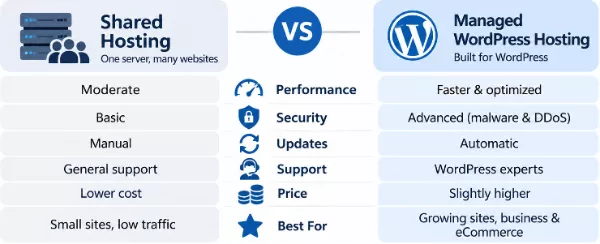
Managed WordPress hosting vs shared hosting at a glance
| Feature | Managed WordPress Hosting | Shared Hosting |
|---|---|---|
| Best for | Business sites, WooCommerce, growing blogs, agencies | Small sites, portfolios, hobby projects, several tiny sites |
| Typical price | Often from about $20 a month (entry plans can be cheaper) | From roughly $2 to $5 a month on introductory pricing |
| Maintenance | Host automates most of it | Mostly you |
| Performance | WordPress-tuned, consistent under load | Good when quiet, variable at peak times |
| Security | Firewall, malware scans, isolation | Basic server security; you add the rest |
| Support | WordPress specialists | General hosting support |
| Flexibility | Limited to WordPress, some plugins blocked | cPanel, email, multiple sites, other CMSs |
What Is Managed WordPress Hosting?
Managed WordPress hosting is a hosting service where the provider configures, secures, updates and supports the server environment specifically for WordPress. Instead of renting a generic slice of a server and building everything on top, you get a platform that already includes server-level caching, a firewall, automatic backups, staging tools and a support team that knows WordPress inside out.
Think of it as the difference between renting an empty office and renting a fully serviced one. In both cases you get walls and a desk, but in the serviced office somebody else handles the cleaning, the security desk and the internet.
How Managed WordPress Hosting Works
Behind the dashboard, a managed host typically runs your site in an isolated container or virtual environment, so the CPU and memory allocated to you are not drained by other customers. A WordPress-specific software stack handles each request:
- Edge and CDN layer: static files such as images, CSS and JavaScript are served from locations close to the visitor.
- Page cache: anonymous visitors receive pre-built HTML pages straight from memory, so PHP and the database are barely touched.
- Object cache: database query results are stored in Redis or Memcached, which matters for logged-in users, membership sites and WooCommerce stores that cannot use full-page caching.
- Application layer: a tuned PHP version and PHP worker pool run WordPress with settings chosen for WordPress workloads.
- Protection and maintenance layer: a web application firewall, malware scanning, automatic core updates, scheduled backups and uptime monitoring run in the background.
Many providers build this on top of public cloud infrastructure. If you want to see how the underlying platforms differ, our guide to cloud hosting providers explains why cloud-based plans scale more smoothly than a single physical server.
Key Features of Managed WordPress Hosting
- WordPress-optimized servers with server-level caching, a current PHP version and tuned database settings.
- Automatic WordPress core updates and, on many plans, safe plugin and theme updates with rollback.
- Daily automatic backups with one-click restore, often with 14 to 30 days of retention.
- Built-in security: web application firewall, DDoS mitigation, malware scanning and brute-force protection.
- Free SSL and a built-in CDN on most plans.
- Staging environments for testing changes before they go live.
- Developer tools such as SSH, WP-CLI, Git integration and selectable PHP versions.
- WordPress-expert support that can diagnose slow queries, plugin conflicts and caching issues.
- Scalability: resources that burst or upgrade quickly when traffic spikes.
Is “WordPress hosting” the same as managed WordPress hosting?
Not always, and this is where many shoppers get confused. The phrase what is a WordPress hosting vs shared hosting hides three different products that all get marketed as “WordPress hosting”:
- Shared hosting that runs WordPress. A regular shared plan with a one-click WordPress installer. Nothing is optimized beyond the installer.
- WordPress-optimized shared hosting. Still shared, but with extras such as a LiteSpeed cache plugin, WordPress auto-updates or a staging tool. This is a middle ground.
- Truly managed WordPress hosting. The platform is built around WordPress, resources are isolated or containerized, and the provider is responsible for maintenance and security.
“Managed” is a marketing term rather than a standard, so introductory prices in 2026 comparisons range from under $3 a month to $75 a month. Always check what is actually included: isolation, backups, staging, support tier, visit limits and plugin restrictions.
What Is Shared Hosting?
Shared hosting is the most common and most affordable type of web hosting. Your website lives on a single physical or virtual server alongside many other websites, and every account draws from the same pool of CPU, memory, disk and network capacity. The provider manages the server itself (hardware, operating system, network), but everything that happens inside your account, including WordPress, is largely up to you.
If you have ever installed WordPress with one click inside cPanel, you have used shared hosting. It remains the entry point for millions of first-time site owners precisely because it is cheap, familiar and flexible.
How Shared Hosting Works
- One server, many accounts. A provider places hundreds, sometimes thousands, of accounts on a server and divides the capacity between them using limits for CPU, RAM, processes and file counts (inodes).
- A control panel. Most plans use cPanel or a similar panel to manage files, databases, domains, email accounts, cron jobs, PHP settings and one-click app installers such as Softaculous.
- Resource limits keep neighbours in line. Technologies such as CloudLinux LVE cap what each account can consume. If your site hits a limit, requests queue or fail with 503 or 508 errors.
- You manage the website. Updating WordPress, plugins and themes, taking extra backups, hardening security and optimizing speed are normally your responsibility.
Because the cost of the server is split across many customers, providers can offer very low prices, which is why shared plans are so popular. For a closer look at budget options, see our roundup of cheap WordPress hosting plans under $5 per month.
Key Features of Shared Hosting
- Low price and generous marketing limits such as “unlimited” bandwidth (always read the fair-use policy).
- cPanel or a similar control panel with full access to files, databases, DNS records and cron jobs.
- Multiple websites on one plan on most mid-tier and higher plans.
- Bundled email accounts on your own domain.
- Support for many platforms: WordPress, Joomla, Drupal, custom PHP and static HTML sites.
- Free SSL on most modern plans, although you may need to activate it yourself.
- Entry-level backups, which vary from weekly copies to paid daily backup add-ons.
- Easy upgrade path to higher shared tiers, VPS or cloud hosting.
Managed WordPress Hosting vs Shared Hosting: Key Differences
On paper both plans “host WordPress”. In practice they behave very differently the moment your site grows, gets attacked or breaks after an update. Below are the 15 differences that matter most, starting with the nine areas readers ask about most and then adding six that most comparisons miss.
1. Server Optimization
Managed WordPress hosting tunes the whole stack for one application. That usually means server-level page caching, an object cache such as Redis, an up-to-date PHP version with a sensible worker count, HTTP/3, image optimization and edge delivery through a CDN. Because the provider only has to support WordPress, it can remove everything WordPress does not need.
Shared hosting uses a general-purpose configuration that has to work for WordPress, Joomla, custom PHP scripts and static sites at the same time. Some shared hosts add a LiteSpeed web server and a cache plugin, which narrows the gap for simple sites, but the configuration is still a compromise. If you want to understand why the web server software matters so much, read our comparison of Nginx vs LiteSpeed.
2. Performance and Website Speed
Speed is where most people feel the difference first. A WordPress page is built dynamically: PHP runs, the database is queried and HTML is assembled. Caching skips most of that work for anonymous visitors, and managed hosts cache at the server level, before PHP is even invoked. On shared hosting, caching normally depends on a plugin you install and configure yourself. Our WP Rocket review shows how much a good caching plugin can recover on a shared plan.
The bigger gap appears under load, or when pages cannot be cached at all (logged-in members, carts and checkouts). On a shared server a busy neighbour can slow your site, and your own account may hit its CPU or memory ceiling. Managed plans isolate resources, so response times stay steadier.
Speed has a direct business cost. Google’s research found that as page load time goes from 1 second to 3 seconds, the probability of a visitor bouncing rises by 32%. You can read the original figures on Think with Google. Speed also feeds Google’s Core Web Vitals, which measure loading, interactivity and visual stability.
Speed has a direct business cost. Google’s 2017 research found that as page load time increases from 1 second to 3 seconds, the probability of a mobile visitor bouncing rises by 32%. You can explore the findings in Google’s mobile page speed research. Website performance also affects Core Web Vitals, which measure loading performance, responsiveness, and visual stability.
An honest caveat: price does not guarantee speed. Independent test results published by WPBeginner show some budget plans loading a test site as fast as hosts costing ten times more. The test sites were lightly loaded, though. The real difference between managed and shared hosting appears under traffic spikes, with uncacheable pages, and over months of real-world use.
3. Security and Protection
Shared hosting provides baseline server security: network firewalls, account isolation (on modern setups), SSL support and server patching. Everything inside WordPress, such as outdated plugins, weak passwords and nulled themes, is your responsibility. A managed host adds WordPress-aware layers: a web application firewall, malware scanning, login protection, automatic core updates and often a clean-up service if something slips through.
Now the uncomfortable part. Patchstack’s 2026 report counted 11,334 new vulnerabilities across the WordPress ecosystem in 2025, a 42% rise on the year before, and about 91% of them were in plugins rather than WordPress core. In its separate test of 18 hosting providers, Patchstack found that typical hosting defences blocked only 26% of vulnerability exploit attempts. You can read both in the State of WordPress Security in 2026 and the hosting defence test.
What does this mean for your choice? Managed hosting still helps, because isolation, fast patching, scanning and clean backups limit the damage. But no plan replaces good habits: remove unused plugins, update quickly, use strong logins and keep your own backups. Work through our WordPress security checklist, compare options in our guide to WordPress security plugins, and run a free scan with our WordPress Security Checker. If the worst happens, follow our steps to recover a hacked WordPress site.
4. Server Resources and Reliability
Shared plans divide resources between accounts and cap each one with limits for CPU, RAM, simultaneous processes and file counts. When your site touches a limit, it slows down or returns errors, even if the server as a whole is healthy. Managed plans usually give you isolated resources (a container or virtual machine) and a defined capacity, such as PHP workers or monthly visits.
Reliability is usually quoted as uptime. The percentages look similar, but the real-world downtime they allow is very different:
Whichever plan you pick, do not rely only on the host’s own status page. Independent monitoring catches problems early, and you can set it up yourself with our WP Server Toolkit for server and uptime monitoring.
5. WordPress Updates and Maintenance
WordPress core, plugins, themes and PHP all need regular updates. On managed hosting the host updates WordPress core automatically, keeps PHP current, and on many plans runs visual or functional checks before applying plugin updates, with a rollback if something breaks. On shared hosting you update through the dashboard or Softaculous (which can auto-update in some setups), choose your own PHP version in cPanel, and fix anything that breaks.
PHP deserves special attention because old versions stop receiving security fixes. The official WordPress requirements page lists recommended versions, and a good host lets you switch easily. Test theme and plugin updates on a staging copy first, so layout surprises never reach your visitors.
6. Backups and Disaster Recovery
Backups are the difference between a bad afternoon and a lost business. Managed hosts normally run automatic daily backups, store them off-server, keep them for 14 to 30 days and let you restore with a click. Shared plans vary widely: some include daily backups, some keep weekly copies, and some charge extra. Even when backups exist, restoring them can mean opening a ticket.
Use the 3-2-1 rule whichever plan you choose: three copies of your data, on two different types of storage, with one copy off-site. Test a restore at least once a quarter, because a backup you have never restored is only a hope.
7. Customer Support
Shared hosting support is built to answer general questions about accounts, DNS, email and server errors. It often stops at “your server is working fine”. Managed WordPress support teams are trained in the application itself, so they can look at slow database queries, caching conflicts, PHP errors and plugin clashes. Response speed and quality vary by provider, so test the live chat before you commit, and read the support scope to see whether plugin or theme problems are covered.
8. Scalability and Traffic Handling
Shared hosting is not designed for big spikes. When traffic surges, your account reaches its limits and visitors see slow pages or errors. The fix is usually to upgrade to a higher tier, then to a VPS, which can mean a migration at the worst possible moment. Managed hosting and cloud-based plans are designed to absorb bursts, add capacity quickly and push cached content through a CDN.
One catch: many managed plans meter monthly visits or bandwidth, and exceeding the allowance can trigger overage fees or a forced upgrade. Ask how visits are counted, whether bots are included, and what happens when you go over.
9. Pricing and Overall Value
Shared hosting is much cheaper on the sticker price. Industry roundups put typical shared plans at about $2 to $5 a month on introductory pricing, while managed WordPress plans commonly start around $20 a month. WPBeginner’s 2026 comparison lists introductory prices from $2.69 up to $75 a month for hosts it calls managed, which shows how loosely the word is used.
Look at total cost of ownership, not the headline price:
| Cost category | Shared hosting | Managed WordPress hosting |
|---|---|---|
| Plan price and renewal | Low intro price, higher renewal | Higher price, often clearer renewal |
| Backups | May need a paid plugin or add-on | Usually included |
| Security and malware clean-up | Security plugin or service, clean-up often extra | Firewall and scanning usually included |
| CDN and caching | Plugin and CDN subscription | Usually included |
| Staging site | Plugin or manual setup | Usually included |
| Your time on maintenance | Several hours a month | Close to zero |
| Cost of downtime or a hack | Higher risk, slower recovery | Lower risk, faster recovery |
A site that earns a few hundred dollars a month can justify managed hosting just by avoiding one outage on a busy day. A hobby blog usually cannot. If budget is the deciding factor, compare renewal prices and included features rather than the first-year discount, and avoid paying for extras the plan already includes.
10. Control, Flexibility and Server Access
Shared hosting with cPanel gives you wide control: file manager, FTP/SFTP, SSH on many plans, MySQL databases, cron jobs, DNS records, PHP settings and the freedom to host non-WordPress projects. Managed hosting trades some of that control for safety and convenience. You typically get SFTP, a database tool, WP-CLI and maybe SSH, but not cPanel, root access, custom server software or traditional cron jobs (WordPress’s own WP-Cron may be your only option). If you need to run custom scripts or other CMSs on the same account, shared hosting is more flexible.
11. Multiple Websites and WordPress Multisite
Many shared plans allow several websites under one subscription, which is great for small personal or client projects. Many managed plans host one site per subscription (higher tiers or agency plans allow more), with each site running in its own isolated environment. If you plan to run dozens of sites, compare per-site pricing carefully. A WordPress network is another approach: our guide to WordPress Multisite networks explains when it is worth the added complexity and what your host needs to support.
12. Email Hosting and Domain Tools
Shared hosting usually bundles mailboxes on your own domain and lets you manage domains, subdomains and DNS in one place. Managed WordPress plans often leave email out, so you may need a separate email provider. That is not necessarily a negative: dedicated email services tend to deliver more reliably than mail sent from a shared web server. Whatever you use, set up SPF, DKIM and DMARC records so your messages reach inboxes rather than spam folders.
13. WooCommerce and eCommerce Readiness
Online stores stress hosting in ways blogs do not. Carts, checkouts and logged-in accounts cannot be served from a full-page cache, so every request hits PHP and the database. That is where managed hosting’s object caching, PHP worker pools and isolated resources earn their price. On a crowded shared server, a sale or product launch can push you over resource limits exactly when you need the site most. If you are new to the platform, start with what WooCommerce is and how it works, then see our picks for the fastest WooCommerce hosting and the essential plugins for WooCommerce.
14. Developer Tools and Staging
Professional workflows need a safe place to test. Managed hosts typically offer one-click staging, Git deployment, SSH and WP-CLI out of the box. On shared hosting you can still build a staging copy using a plugin or a subdomain, but it takes more effort and uses your limited resources. If you build client sites for a living, tool access and per-site isolation matter more than the price.
15. Plugin Restrictions and Lock-In
Some managed hosts block plugins that duplicate their own features or that are known to hurt performance. Typical examples are caching plugins, certain backup plugins, related-posts plugins and some security tools. Shared hosting rarely restricts what you install, but you carry the performance and security consequences. Before moving, check the host’s disallowed plugin list so you do not discover a conflict after the migration.
Managed WordPress hosting vs shared hosting: side-by-side comparison
| Area | Managed WordPress Hosting | Shared Hosting |
|---|---|---|
| Server optimization | Tuned for WordPress, server-level caching | General-purpose configuration |
| Speed under load | Steady, isolated resources | Can slow when neighbours or your own site spike |
| Security | WAF, malware scans, auto-updates | Baseline server security, you add the rest |
| Resources | Dedicated or isolated allocation | Shared pool with per-account caps |
| Updates | Automated core updates and tested plugin updates | Manual or semi-automatic |
| Backups | Daily, off-server, one-click restore | Varies, sometimes extra |
| Support | WordPress experts | General hosting support |
| Scalability | Quick upgrades, burst capacity | Upgrade tiers, then VPS |
| Price | Higher | Lower |
| Control | Limited, no cPanel | High, cPanel, SSH, cron jobs |
| Websites per plan | Often one | Often several |
| Often not included | Usually included | |
| Plugin freedom | Some plugins blocked | Almost any plugin |
Shared vs VPS vs managed WordPress vs dedicated hosting
Readers often ask how to compare shared vs VPS vs managed WordPress hosting, and what is managed WordPress hosting vs shared, VPS and dedicated hosting. The key is to separate two ideas that get mixed up: how resources are allocated (shared, VPS, dedicated) and who manages the server (you or the host). Managed WordPress hosting is a management model that can run on shared, virtualized or cloud infrastructure.
| Type | Resources | Who manages it | Best for |
|---|---|---|---|
| Shared hosting | Pooled with many accounts | Host manages server, you manage the site | Small sites and low budgets |
| VPS hosting | Reserved slice of a server, root access | You (unmanaged) or the host (managed VPS) | Developers, custom stacks, growing sites |
| Managed WordPress hosting | Isolated or containerized, WordPress-tuned | Host manages server and most WordPress upkeep | Business sites, WooCommerce, agencies |
| Dedicated server | A whole physical server | You or the host, depending on the plan | Very high traffic and strict compliance needs |
Real-world example: Namecheap shared hosting vs WordPress hosting (EasyWP)
If you are comparing Namecheap shared hosting vs WordPress hosting, the provider’s own documentation is a useful case study. According to Namecheap’s comparison of EasyWP and Shared Hosting (updated October 2026), the two products are built for different jobs:
- EasyWP (managed WordPress): one WordPress website per subscription, cloud platform, built-in caching, a simple dashboard, SFTP and phpMyAdmin access, free SSL, a 3 GB database limit per site, and no traditional cPanel cron jobs.
- Shared Hosting (Stellar plans): cPanel, multiple websites and domains, email accounts, cron jobs and SSH, support for other CMSs and custom PHP or HTML sites, and a larger shared database allowance.
Namecheap also publishes base resource limits for each product. The numbers are a good reminder not to compare specifications alone:
| Plan | CPU | RAM | Disk | Resource upgrades |
|---|---|---|---|---|
| Shared: Stellar | 0.5 core | 1 GB | 20 GB | No |
| Shared: Stellar Plus | 0.5 core | 2 GB | Unmetered | No |
| Shared: Stellar Business | 1 core | 2 GB | 50 GB | No |
| EasyWP Starter | 1 core | 512 MB | 10 GB | Yes |
| EasyWP Turbo | 2 cores | 768 MB | 50 GB | Yes |
| EasyWP Supersonic | 4 cores | 1152 MB | 100 GB | Yes |
| VPS Spark | 1 core | 1 GB | 20 GB | Yes |
| VPS Pulsar | 2 cores | 2 GB | 40 GB | Yes |
Notice that the entry EasyWP plan lists less RAM than Stellar Plus. The difference is not raw size: it is that EasyWP allocates its resources to a single WordPress site and tunes the platform for it, while shared plans split theirs across an account’s websites, email and applications. Plans and limits change, so confirm the latest numbers before you buy.
Pros and Cons of Managed WordPress Hosting
Managed hosting solves real problems, but it is not a free upgrade. Here is a balanced view before you decide.
Pros
- Faster, steadier performance thanks to WordPress-tuned servers and caching.
- Stronger security layers: firewall, malware scanning and isolation.
- Automatic daily backups with simple restores.
- Automatic core updates and managed PHP versions.
- WordPress-expert support that can solve plugin and performance issues.
- Staging sites, Git, SSH and WP-CLI for safer development.
- Better scalability for traffic spikes and WooCommerce stores.
- Saves hours of maintenance every month.
Cons
- Higher monthly price than shared hosting.
- Built for WordPress only; other CMSs and custom apps are not supported.
- Less server control: usually no cPanel, root access or classic cron jobs.
- Some plugins are blocked or restricted.
- Plans may cap monthly visits or bandwidth, with overage fees.
- Email hosting is often not included.
- Many plans cover only one site per subscription.
- Security is stronger but never absolute; plugin risk remains.
Pros and Cons of Shared Hosting
Shared hosting is not “bad hosting”. It is the right tool for many small projects, as long as you understand its limits.
Pros
- The lowest price of any hosting type.
- Beginner-friendly with one-click WordPress installers.
- cPanel gives broad control over files, databases, DNS and cron jobs.
- Host several websites on one plan.
- Email accounts on your domain are usually included.
- Works with WordPress, Joomla, Drupal, custom PHP and static sites.
- Easy to upgrade to higher tiers, VPS or managed plans later.
- Huge choice of providers and plan types.
Cons
- Shared resources mean performance can dip when neighbours get busy.
- Strict per-account limits on CPU, RAM, processes and inodes.
- You are responsible for updates, backups and most security work.
- Slower and less predictable during traffic spikes.
- Support is general rather than WordPress-specific.
- Backups vary by plan and may cost extra.
- Renewal prices often jump after the introductory term.
- Growth can mean a disruptive move to VPS or managed hosting.
Managed WordPress Hosting vs Shared Hosting: Which Is Better for You?
There is no universal winner. The better choice is the one that matches the value of your site, your traffic pattern and your appetite for technical work. Ask yourself three questions: What does an hour of downtime cost me? How much time can I spend on maintenance? Will my traffic stay steady or spike?
When to Choose Managed WordPress Hosting
- Your site makes money or leads. Stores, booking sites, membership sites and lead-generation pages lose revenue every minute they are slow or down.
- You run WooCommerce, memberships or an LMS. Uncacheable, logged-in traffic needs object caching and isolated resources.
- Traffic is growing or spiky. Product launches, campaigns, newsletters and seasonal peaks are easier to survive on scalable plans.
- You manage client sites. Agencies benefit from staging, backups, per-site isolation and a reliable support line.
- You are not technical, but the site matters. Paying for automation is cheaper than learning server administration.
- You want fewer security worries. Firewalls, scanning and fast restores reduce risk and recovery time.
When to Choose Shared Hosting
- You are launching a new blog, portfolio or hobby site and traffic is small.
- Your budget is tight and the site has no direct revenue.
- You host several small websites and want them under one cPanel account.
- You need bundled email on your own domain.
- You use other platforms such as Joomla, Drupal or custom PHP, or you need classic cron jobs and SSH.
- You are comfortable managing updates and backups, or you want to learn.
Quick recommendations by use case
| Scenario | Best fit | Why |
|---|---|---|
| New personal blog | Shared (or an entry managed plan) | Low cost, low traffic, easy to upgrade later |
| Portfolio or small brochure site | Shared with a caching plugin, or entry managed | Mostly cacheable pages and modest traffic |
| Local business that gets leads online | Managed (entry tier) | Uptime and security protect your leads |
| WooCommerce store | Managed or cloud | Checkout speed and uptime directly affect revenue |
| Membership, LMS or community site | Managed or cloud/VPS | Logged-in traffic cannot rely on page caching |
| Agency with many client sites | Managed (agency plan) | Staging, isolation and support save billable hours |
| Several small hobby sites | Shared | One plan, many sites, lowest cost |
| Developer with a custom stack | VPS or cloud | Root access and full control |
Web Hosting Statistics and Market Trends
Numbers help separate hype from reality. Here is what current data says about the platform your site runs on and the hosting industry behind it. Different trackers measure different things, so we cite the source and the date for each figure.
WordPress usage: the audience you are hosting for
According to BuiltWith’s WordPress usage statistics, WordPress powers tens of millions of live websites worldwide, reflecting its widespread adoption as a content management platform. That is down from a peak of about 43.6%, but it is still more than seven times the share of the next biggest platform, Shopify. For a deeper look at the numbers, see our article on the percentage of websites using WordPress.
The hosting market keeps growing
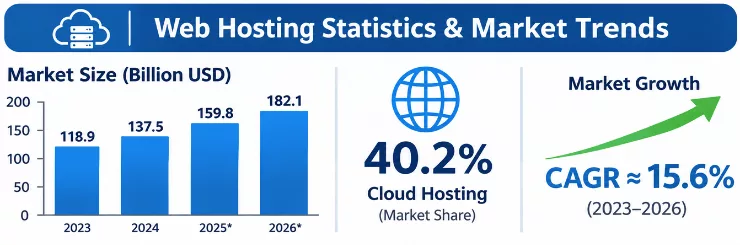
The web hosting industry is large and still expanding. Fortune Business Insights values the global market at $149.30 billion in 2025 and $178.76 billion in 2026, and projects about $661 billion by 2034, a compound annual growth rate near 17.8% (figures summarized in WPBeginner’s web hosting statistics report). Other analysts publish lower or higher estimates because they define the market differently, but they agree on the direction.
Web hosting statistics at a glance
| Statistic | Figure | Source |
|---|---|---|
| Global web hosting market, 2026 | $178.76 billion | Fortune Business Insights |
| Projected market size, 2034 | $661 billion (17.8% CAGR) | Fortune Business Insights |
| WordPress share of all websites | About 40% (Oct 2026) | W3Techs |
| WordPress share of CMS-powered sites | About 59% | W3Techs |
| New WordPress ecosystem vulnerabilities in 2025 | 11,334 (up 42%) | Patchstack |
| Share of those found in plugins | About 91% | Patchstack |
| Vulnerability attacks blocked by typical host defences | 26% | Patchstack hosting test of 18 hosts |
| Bounce probability increase from 1s to 3s load | +32% | Google research |
| Typical shared plan price | About $2 to $5 a month (intro) | Industry roundups |
| Typical managed WordPress entry price | Around $20 a month (range is wide) | WPBeginner and others |
What the trends mean for your hosting choice
- The market is shifting toward managed, VPS and cloud. Analysts describe growth in managed and application-specific hosting as site owners trade low prices for convenience, speed and security. Shared hosting still serves a huge number of small sites, but it is no longer the only sensible default.
- Attackers move faster than most site owners. Patchstack’s data points to a median of roughly five hours between a vulnerability becoming public and mass exploitation starting. Automatic protection and quick updates matter more than ever, so be sure your plan covers them or that you do.
- The risk sits in plugins, not core. With only a handful of core vulnerabilities in 2025 versus thousands in plugins, your plugin list is your biggest security lever on any hosting type.
- Speed is a business metric. Because bounce probability climbs quickly as load time grows, hosting that stays fast during peaks protects both conversions and search visibility.
- Cloud and AI-related workloads are adding demand. Some analysts expect more flexible, usage-based plans and more overlap between “managed” and “cloud” hosting over the next few years.
Can You Switch from Shared Hosting to Managed WordPress Hosting?
Yes, and it is more common than most people realize. Starting on shared hosting and moving to managed hosting once the site proves itself is a perfectly sensible path. The migration itself is straightforward when planned: WordPress is just files plus a database, and many managed hosts offer free migrations or migration plugins.
Signs It’s Time to Upgrade
- You see slowdowns, 503 or 508 errors, or “resource limit reached” notices during traffic peaks.
- Your time-to-first-byte is high even with caching enabled.
- You run WooCommerce, memberships or bookings, and checkout speed is hurting sales.
- Your site has been hacked, or you are spending hours on updates, backups and security checks.
- Your host’s support cannot diagnose WordPress-specific problems.
- You need a staging site and safer deployments.
- Traffic is growing, or you are planning a campaign or product launch.
- The site now earns enough that an hour of downtime costs more than a month of hosting.
What to Consider Before Migrating
- Plan limits. Check monthly visits, storage, PHP workers, database size and the number of sites included.
- Plugin compatibility. Review the new host’s blocked or restricted plugin list, especially caching and backup plugins.
- Email. If your mailboxes live on your shared plan, move them to a dedicated email service first or keep a small plan for email only.
- Custom configuration. Note cron jobs,
.htaccessrules, redirects and custom PHP settings that may need new equivalents. - Migration help. Find out whether migration is free, how many sites are covered and who fixes issues afterward.
- SEO safety. Keep URLs and redirects identical, keep HTTPS working, and avoid changing themes and hosts at the same time.
- Timing and fallback. Migrate during your quietest hours and keep the old plan active until the new site has run cleanly.
- Cost. Confirm renewal prices, overage fees and cancellation or refund terms on both sides.
A simple migration walkthrough
- Audit your current site. List plugins, themes, PHP version, database size, cron jobs, email accounts and traffic levels.
- Choose the new plan using the limits you just measured, not just the price.
- Take a full backup of files and database and store a copy off-server.
- Copy the site using the host’s free migration, a migration plugin or a manual file and database transfer.
- Test on a temporary URL or staging site: forms, search, checkout, login, emails, redirects and page speed.
- Lower your DNS TTL a day in advance, then update the DNS records during a quiet period.
- Verify and monitor: check HTTPS, crawl the site for broken links, watch uptime and review Search Console for errors.
Common Mistakes to Avoid When Choosing WordPress Hosting
- Choosing on the introductory price alone. The first-year discount is not the real price. Compare renewal prices and what is included.
- Believing “unlimited” means unlimited. Fair-use policies, inode limits and CPU caps still apply. Read the terms for CPU, RAM, processes and file counts.
- Assuming “managed” means “fully handled”. Plugin choices, passwords and content stay your responsibility. Patchstack’s finding that hosts blocked only 26% of vulnerability attacks is a reminder to keep your own defences.
- Ignoring the SLA. A 99.9% uptime promise allows almost nine hours of downtime a year. Check how downtime is measured and what compensation you get.
- Skipping the plugin and PHP checks. Look for blocked plugins and make sure your theme and plugins support the PHP version the host runs.
- Forgetting email. If your plan does not include mailboxes, set up a separate email service and the SPF, DKIM and DMARC records before you move.
- Overbuying or underbuying. A new hobby blog does not need an enterprise plan, and a store should not run on the cheapest shared tier.
- Relying only on the host’s backups. Keep your own off-site copy and test a restore. Also learn the basics of HTTPS: even when SSL is free, our guide on how to install an SSL certificate helps you renew and troubleshoot it.
- Not testing support before buying. Ask a technical question in live chat and see how quickly and accurately it is answered.
- Ignoring location and CDN. Choose a data centre near your audience and confirm whether a CDN is included. WordPress.org also maintains its own list of recommended hosts, which is a useful starting point.
Frequently Asked Questions (FAQs)
Is Managed WordPress Hosting Better Than Shared Hosting?
For most business sites, yes. Managed WordPress hosting delivers more consistent speed, stronger security, automatic backups and expert support, all of which shared hosting leaves mostly to you. For a small, low-traffic site on a tight budget, shared hosting is still perfectly adequate. “Better” depends on what your site is worth to you.
Is Managed WordPress Hosting Worth the Extra Cost?
It is worth it when your site earns revenue, handles customer data or needs reliable uptime. The extra cost buys back your time and reduces the risk of outages and hacks. If the site is a hobby with no income, shared hosting plus good backups is usually the better value.
Can Shared Hosting Handle a WordPress Website?
Yes. WordPress runs well on shared hosting for small and medium sites, especially with a good caching plugin, optimized images and a recent PHP version. Problems appear with heavy plugins, WooCommerce, membership sites or traffic spikes, where resource limits become the bottleneck.
Is Managed WordPress Hosting Faster?
Usually, and most clearly under load. Server-level caching, object caching, isolated resources and CDNs make response times steadier. A well-tuned shared plan can be fast for simple, cacheable pages, so test your own site rather than trusting price alone.
Which Hosting Is Better for Beginners?
Both work. Shared hosting is cheaper and teaches you how hosting works. An entry-level managed plan removes technical chores, which suits beginners who want to focus on content. If your budget is limited and the site is new, start with shared hosting and upgrade when traffic or revenue justifies it.
What Are the Advantages of WordPress Hosting vs Shared Hosting?
The main advantages of WordPress (managed) hosting are WordPress-tuned performance, built-in security, automatic backups and updates, staging tools, expert support and easier scaling. Shared hosting’s advantages are lower cost, cPanel flexibility, multiple sites, bundled email and support for other platforms.
What Is the Difference Between Shared, VPS and Managed WordPress Hosting?
Shared hosting pools resources across many accounts. VPS hosting gives you a reserved slice of a server with root access, but you (or a managed VPS provider) must run it. Managed WordPress hosting is a service model where the provider tunes and maintains the environment for WordPress, often on isolated or cloud infrastructure.
Can I Install Any Plugin on Managed WordPress Hosting?
Most plugins work, but many managed hosts block a short list that duplicates built-in features or hurts performance, such as some caching, backup and related-posts plugins. Check the host’s disallowed plugin list before you migrate.
Does Managed WordPress Hosting Improve SEO?
Hosting is not a direct ranking factor, but it affects the things that are: loading speed, Core Web Vitals, uptime and security. Faster, more reliable pages reduce bounces and make crawling easier, so good hosting supports your SEO efforts.
Final Verdict: Managed WordPress Hosting vs Shared Hosting
Managed WordPress hosting and shared hosting are two different answers to the same question: how much of the work should you take on? Shared hosting gives you low prices and plenty of freedom in exchange for your time and attention. Managed WordPress hosting gives you speed, security, backups and expert help in exchange for a higher price and less control.
Here is the short version:
- Pick managed WordPress hosting if your site makes money, runs WooCommerce, serves a growing audience or is managed for clients, and downtime or a hack would cost more than the monthly fee.
- Pick shared hosting if your site is small, new or experimental, your budget is tight, you need bundled email or several sites on one plan, and you are happy to keep up with updates and backups.
- Not sure? Start with a quality shared or entry-level managed plan, set up independent backups and uptime monitoring, and move up when the signs in this guide appear.
Whatever you choose, remember that hosting is only one layer of a healthy WordPress site. Keep plugins lean, update promptly, back up off-site and test your restore process. Do that, and either hosting type can serve you well.