
Most store owners don’t need 140 demos, 80 widgets and a settings panel with 600 options. They need a simple WooCommerce theme that installs in minutes, shows products clearly and takes a shopper from product page to payment without confusion. That is what the easiest WooCommerce themes deliver: a clean WooCommerce layout, a minimalist product page, a clean checkout layout and fast loading speed on a phone.
Speed matters more than most beginners expect. Portent’s site speed research, as summarized by WP Rocket, found that ecommerce conversion rates peak when a page loads in roughly one to two seconds, then slip by about 0.3% for every extra second. NitroPack’s math is blunter: it estimates that a store making $30,000 a month could lose around $25,000 a year to a single second of delay. A lightweight WordPress store theme is the cheapest insurance against that.
There is a catch. The “fastest WooCommerce theme” lists from WP Rocket, NitroPack and WPBeginner are written for performance testers. They rank themes by lab scores, then leave beginners to work out builders, add-ons and Pro upgrades alone. This guide is written for the other reader: someone who wants simple WooCommerce themes that are easy to set up, easy to edit and still quick. You get 16 picks, free and paid, with honest notes on who each theme suits, what it costs and where it can get in your way.
Quick Picks: Which Simple WooCommerce Theme Should You Choose?
In a hurry? This table matches the most common situations to a theme. Full reviews follow below.
| If you want… | Start with | Why |
|---|---|---|
| A free simple WooCommerce theme with zero fuss | Storefront | Official WooCommerce theme, 90,000+ active installs, plain and predictable |
| A minimalist WooCommerce theme with store features | Botiga | Block-editor demos, 12+ starter sites, top-tier speed scores in third-party tests |
| The most flexible free-to-start option | Astra | Huge template library, works with the block editor and major builders |
| The easiest paid setup with demo import | Startup Shop, Shoper | One-click demos, Elementor editing, $25–$29 |
| A minimalist product page for jewelry or fashion | Joyas | Modal mini cart, Ajax search, variation swatches |
| A dark, modern store | The8 Shop Pro | Black design background with a light/dark option |
| A store built around one hero product | Smartic | Landing-page layout for single-product shops |
| The widest choice of ready-made demos | XStore | 140+ prebuilt demos and a setup wizard |
What Makes a WooCommerce Theme Genuinely Simple?
“Simple” gets used as a marketing word, so here is a practical definition. A theme earns the label when you can go from install to first sale without learning a page builder, a framework or a developer’s vocabulary. In practice that means:
- One-click demo import or a setup wizard so you start from a finished homepage, not a blank page.
- A clean WooCommerce layout with sensible defaults for the shop grid, cart and account pages.
- A minimalist product page: large gallery, clear price, obvious add-to-cart button, readable tabs.
- A clean checkout layout that removes distractions at the moment people decide to pay.
- One editing method you already know, either the block editor (a Gutenberg-compatible shop theme) or a single builder such as Elementor.
- Responsive online store design: a mobile-friendly eCommerce theme that works on small screens without extra tweaking.
- A PageSpeed optimized WordPress store foundation: light CSS and JavaScript, no sliders loading on every page.
- SEO-optimized WooCommerce templates: clean markup, proper heading structure and compatibility with your SEO plugin.
- Documentation and support you can actually reach.
If the editor matters to you, read our guide to Gutenberg-compatible themes. If the visual style is your priority, our list of minimalist eCommerce themes goes deeper on design.
Simple vs Heavy: What the Speed Data Shows
“Simple” and “fast” tend to travel together. The chart below uses mobile PageSpeed Insights scores from WP Rocket’s hands-on theme test. The lightweight, store-first themes (Storefront, Botiga, Astra and Neve) cluster at 84–85. The heavy multipurpose and builder-style themes land between 60 and 83.
Three takeaways from the three competitor tests are worth knowing before you shop:
- Light themes score higher on phones. In WP Rocket’s run, BeTheme’s mobile score was 60/100 with a 12.8-second Largest Contentful Paint, while Storefront and Botiga both scored 84/100.
- No theme is perfect out of the box. NitroPack found that none of the 10 themes it tested passed 90 on mobile without extra optimization. GeneratePress came closest with an average mobile score of 82.5.
- Beginner-friendly can still be fast. WPBeginner tested 22 themes and put Botiga first, with an A grade and 94% performance on GTmetrix.
One caution: each publisher used a different server, location, demo content and tool, so don’t compare scores across studies. Use them to see patterns, then test your own store on PageSpeed Insights and review the Core Web Vitals metrics Google uses. For wider speed comparisons beyond WooCommerce, see our roundup of the fastest WordPress themes.
01. Storefront
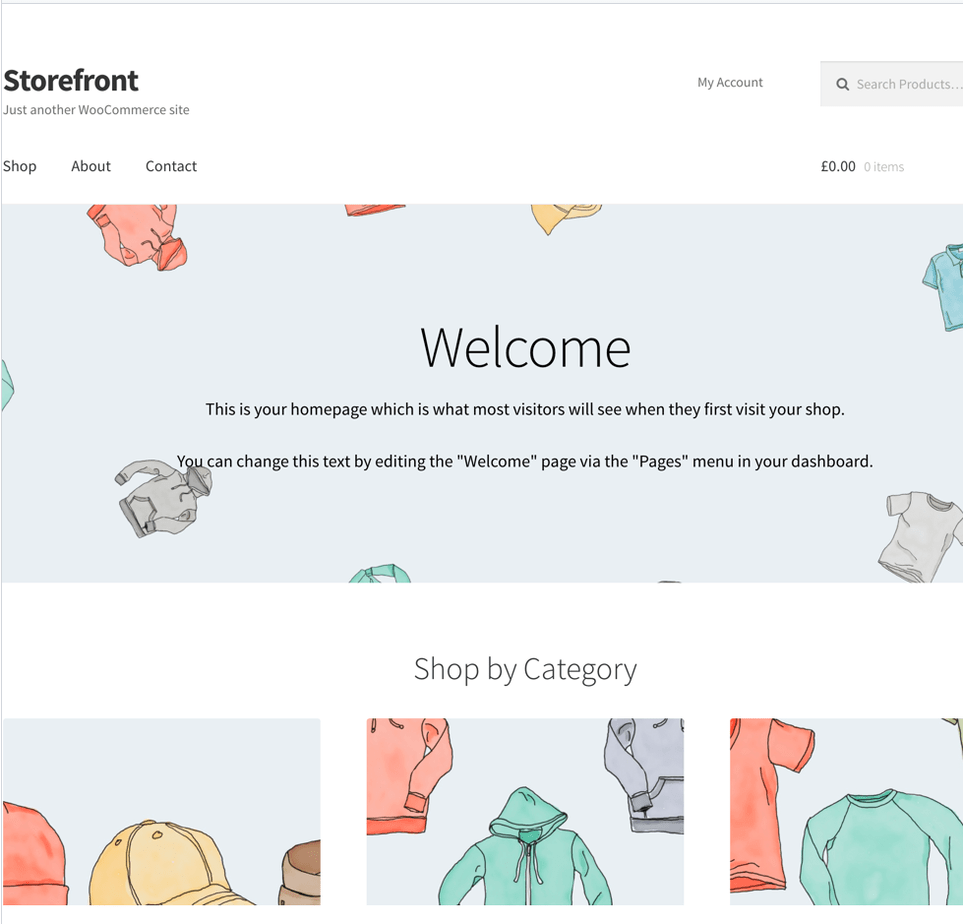
Storefront is the baseline every other simple WooCommerce theme gets compared to. It is the official theme from the WooCommerce team, published on WordPress.org under Automattic, so it is built around WooCommerce’s own markup, updates and extensions instead of having them bolted on. It is also a genuine free simple WooCommerce theme: layout and colour options, several widget areas and a responsive design cost nothing.
In WP Rocket’s test, Storefront scored 84/100 on mobile PageSpeed Insights with a 2.1-second total load time. NitroPack saw the same pattern: a strong desktop average of 92 and a more modest mobile average of 71. Its WordPress.org listing shows 90,000+ active installations and a 4.5-star rating from 155 reviews, so tutorials and answers are easy to find.
The trade-off is design range. Storefront looks plain by default, and big visual changes usually mean child themes or paid Storefront extensions. If you outgrow it, our guide to Storefront alternatives shows where to go next.
- Best for: first-time sellers who want the least risky, officially maintained base.
- Standout features: deep WooCommerce integration, multiple layout and colour options, accessibility-ready tag, child themes available.
- Keep in mind: limited customization without extensions, and a basic look.
02. Botiga
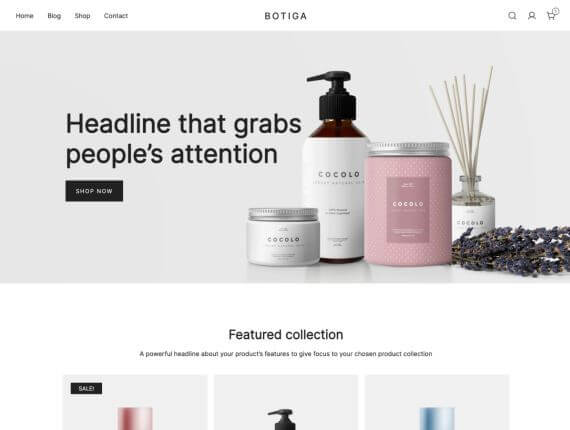
Botiga, from aThemes, is the closest thing to a minimalist WooCommerce theme with the store features already switched on. Its demo content is built with the native WordPress block editor, which makes it a Gutenberg-compatible shop theme from the ground up. You get several layouts for product galleries, the cart and the checkout page, plus off-canvas filters and product search.
It is also quick. WPBeginner tested Botiga at an A grade and 94% performance on GTmetrix and named it its fastest WooCommerce theme. NitroPack recorded the best desktop PageSpeed average of any theme it tested (92.5), and WP Rocket scored Botiga 84/100 on mobile. WPBeginner also found 12+ starter sites in the library, useful if you want a ready-made clean WooCommerce template to begin with.
Read the fine print on the free version. WPBeginner notes limited styling options there, and NitroPack lists wishlists and the sticky add-to-cart button among the Pro features.
- Best for: fashion, beauty and lifestyle stores that want a clean look with conversion features.
- Standout features: block-editor demos, quick view, product filters, distraction-free checkout options in Pro.
- Keep in mind: the most useful extras sit behind Pro, and the template library is smaller than some rivals.
03. Astra

Astra is the lightweight WordPress store theme most beginners meet first, and for good reason. It is free to start, fast and comes with a very large library of starter templates. It works with the block editor as well as Elementor, Beaver Builder and Brizy, so you can edit in the tool you already know.
WP Rocket measured 85/100 on mobile PageSpeed (using the Pro WooCommerce add-on) with a 2.3-second load time. NitroPack’s averages were 71.5 on mobile and 89.5 on desktop. WPBeginner calls Astra free, minimalist and surprisingly fast, but warns it can feel limiting as a store grows. The Pro add-on brings checkout customization, an advanced product gallery and filters, which is where a simple store starts to become a bigger one.
Weighing it against other options? Our guide to Astra alternatives compares eight other themes for stores.
- Best for: beginners who want a free base with room to grow and plenty of starter sites.
- Standout features: broad builder support, mobile-only header options, extensive documentation.
- Keep in mind: the best WooCommerce features need Pro.
04. Startup Shop
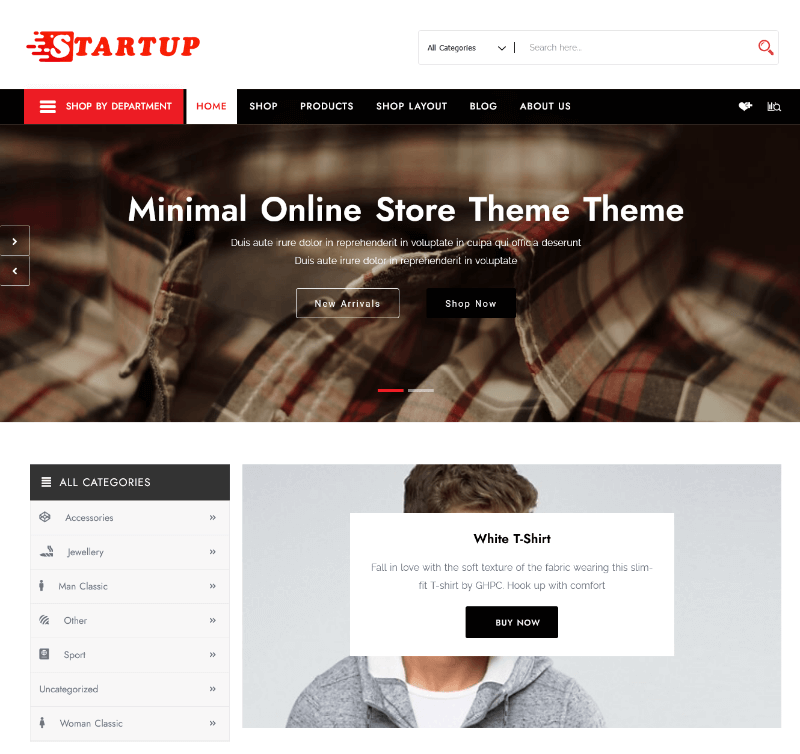
Startup Shop is aThemeArt’s minimal WooCommerce theme for small shops. It pairs WooCommerce with Elementor, offers grid and list product layouts and imports starter content with one click through a setup wizard, so you never build a homepage from nothing. The product page also lists 40+ Elementor widgets, unlimited colour and Google font options, WPML-ready translation files and the option to remove the footer credit.
The demo and copy lean toward fashion, watches, cosmetics, jewelry and footwear, but a clean grid with strong product photography suits most catalogs. It was priced at $25 on its product page in November 2026.
- Best for: small boutiques and first stores that want a minimalist look and a quick start.
- Standout features: one-click starter content, grid and list views, Elementor drag-and-drop editing.
- Keep in mind: advanced theme options rely on the Codestar framework, which the page says belongs to the paid version.
05. Shoper
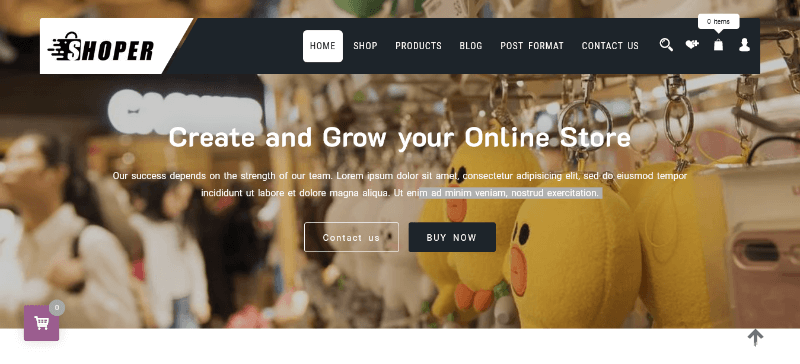
The aThemeArt page calls Shoper (spelled that way on purpose) its easiest and simplest WooCommerce theme, and the feature list backs up the pitch. You get a one-click demo importer, a theme panel divided into clear sections, 30+ custom Elementor widgets and a library of 600+ Google fonts. It also bundles four premium plugins valued at $59: the Codestar Framework, Advanced Product Search, Ajax Add to Cart and Smart Variation Swatches. That means product search, swatches and instant add-to-cart work from day one.
Store tools include quick view, product compare, wishlist, a mini cart and a fly cart, plus deal countdown timers for sales. It is a woocommerce simple theme in the sense that the heavy lifting is already configured. It cost $29 in November 2026.
- Best for: beginners who want search, swatches and cart features without hunting for plugins.
- Standout features: bundled premium plugins, quick view, compare, wishlist, fly cart.
- Keep in mind: the feature list is long, so import one demo and switch off what you don’t need.
06. ShopStore
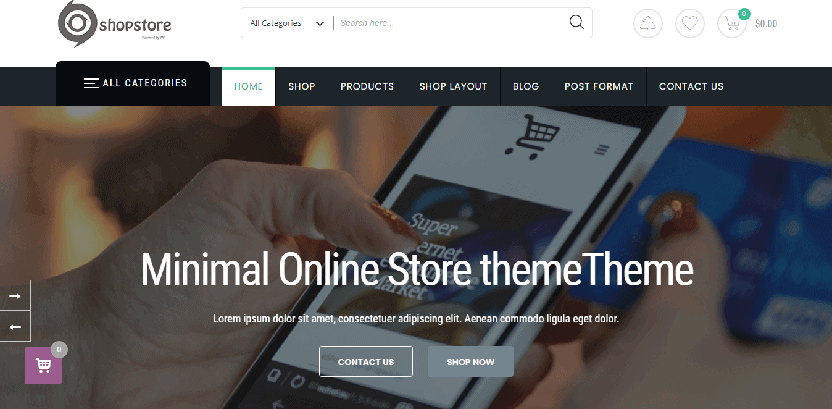
ShopStore (PRO) follows the same recipe as Shoper with a simple, minimalistic design aimed at general-purpose shops. The page lists jewelry, cosmetics, groceries, electronics, toys, tools, clothing, watches and furniture as suitable categories. Editing happens in Elementor with 40+ elements, there are three header layouts, and any live demo imports with one click.
Like its siblings it ships with four premium plugins, including Smart Variation Swatches and Ajax search, so shoppers see colours and sizes as buttons and results appear without a page reload. It works with Revolution Slider, TranslatePress, Yoast SEO and Rank Math, which helps when you want SEO-optimized WooCommerce templates without conflicts. The price was $25 in November 2026.
- Best for: general stores selling several product types.
- Standout features: three header layouts, Ajax search, swatches, lifetime updates.
- Keep in mind: a long options list means you should decide on a layout before customizing.
07. Joyas
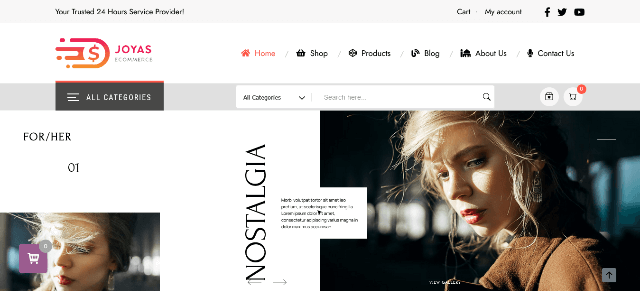
Joyas is the pick when your priority is a minimalist product page and a calm, clean WooCommerce layout. It was designed for jewelry, fashion, cosmetics and watches, though the page also lists gift shops, furniture and organic stores. Editing is done in Elementor, and the theme compares well on convenience: a modal mini cart lets shoppers add items without leaving the page, Ajax search works on the shop page, and variation swatches turn dropdowns into visual buttons.
For performance, the product page says an HTML/JS/PHP compiler combines all styles into one generated file, which is aimed at fast loading speed. It is compatible with Gutenberg, Elementor and Beaver Builder, includes WPML-ready files and bundles four premium plugins. The listing shows a $29 price and a 5.00 average from five ratings.
- Best for: jewelry, watch, beauty and boutique fashion stores that sell on photography.
- Standout features: modal mini cart, Ajax search, swatches, two header layouts, 600+ Google fonts.
- Keep in mind: the demo content is niche-specific, so replace images and text to fit your brand.
08. The8 Shop Pro
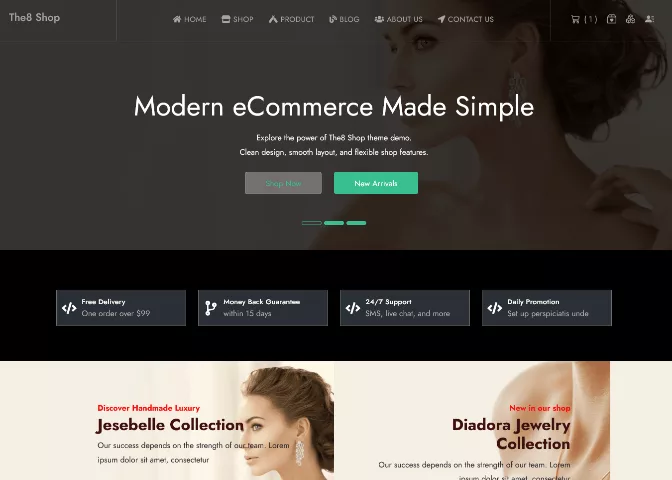
The8 Shop Pro is a modern, minimalist WooCommerce theme built around a black design background that makes product photos stand out. You can switch to light or dark mode, and the page describes responsive, retina-ready layouts with fast loading and SEO optimization. Colours, typography, header styles, footer options and grid spacing are all adjustable through Elementor and the theme options.
The package includes pre-designed pages, content blocks and demo import, RTL and translation support, and a WooCommerce LookBook module for shoppable product showcases. Premium plugins and custom Elementor addons come bundled. The developer recommends PHP 7.4 or higher and lists compatibility with PHP 8+. The price was $25 in November 2026.
- Best for: watches, fashion, beauty, electronics and gift stores where a dark backdrop suits the brand.
- Standout features: dark and light modes, LookBook module, RTL-ready, demo import.
- Keep in mind: dark designs suit premium or edgy brands more than pastel or playful ones.
Check It Now ( The8 Shop Pro )
09. The9 Store Pro
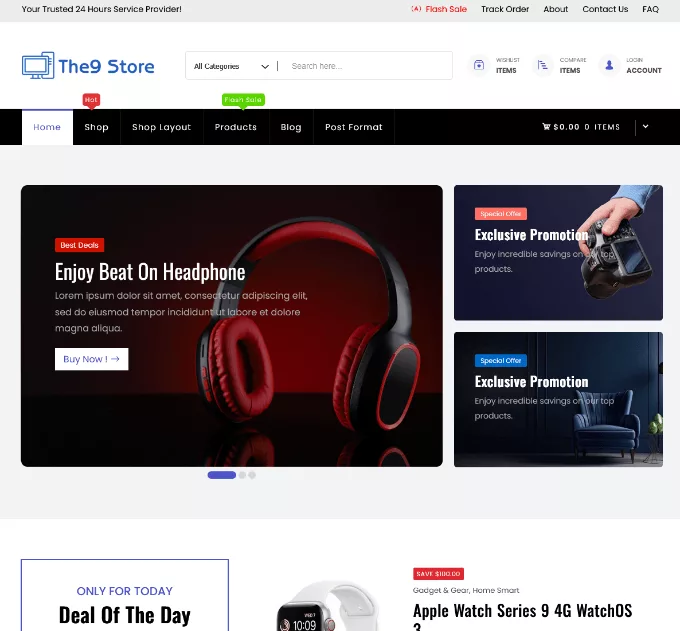
The9 Store Pro is a storefront theme for versatile retail: electronics and gadgets, fashion, furniture and beauty. The product page highlights SEO-optimized code, layouts that adapt to every device and custom Elementor elements so you can shape unique store designs without code. Integrated product catalogs, customer accounts and analytics keep day-to-day management simple.
Setup looks easy in practice. One customer review on the product page says the demo content was imported and the store ready in under 10 minutes, thanks to clear video guides. It is GPL-licensed for unlimited sites, WPML-ready, and was priced at $30 in November 2026.
- Best for: electronics, accessories and mixed catalogs that need a polished, modern storefront.
- Standout features: custom Elementor elements, built-in catalog and account management, video documentation.
- Keep in mind: the page offers fewer specifics on features than some siblings, so check the live demo before buying.
Check It Now ( The9 Store Pro )
10. Prime Shopping Cart Pro

Prime is a lightweight WooCommerce theme with a floating shopping cart that keeps the buying flow in view. It combines drag-and-drop layouts with 30+ custom widgets, so you can skip separate add-ons just to get a particular look. Four premium plugins come included: the Codestar Framework, Advanced Product Search, Ajax Add to Cart and Smart Variation Swatches.
Conversion tools include Ajax live search, product video galleries, wishlists, comparison tools, deal countdown timers and a built-in currency converter for international shoppers. You can pick a compact mini cart or a fly-out cart. Developers get hooks and filters, child theme support and a stack built on Underscores and Bootstrap. It cost $29 in November 2026.
- Best for: furniture, clothing, electronics, pet and sports stores that want strong cart and search features.
- Standout features: floating cart, live search, currency converter, 30+ widgets.
- Keep in mind: the many conversion features are optional, so keep the layout lean if you want the simplest product page.
Check It Now ( Prime Shopping Cart Pro )
11. Altr
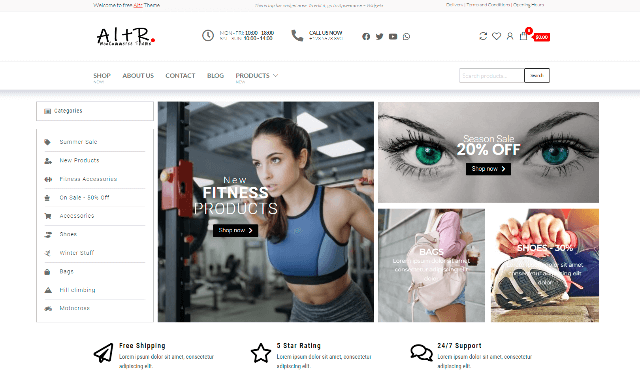
Altr is a free option from EnvoThemes. WordPress.org describes it as a fast, clean, lightweight and responsive WooCommerce theme that works with the block editor and builders such as Elementor and Beaver Builder. It is compatible with YITH Wishlist, YITH Compare and WooCommerce Variation Swatches, and it is SEO-friendly, WPML-ready and RTL-ready.
Altr is a child theme of Entr and is still young: the listing shows 1,000+ active installations and no reviews yet. That does not make it a bad choice, but it does mean fewer community tutorials than Storefront or Astra. Install it on a staging site first.
- Best for: budget-first sellers who want another free simple WooCommerce theme to test.
- Standout features: block editor support, plugin compatibility, imports a demo from the developer’s site.
- Keep in mind: small user base and no ratings yet.
12. PopularFX

PopularFX is a free, lightweight theme built around a drag-and-drop page builder. Its website promotes 650+ templates and 1,000+ pre-made sections, live and inline editing, undo and redo, and a revision history. It is a general-purpose theme rather than a store-only one, so it suits a simple site that sells a handful of products: you design pages visually and let WooCommerce handle the cart and checkout.
Premium plans unlock the full template library and Pagelayer Pro. Before committing, confirm that the template you like includes shop layouts, and run a speed test on the demo.
- Best for: small sites that want visual editing and a few products on sale.
- Standout features: drag-and-drop builder, huge template library, free to start.
- Keep in mind: not purpose-built for WooCommerce stores.
13. SeedProd
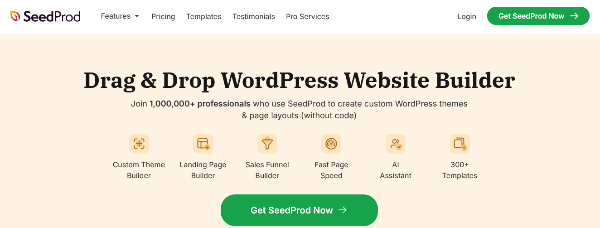
SeedProd is not a classic theme. It is a drag-and-drop website and theme builder with WooCommerce blocks, which means you design headers, product pages and checkout elements visually instead of choosing a fixed layout. WPBeginner ranked it second in its fastest WooCommerce themes list with an A grade and 91% on GTmetrix, and says its AI website builder can generate a custom site in under 60 seconds.
There is a free version, and WPBeginner lists Pro from $39.50 a year. The same review is candid about the downside: a learning curve and more complexity than a simple store needs. Pick SeedProd when you want to control every pixel of your responsive online store design rather than accept a preset.
- Best for: sellers who want total layout control without code.
- Standout features: WooCommerce product grid and cart blocks, theme builder, AI site generation.
- Keep in mind: more options than a beginner shop strictly needs.
14. Smartic
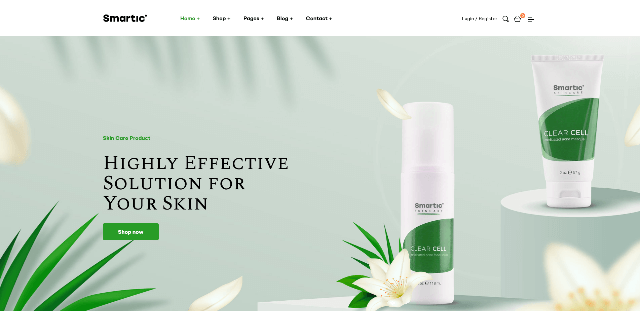
Smartic, by Opal_WP on ThemeForest, is a product landing page theme for stores built around one hero product. The homepage works as a long landing page with room for features, benefits, reviews and a call to buy, and Elementor WooCommerce modules let you create several single-product layouts.
That focus makes it the simplest choice for a one-product brand and a poor fit for a large catalog. If you only sell a few items, it can be the fastest route to a focused, high-converting page.
- Best for: single-product brands, drop-style launches and one-product dropshipping stores.
- Standout features: landing-page homepage, multiple single-product layouts, Elementor modules.
- Keep in mind: not designed for browsing a big catalog.
15. XStore
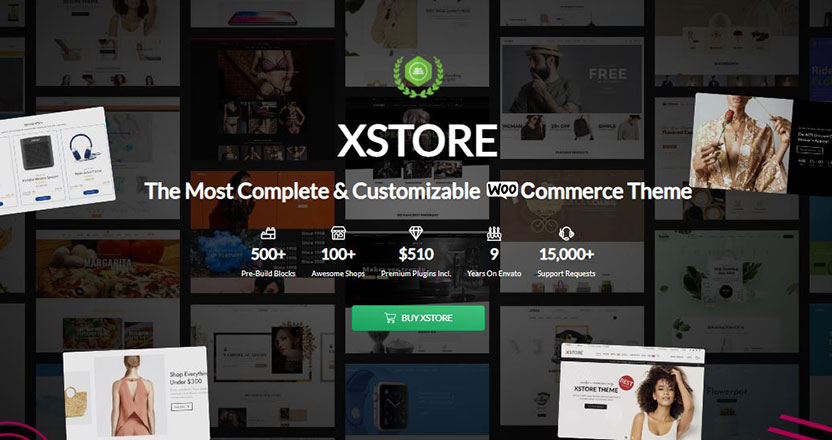
XStore from 8theme is the heavyweight on this list, included because its demos make setup quick. ThemeForest shows 140+ prebuilt demos, 80+ custom elements, a header builder, built-in wishlist, compare, swatches and AJAX filters, plus a setup wizard. It lists a $59 regular license, 55,000+ sales, a 4.88-star rating from about 2,300 reviews and six months of support.
The trade-off is weight. WP Rocket’s test shows multipurpose themes such as Flatsome, Avada, Divi, The7 and BeTheme scoring between 60 and 83 on mobile. XStore was not in that test, so check the demo you want on PageSpeed Insights and import only that demo, nothing else. Used that way, it is a good fast-loading eCommerce theme candidate with a huge design menu.
- Best for: sellers who want to pick a polished niche demo and swap in their own products.
- Standout features: 140+ demos, Elementor and WPBakery support, header builder, multi-vendor styling.
- Keep in mind: the feature set is vast, so it isn’t the simplest theme to master.
16. Artemis
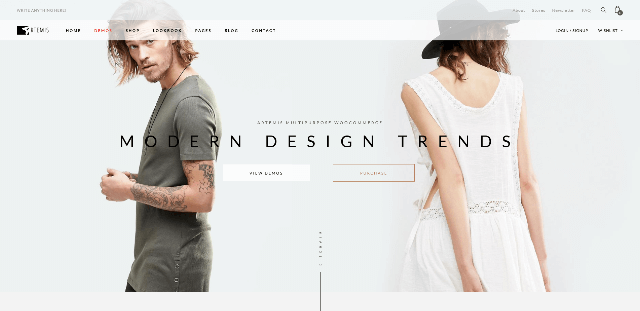
Artemis, from SmartWPress, is a multipurpose WooCommerce theme with a classy design. It supports one-click demo import, works with Elementor and WPBakery, and includes Slider Revolution at no extra cost. ThemeForest shows 1,300+ sales, a modest but steady track record compared with XStore.
Choose Artemis if you like its look and want a theme with established documentation. As with any multipurpose theme, switch off sliders and effects you don’t use to protect page speed.
- Best for: stores that want a refined, classic design with demo import.
- Standout features: Slider Revolution included, one-click demos, Elementor compatibility.
- Keep in mind: smaller community than the biggest ThemeForest themes.
Side-by-Side Comparison of the 16 Simple WooCommerce Themes
Prices are as listed on each page in November 2026 and may change, so confirm before buying.
| Theme | Price model | Editing | Best for |
|---|---|---|---|
| Storefront | Free | Block editor | First-time sellers |
| Botiga | Free + Pro | Block editor, Elementor | Clean fashion and lifestyle shops |
| Astra | Free + Pro | Block editor, Elementor, Beaver Builder, Brizy | Flexible stores that will grow |
| Startup Shop | $25 | Elementor | Small boutiques |
| Shoper | $29 | Elementor | Beginners who want bundled features |
| ShopStore | $25 | Elementor | General multi-category shops |
| Joyas | $29 | Elementor, Gutenberg | Jewelry, fashion, cosmetics |
| The8 Shop Pro | $25 | Elementor | Dark, premium-looking stores |
| The9 Store Pro | $30 | Elementor | Electronics and mixed retail |
| Prime Shopping Cart Pro | $29 | Elementor | Stores that need strong cart and search |
| Altr | Free | Block editor, major builders | Budget-first testing |
| PopularFX | Free + premium plans | Built-in drag-and-drop builder | Small sites with a few products |
| SeedProd | Free + Pro | Visual theme builder | Total design control |
| Smartic | Premium (ThemeForest) | Elementor | Single-product stores |
| XStore | $59 (ThemeForest) | Elementor, WPBakery | Huge demo library |
| Artemis | Premium (ThemeForest) | Elementor, WPBakery | Classic, refined design |
How to Choose the Easiest WooCommerce Theme for Your Store
Start with your budget and your editor, then narrow by store type.
Choose a free theme if…
- You are validating a product idea.
- You like the block editor and want minimal moving parts.
- You are comfortable upgrading later (Storefront, Botiga, Astra, Altr).
Choose a premium theme if…
- You want a finished-looking store from a one-click demo.
- You want search, swatches and cart extras bundled in.
- You value included support and updates.
Then match the theme to what you sell:
- Zero budget: start with Storefront. For more store features at no cost, try Botiga’s free version. Our list of the best free WooCommerce themes covers more free options.
- Simplest paid setup: Startup Shop, Shoper, ShopStore and Joyas all pair Elementor with one-click demo import and cost $25–$29. aThemeArt’s product pages also say paid items include free installation and demo setup for one site.
- Minimalist product page: Joyas keeps the focus on photography.
- Dark, modern branding: The8 Shop Pro.
- One product: Smartic.
- Custom design control: SeedProd or PopularFX.
- Largest choice of ready-made demos: XStore or Artemis.
Whatever you choose, preview the demo on your phone first. Check the product page, cart and checkout, since that path decides whether the theme feels easy for your customers.
How to Keep a Simple Theme Fast
A good theme is a head start, not a finish line. These habits protect a PageSpeed optimized WordPress store:
- Import one demo only. Extra demos add images, plugins and settings you will never use.
- Compress and size images. Large product photos are the most common cause of a slow product page.
- Add caching. In its own test, WP Rocket reported lifting a heavy theme from 60/100 to the high 90s on mobile PageSpeed. See our WP Rocket review for how the plugin works in practice.
- Pick hosting that matches a store. Cheap shared plans struggle with WooCommerce’s cart and checkout. Our guide to fast WooCommerce hosting compares options.
- Limit plugins. Each plugin adds scripts and styles. Keep the ones that earn their place.
- Measure on mobile. Test your product page and checkout, not only the homepage, and watch Core Web Vitals.
How We Picked These Themes
We started with the themes that appear in the three competing “fastest WooCommerce themes” guides, then added options chosen for ease of setup rather than raw speed: one-click demo import, a clean WooCommerce layout, a minimalist product page and a straightforward checkout. We reviewed each theme’s official page, documentation and demo details, and we combined them with published third-party speed tests from WP Rocket, NitroPack and WPBeginner. We have not re-run lab tests ourselves, so speed figures in this article are attributed to their original publishers, and themes without a published test carry no speed claim.
We dropped options that serve one narrow niche or aren’t a good match for “simple,” and added Botiga and Astra because they are widely recommended and tested across all three competitor guides.
FAQ: Simple WooCommerce Themes
What is the easiest WooCommerce theme for beginners?
For a free option, Storefront is the simplest because it is built by the WooCommerce team and has few settings to learn. For a paid option with a finished-looking store from day one, Startup Shop, Shoper, ShopStore and Joyas combine one-click demo import with Elementor editing and cost $25–$29.
Is there a free simple WooCommerce theme worth using?
Yes. Storefront, the free versions of Botiga and Astra, and Altr are all workable starting points. Storefront has the largest active user base (90,000+ installations), while Botiga’s free version offers a cleaner modern look. Upgrade only when you need Pro features such as wishlists or advanced checkout controls.
What is the fastest WooCommerce theme?
It depends on the test. Shoptimizer led WP Rocket’s mobile ranking at 88/100, GeneratePress had the best mobile average in NitroPack’s test, and Botiga topped WPBeginner’s GTmetrix results. NitroPack also found that no theme passed 90 on mobile without extra optimization, so caching and image optimization matter as much as the theme.
Do I need a page builder for a simple store?
No. Storefront, Botiga and Altr work well with the block editor. A builder like Elementor helps if you want drag-and-drop control, but it adds some page weight, so use only the widgets you need.
Are minimalist WooCommerce themes good for SEO?
Often, yes. Lean code, clear heading structure and fast loading help both rankings and conversions. Look for SEO-optimized WooCommerce templates that work with Yoast SEO or Rank Math, and keep your product titles and descriptions unique.
Can I switch WooCommerce themes later?
Yes. Your products, orders and customers live in WooCommerce, not in the theme. You may lose theme-specific settings, widgets or shortcodes, so back up your site and test the new theme on a staging copy first.
Final Thoughts
The easiest WooCommerce themes share a pattern: a lightweight base, a clean layout, one editing method and enough store features to sell without a pile of plugins. If you are starting free, begin with Storefront or Botiga. If you want a store that looks finished the day you import the demo, Startup Shop, Shoper and Joyas are practical, affordable paths. If you sell a single product, Smartic fits better than a catalog theme.
Whatever you pick, import one demo, optimize your images, add caching and test on your phone. A simple theme that loads fast and checks out cleanly will usually outsell a complicated one.