A magazine site lives or dies on two things: how fast the first story appears and how easily readers find the second one. Pick a bloated theme and your breaking-news ticker, hero slider and five ad slots will push Largest Contentful Paint past a visitor’s patience. Pick a lean magazine WordPress theme and the very same layout feels instant.
This guide rounds up 15 of the fastest magazine WordPress themes worth installing right now. Most of them are free magazine WordPress themes, plus one affordable premium option built for video news. Every theme was checked against its live listing in October 2026 (version, last update, active installs and rating), so you are not choosing from a list that quietly went stale in 2022.
Whether you want WordPress news magazine themes with a ticker and featured slider, a calm magazine website template for long reads, or a wp blog template that can grow into a full publication, you will find a match below. If you only need a quick shortlist, start here.
Quick Picks: Best Magazine WordPress Themes at a Glance
- Best all-round free option: News Magazine X. It has 30 five-star reviews, 8,000+ active installs and a long list of magazine widgets with ad placement built in.
- Best block-based (full site editing) option: Bluehost Blueprint, with 50,000+ active installs and 18 style variations.
- Best for photo-led stories: Pinbin. Its masonry grid is pure CSS with no jQuery or Masonry script.
- Best for video news and reviews: NewsBd24, a $30 premium theme with YouTube, Vimeo, SoundCloud and a built-in rating system.
- Best for writers who want a clean reading experience: Occasio or Donovan, both from ThemeZee and both actively updated in 2026.
Anatomy of a Great Magazine WordPress Design
A magazine layout is not just a blog with more columns. It is a system for surfacing many posts across many categories without overwhelming the reader. The wireframe below shows the building blocks every theme on this list arranges in its own way.
When you compare themes, check how each one handles these six blocks: the featured slider or hero grid, the news ticker, category sections, sidebar widgets, ad zones and search or dark mode controls. A theme that does five of them well and loads quickly beats one that does all six and drags.
What Makes a Magazine WordPress Theme Fast?
A quick word on the word “fastest”. Page speed depends on your host, your images and your plugins as much as on the theme, and we did not run lab benchmarks for this roundup. Here, “fast” means a theme built on lean foundations: current code, few front-end scripts, no mandatory page builder and a team that still ships updates. Those are the signals that predict a quick site once you add real content.
Look for these traits before you commit:
- No unnecessary scripts. A grid built with CSS (like Pinbin’s) removes layout JavaScript entirely.
- Native block or Customizer controls instead of a heavy bundled builder.
- Modern PHP support. Themes that require PHP 7.4 or newer are usually maintained, while very old minimum versions can signal legacy code.
- Responsive images and lazy loading so your hero image does not delay the page.
- Reserved ad and slider space to avoid layout shift when banners load.
- Recent updates. Almost every theme here was updated between April and October 2026.
Google measures real-world speed with Core Web Vitals. A “good” score means Largest Contentful Paint within 2.5 seconds, Interaction to Next Paint under 200 milliseconds and Cumulative Layout Shift below 0.1. Run the demo of any theme you like through PageSpeed Insights on mobile before installing it. If you want a broader view beyond magazines, see our roundup of the fastest WordPress themes.
How We Chose These Magazine Themes
We started with the themes on this list and verified each one on its official page. For the ones hosted on the WordPress theme directory, we recorded the current version, last-updated date, active installs and rating. Then we looked at what each theme actually gives a publisher:
- Magazine-specific layouts such as grids, sliders, tickers and category blocks
- Free versus paid features, so there are no surprises after install
- Block editor, Customizer or widget-based editing
- Compatibility with WooCommerce, translation and RTL languages
- Maintenance activity and the size of the user base
All free themes follow the standards in the official WordPress Theme Handbook because they passed directory review. Still, always test on a staging site first.
Magazine WordPress Themes Compared
Here is the whole list in one table. Figures come from the WordPress.org directory in October 2026 unless noted. “n/a” means the source page does not publish that number.
| Theme | Price | Active installs | Rating | Last updated | Best for |
|---|---|---|---|---|---|
| Gema Lite | Free (Pro available) | n/a | n/a | n/a | Bold newspaper-style blogs |
| Color NewsMagazine | Free + paid upgrades | 500+ | 5.0 (8 reviews) | Aug 6, 2026 | Colorful newspaper sites |
| NewsBd24 | $30 premium | n/a | 5.0 (5 ratings) | n/a | Video news and reviews |
| Donovan | Free | 9,000+ | 4.8 (24 reviews) | Aug 6, 2026 | Clean blog-magazine hybrids |
| Treville | Free | 1,000+ | No reviews yet | Jun 14, 2026 | Slider-led editorial sites |
| Wellington | Free | 4,000+ | 4.9 (16 reviews) | Jun 14, 2026 | Simple magazine layouts |
| Occasio | Free | 3,000+ | 5.0 (3 reviews) | Jun 14, 2026 | Writers using the block editor |
| Pinbin | Free | 400+ | 4.9 (14 reviews) | Sep 10, 2026 | Image-first masonry grids |
| Royal News Magazine | Free | 500+ | 3.7 (3 reviews) | Aug 20, 2026 | Newspaper-style portals |
| Bluehost Blueprint | Free | 50,000+ | No reviews yet | Apr 21, 2026 | Block-based custom builds |
| BlogHash | Free | 10,000+ | 4.7 (13 reviews) | Oct 5, 2026 | Lightweight blogs and news |
| News Magazine X | Free (some widgets Pro) | 8,000+ | 5.0 (30 reviews) | Oct 6, 2026 | Widget-rich news sites |
| Blogsy | Free | 4,000+ | No reviews yet | Oct 14, 2026 | Modern blogs with dark mode |
| Blogsy News | Free (child theme) | 2,000+ | No reviews yet | Jun 27, 2026 | News publishers on Blogsy |
| ColorMag | Free + Pro | n/a | n/a | n/a | Widget-based magazine homepages |
Install counts are not a quality score. A newer theme such as Blogsy can be excellent with a small base, and an older one can coast on past popularity. Use the numbers alongside the update dates and reviews above.
1. Gema Lite: Free Newspaper-Style Magazine WordPress Theme for Bold Storytelling
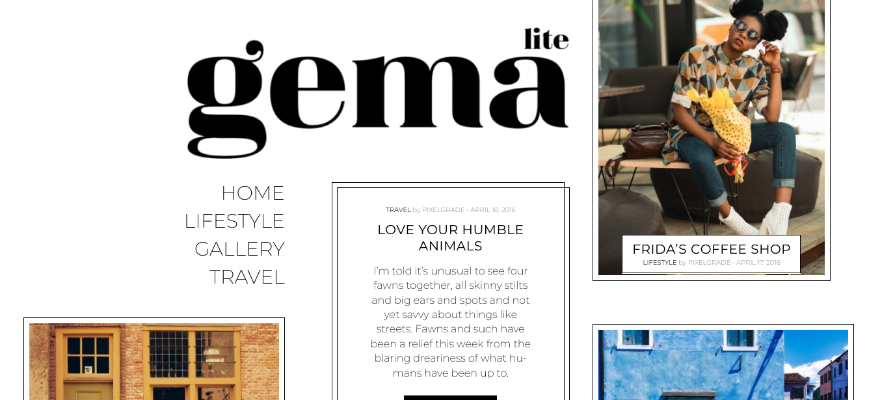
Gema Lite comes from Pixelgrade and is described by its developers as a newspaper-inspired theme that presents content in “diverse, daring and bold ways”. That makes it a natural fit for travel writers, lifestyle bloggers, photographers and personal magazines rather than a wire-service news desk. Its public repository shows a classic PHP theme with a small set of template files and no bundled page builder, which is a good sign for a light front end.
The theme is open source under GPL v2, so you can read every line of code before you install it. A Pro version exists if you outgrow the free one, and the live demo shows the bold typography in action.
Best for: travel, lifestyle and photo-led magazines. Price: free, with a Pro upgrade.
2. Color NewsMagazine: Free WordPress News Magazine Theme with Dynamic Colors
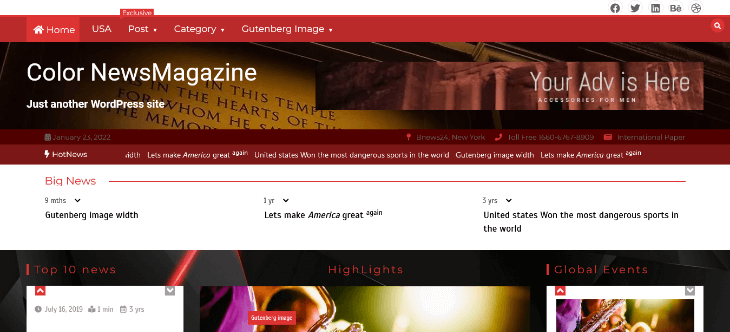
Color NewsMagazine, from PostMag Themes, is built for magazine and newspaper websites, and its blog design also suits bloggers who like a lot of color. The headline feature is unusual: the highlighted accent color changes dynamically every time your site loads, so the homepage never looks exactly the same twice.
It also lets you filter posts by number of comments, author, random date and recent date, which is handy for “most discussed” or “from the archive” sections. The listing shows grid layout support, left and right sidebars, and one-, two- and three-column options. At version 1.4.4 it was updated on August 6, 2026, and all eight reviews are five stars. It is a small theme with 500+ active installs, so treat the support forum as your safety net. Paid upgrades and support are available through the developer, and there is a live demo.
Best for: colorful newspaper sites. Watch out: the rotating accent color can clash with a strict brand palette.
Check It Now ( Color NewsMagazine )
3. NewsBd24: A Professional Video News Magazine WordPress Theme
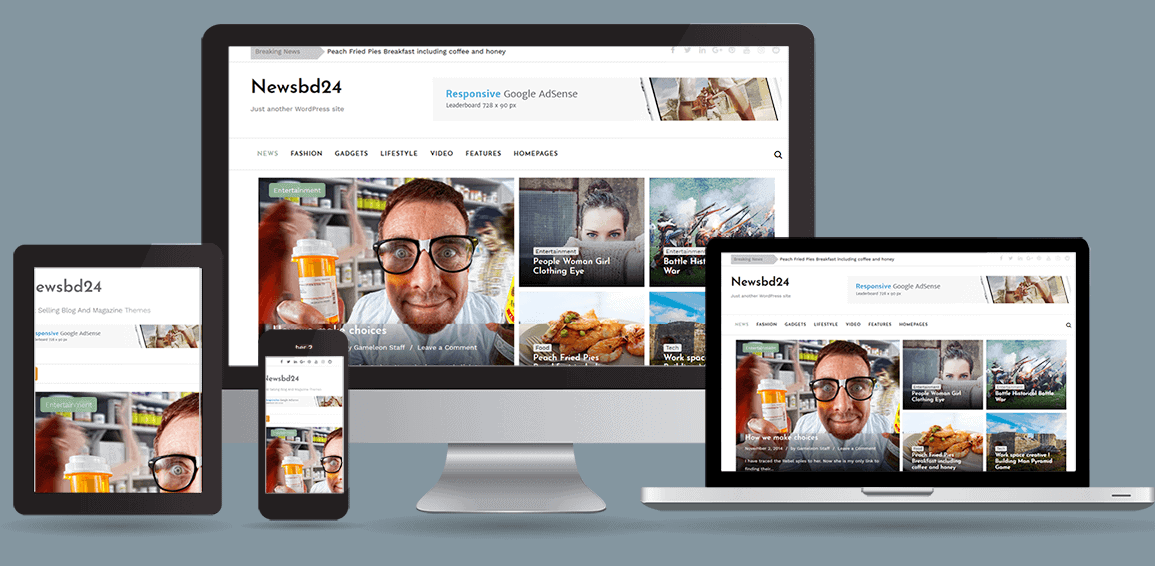
If you publish video, reviews or a mix of both, NewsBd24 is the premium pick on this list. It is a multipurpose newspaper, magazine and blog theme aimed at sites covering technology, fashion, sport, health, travel and more, and it works equally well for a personal blog or a larger news portal. At $30 it is also a reasonable premium magazine style responsive WordPress theme for anyone who has outgrown free options.
What sets it apart is the post-format toolkit. Each story can use a large or small featured image, a gallery, YouTube or Vimeo video, SoundCloud audio, a review layout with a rating system, or a quote. Responsive Google Ads and AdSense placements are supported, and the Live Customizer handles colors and fonts without touching code. The product page lists four post layouts, page layouts, magazine layout and post widgets, footer widgets, unlimited colors and fonts, and an average rating of 5.00 from five ratings. Paid items also include free installation and demo setup for one domain, and you can preview everything on the live demo.
Best for: video-first news sites, gadget and product reviewers. Price: $30.
4. Donovan: Clean Free WordPress Blog Template with Magazine Layouts
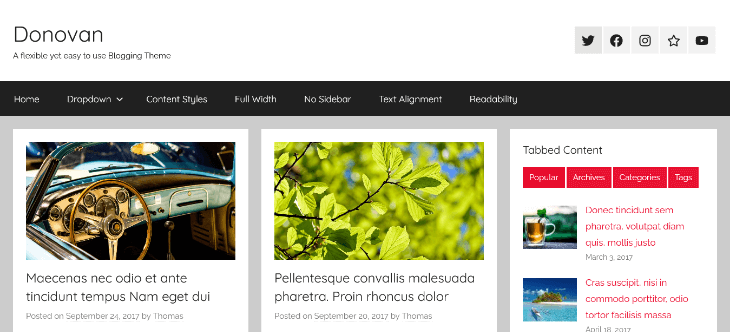
Donovan is a flexible blogging theme from ThemeZee with a clean, modern design and a mobile-first approach. It ships with three different blog layouts and extensive post settings, which makes it one of the more adaptable top WordPress themes for blogs that can also behave like a small magazine.
It has the strongest track record in the ThemeZee family: 9,000+ active installs, 23 five-star reviews against a single one-star review (4.8 overall), and version 1.9.4 released on August 6, 2026. It supports grid layouts, sticky posts, left and right sidebars, one to three columns, full-width templates, RTL languages and translation. Block editor styles are included, so posts look the same in the editor and on the front end.
Best for: personal blogs that want a magazine feel without complexity. Price: free.
5. Treville: Elegant Magazine WordPress Theme with a Fullscreen Post Slider
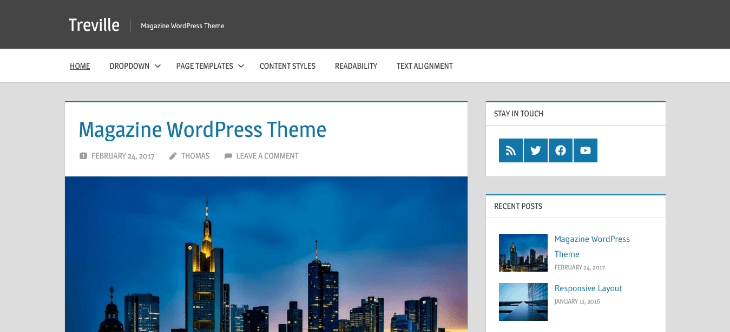
Treville is an elegant blogging and magazine theme with subtle colors and strong typography. It supports two navigation menus, advanced post settings and a post slider with fullscreen images, so your lead story can take over the first screen on desktop and mobile alike. The two menus are useful for a magazine: one for main sections and a secondary one for topics, pages or social links.
Version 2.2.2 was released on June 14, 2026. With 1,000+ active installs and no public reviews yet, it is a quieter choice than its siblings, but it uses the same mature ThemeZee codebase with grid layouts, sticky posts, RTL support and translation readiness.
Best for: editorial sites led by large photography. Price: free.
6. Wellington: Simple Magazine WordPress Template with a Featured Post Slider
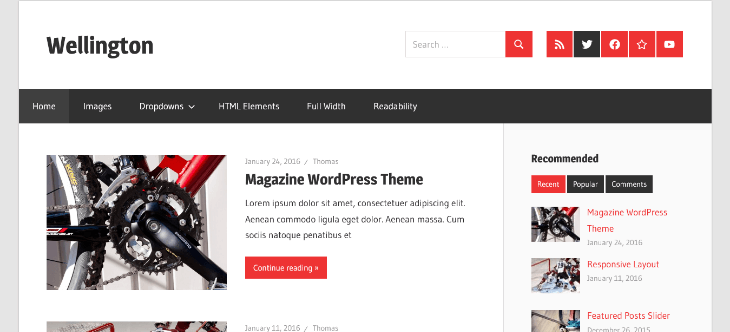
Wellington is a clean, simple magazine theme with beautiful typography and subtle colors. It gives you two post layouts, a featured post slider and thoughtful settings in the Customizer. If you want a ready-made magazine WordPress template that stays out of your way, this is it.
The numbers back it up: 4,000+ active installs, fifteen 5-star reviews and one 3-star review (4.9 overall), and an update on June 14, 2026. Because it comes from the same studio as Donovan and Treville, you get RTL support, translation readiness, full-width templates and block editor styles. Its theme homepage lists the extra paid modules if you need them later.
Best for: first-time publishers who want a calm, readable layout. Price: free.
7. Occasio: AMP-Ready Magazine WordPress Design for Block Editor Writers
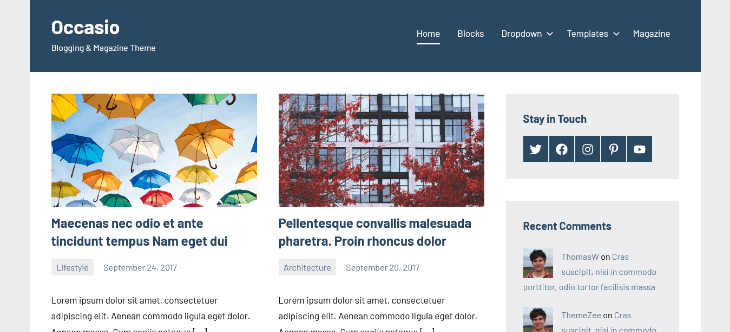
Occasio is a sleek, modern blogging and magazine theme designed with writers in mind. It is built for the Gutenberg block editor, supports several blog layouts and extensive post settings, and offers various page templates. The listing also calls it AMP-ready and accessible, two traits that are rare in free themes and valuable for a news publisher.
It has 3,000+ active installs, three 5-star reviews and version 1.1.4 from June 14, 2026. If you care about clear contrast, keyboard navigation and a good reading experience, review the WCAG guidelines alongside the demo. Grab the theme from the ThemeZee site or directly from WordPress.org.
Best for: long-form editorial and accessibility-minded sites. Price: free.
8. Pinbin: Free Masonry Magazine Website Template for Visual Stories
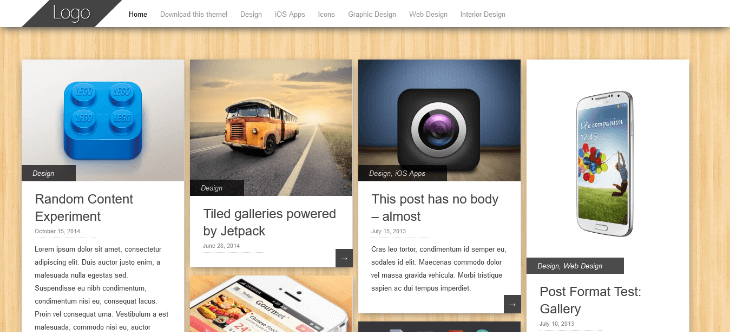
Pinbin is a clean, minimalistic theme from Colorlib inspired by Pinterest’s images-first approach. Colorlib positions it as a portfolio theme, but its masonry grid also works well as a magazine website template for photo essays, design magazines and visual news.
Version 2.0, rebuilt from the ground up in 2026, is the reason it earns a place in a speed-focused list. It removed jQuery, Masonry and imagesLoaded, so the grid is pure CSS with no layout scripts. It added full block editor support through theme.json, automatic dark mode that follows the visitor’s system setting, RTL support, an accessible menu and a full-width template. It requires WordPress 6.6 and PHP 7.4, has been downloaded 147,094 times in total, and holds a 4.9 rating from 14 reviews. The latest release is 2.0.2 from September 10, 2026, and you can try the live demo. For more options in this style, browse our list of masonry grid WordPress themes.
Best for: image-led magazines and portfolios. Price: free.
9. Royal News Magazine: Free WordPress News Magazine Theme for Newspaper Sites
Royal News Magazine is built intentionally for news and magazine websites, and its developer, Elegant Blog Themes, positions it as a newspaper-style theme. It supports a custom logo, custom menus, custom background, featured images, threaded comments and translation, and it requires PHP 7.4, which signals reasonably modern code.
Be realistic about the social proof. It has 500+ active installs and a 3.7 rating, but that comes from only three reviews (two five-star and one one-star), so read the live demo and the support forum before committing. Version 1.0.22 was released on August 20, 2026, which shows it is still being maintained.
Best for: small news portals that want a newspaper look out of the box. Price: free.
Check It Now ( Royal News Magazine )
10. Bluehost Blueprint: Block-Based Magazine WordPress Template with 18 Style Variations
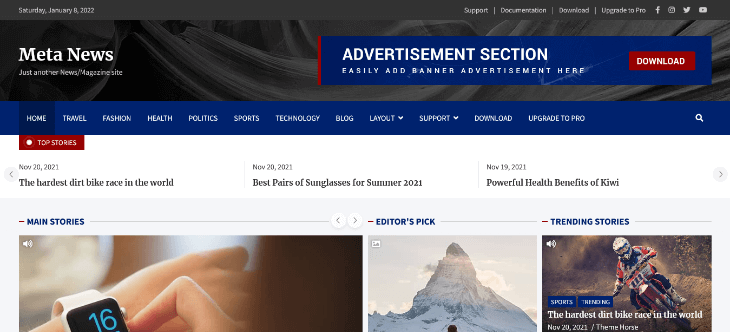
Bluehost Blueprint is a block-based, multipurpose theme built on Full Site Editing. It is not a magazine-first theme, so be clear about what you are getting: a flexible toolbox rather than a pre-built newsroom. With its included block patterns and the Query Loop block you can assemble a hero grid, category rows and archive templates directly in the Site Editor.
That approach is exactly why it can be fast. There is no separate builder to load, just native blocks. The theme ships with 18 style variations, including dark versions of each palette, covers e-commerce and portfolio use cases, and has already reached 50,000+ active installs (the largest on this list). It requires WordPress 6.6 and PHP 7.2. Version 1.0.2 was updated on April 21, 2026, and the source is on GitHub. New to this approach? Our guide to WordPress block themes explains how they differ from classic themes.
Best for: publishers who want to design their own magazine layout with blocks. Price: free.
Check It Now ( Bluehost Blueprint )
11. BlogHash: Lightweight Top WordPress Theme for Blogs and News Websites
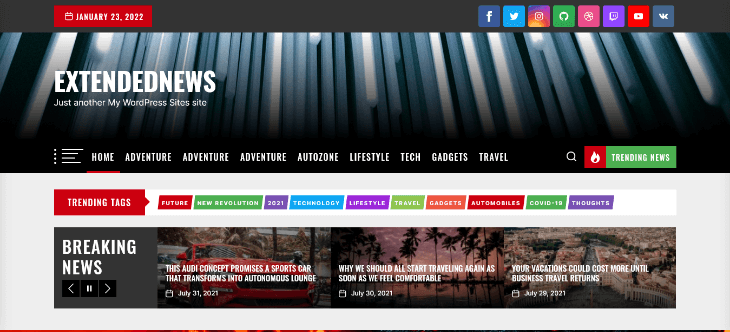
BlogHash from Peregrine Themes is aimed at bloggers who want a lightweight, customizable theme. You get plenty of color and typography options, and the listing states it is SEO friendly and fully compatible with WPML, Gutenberg, Elementor and WooCommerce, with translation and RTL support.
It is a strong all-rounder among top WordPress themes for blogs: 10,000+ active installs, a 4.7 rating (twelve five-star reviews against one one-star), and a very recent update on October 5, 2026. Tags include news, blog, BuddyPress, post formats and a flexible header, so it can stretch from a personal blog to a small news site without a rebuild.
Best for: bloggers who may add a shop or a multilingual layer later. Price: free.
12. News Magazine X: Widget-Rich Free Magazine WordPress Theme with Ad Slots
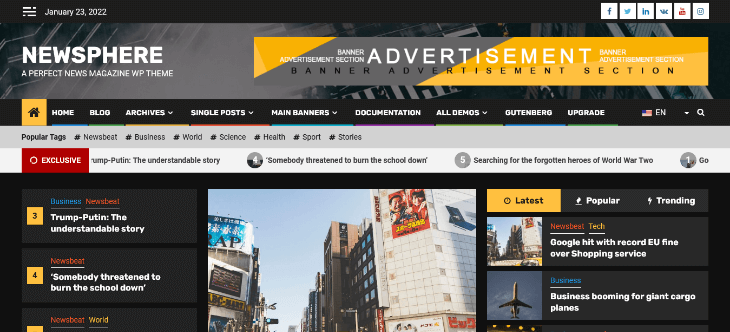
News Magazine X is the most feature-packed free option here and the best-reviewed, with 30 five-star reviews and 8,000+ active installs. It is built for bloggers, journalists and multi-author online magazines, and it comes with a toolkit of magazine widgets: a Magazine Grid widget, Classic Post Grid, Featured Tabs, Featured Post, a subscription (newsletter) widget and a category list.
A header and footer builder adds a news ticker, social icons, search, a dark mode switcher, a random post widget and an off-canvas side menu. The weather widget is a Pro feature. You can place ads in the header, footer and homepage sections, which makes monetization straightforward. It works with Elementor, Gutenberg, Brizy, Beaver Builder, Visual Composer, SiteOrigin and Divi, and it is described as GDPR-friendly. Version 1.2.59 landed on October 6, 2026, and the free demo lets you see it all before installing.
Best for: news sites and multi-author magazines. Price: free, with a Pro upgrade.
Check It Now ( News Magazine X )
13. Blogsy: Modern Magazine and Blog Theme with Dark Mode and WooCommerce
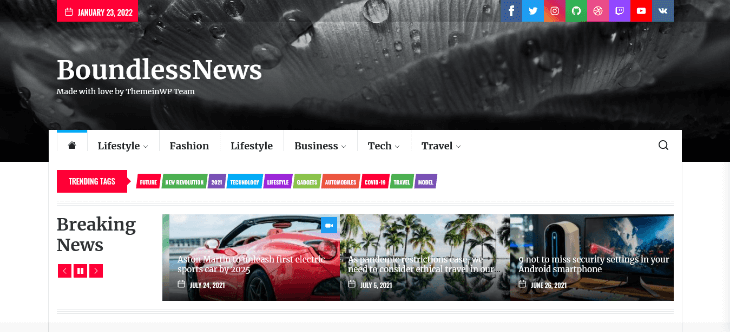
Blogsy is a modern, high-performance theme for bloggers, news publishers and content creators. It was first published in January 2026, and version 1.0.21 arrived on October 14, 2026. You get Gutenberg support with ready-made block patterns, Elementor integration, multiple header styles, flexible layouts (left, right or no sidebar), and grid or masonry blog designs.
Dark mode, unique sidebar widget patterns and one-click demo import make setup quick, and WooCommerce compatibility lets you add a store later. It has 4,000+ active installs and no reviews yet, so treat it as promising rather than proven. You can browse the available demos before choosing one.
Best for: modern blogs and magazines with a possible shop. Price: free.
14. Blogsy News: Free News Magazine WordPress Theme Built as a Blogsy Child Theme
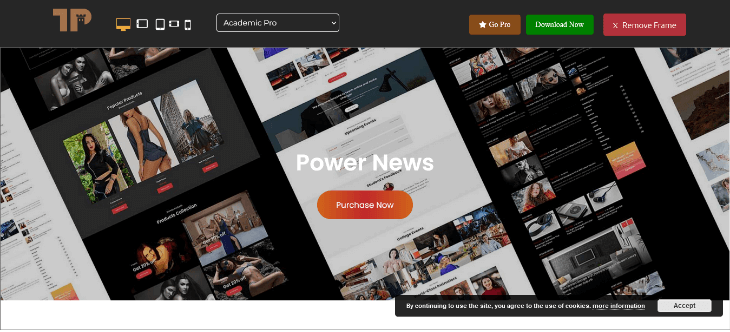
Blogsy News is a child theme of Blogsy tuned for news publishers. It carries over everything above (block patterns, dark mode, grid and masonry layouts, WooCommerce support and one-click demo import) with a layout designed around headlines. Because it inherits from Blogsy, you also keep the option to switch styles later without losing your content structure.
It was released in May 2026, reached 2,000+ active installs, and sits at version 1.0.2 from June 27, 2026. There are no reviews yet. Check the Blogsy News demo and remember that a child theme needs its parent installed.
Best for: headline-driven news layouts on the Blogsy foundation. Price: free.
15. ColorMag (Bonus): Proven Free Magazine WordPress Theme for Widget-Based Homepages
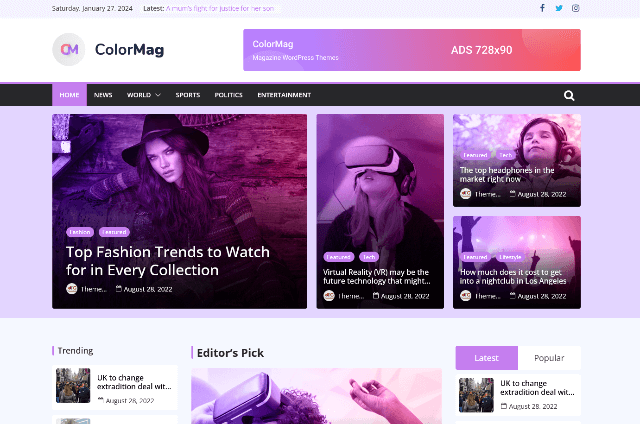
ColorMag is the only theme here that all three top-ranking competitor roundups mention, which tells you how established it is. It is a magazine theme with a featured content slider, custom magazine widgets, a breaking news ticker, custom header support and color and background options, and it supports WooCommerce out of the box. The homepage is built from widgets, so there is no page builder learning curve, and it also works with Elementor if you want more layout control.
The trade-off is design age: it is reliable and easy to set up but less modern than newer themes such as Blogsy or Pinbin. A Pro version adds more widgets and layouts. We added it as the 15th pick so the roundup is a true “15+”.
Best for: publishers who want a proven, widget-driven magazine homepage. Price: free, with Pro.
Free vs Premium Magazine WordPress Themes: Which Should You Choose?
Free themes from the official directory are reviewed for code quality, which makes them a safe starting point. Premium themes earn their price in support, extra layouts and speed of setup. Here is how to decide.
- Are validating a niche or launching a new blog
- Are comfortable with the Customizer, widgets or blocks
- Want to upgrade to Pro only when a feature is truly needed
- Prefer code reviewed by the WordPress.org team
- Publish video, reviews or galleries every day
- Want one-on-one install help and demo setup
- Need a polished, premium magazine style responsive layout fast
- Rely on built-in ad zones and extra post formats
If your plan is a pure news site, our collection of blogging theme goes deeper on free-only choices.
Hybrid Magazine, Shop, Review and News Themes
Many modern publications are no longer pure editorial. They review products, sell merchandise or run a subscription store alongside their news. If that sounds like you, you need a hybrid magazine, shop, review and news WordPress theme, and several picks above qualify:
- NewsBd24 offers a review post format with a rating system for product coverage.
- Blogsy, Blogsy News and BlogHash state WooCommerce compatibility.
- Bluehost Blueprint includes e-commerce in its feature tags, and its blocks let you place products inside editorial templates.
- ColorMag supports WooCommerce straight out of the box.
Pick a Magazine Theme by Niche
- Breaking news or politics: News Magazine X, Royal News Magazine, Color NewsMagazine
- Lifestyle, travel and fashion: Gema Lite, Treville, Wellington. For softer typography and palettes, browse these feminine WordPress themes.
- Photography and design: Pinbin, Treville
- Long-form writing: Occasio, Donovan
- Video and reviews: NewsBd24
- Multilingual or RTL publications: BlogHash, Donovan, Pinbin, Occasio (translation and RTL support listed)
Features Every Magazine WordPress Design Should Have
Before you fall for a demo, run it against this checklist:
- Featured slider or hero grid that does not shift the page while it loads
- News ticker for breaking stories
- Category color coding and category landing templates
- Widget areas or blocks for popular, recent and tabbed posts
- Ad zones that reserve their height, so banners cannot cause layout shift
- Dark mode for night readers
- Large featured images. Google Discover favors high-quality large images
- Clean article markup. Use an SEO plugin that outputs Article structured data
- Accessible navigation and contrast that meet WCAG
- Translation readiness, RTL support and WooCommerce compatibility
How to Build Your Magazine Website Template in 8 Steps
- Plan your sections. List your categories, homepage blocks and ad positions. Sketching helps, and a quick visual from one of these free mockup generators is perfect for sharing the idea with a designer or your team.
- Choose hosting and install WordPress. Magazine sites carry many images, so pick a host with enough storage and caching.
- Install your theme. Go to Appearance › Themes › Add New, search for the theme and click Activate. Upload the zip if it is a premium theme like NewsBd24.
- Import a demo or start from patterns. Blogsy offers one-click demo import, while Bluehost Blueprint uses block patterns.
- Build your homepage sections. Use the theme’s widgets or blocks. If you need a custom category loop, the WP Query Generator helps you create the post query without writing it from scratch.
- Set menus and categories. Keep the main menu to five or six top-level sections and use a secondary menu for topics.
- Add ads, newsletter and social links. Reserve space for ad slots so the page does not jump.
- Test everything. Check Core Web Vitals in PageSpeed Insights and inspect layout shifts and fonts with a few Chrome extensions for web developers. Then test on a real phone.
Already running a site? Back it up and follow this guide on how to change your WordPress theme safely, so rankings and widgets survive the switch.
Speed Up Your Editorial Workflow with AI
A fast theme is half the story; a fast newsroom is the other half. Modern AI tools for WordPress can draft headline options, write alt text for your featured images and summarize long articles. Always review the output, keep your editorial voice, and compress images before upload so your beautiful hero does not become your biggest speed problem.
How to Monetize a Magazine WordPress Site
- Display ads: join a network such as Google AdSense and place units in the header, between stories and in the sidebar. Themes like NewsBd24 and News Magazine X make that easy.
- Newsletters and memberships: add a signup widget and offer a premium tier.
- Merchandise and digital products: pair a WooCommerce-ready theme with your editorial brand.
- Classifieds and directories: a local publication can earn from paid listings. See these classified ads WordPress themes for ideas.
Common Mistakes When Choosing a Magazine Theme
- Choosing by demo screenshot instead of testing the demo’s mobile speed
- Importing every demo widget and plugin “just in case”
- Stacking multiple sliders, tickers and popups on the first screen
- Ignoring update dates and picking a theme that has not changed in years
- Forgetting that child themes like Blogsy News need their parent theme
Frequently Asked Questions About Magazine WordPress Themes
What is the best free magazine WordPress theme?
For most publishers, News Magazine X is the safest all-round choice thanks to its widgets, ad placement and 30 five-star reviews. Donovan and Wellington are excellent if you prefer a simpler layout.
Which magazine WordPress theme is the fastest?
No theme is fast on its own; your host, images and plugins matter. Themes with lean foundations, like Pinbin (no jQuery) and block-based Bluehost Blueprint, give you the best head start. Always test a demo with PageSpeed Insights.
What is the difference between a magazine theme and a blog theme?
A blog theme usually lists posts in a chronological feed. A magazine theme uses grids, sliders and category sections to show many posts across several topics at once.
Can I use these themes for a WooCommerce store?
Yes, several do. Blogsy, Blogsy News, BlogHash and ColorMag list WooCommerce compatibility, and Bluehost Blueprint includes e-commerce support.
Do I need a page builder to build a magazine layout?
No. Widget-based themes like ColorMag and News Magazine X, or block-based themes like Bluehost Blueprint, work without one. Page builders are optional extras.
Are free magazine WordPress themes safe?
Themes in the official directory go through a review process, and every theme here except NewsBd24 is listed there. Still, install from trusted sources, check the last-updated date and test on staging first.
Can I switch magazine themes later?
Yes. Back up your site, test on staging and expect to rebuild homepage widgets or blocks, because layouts rarely transfer between themes.
Final Thoughts: Choosing the Right Magazine WordPress Theme
The right magazine WordPress theme depends on how you publish. Choose News Magazine X for a widget-rich news desk, Bluehost Blueprint if you want to build with blocks, Pinbin for visual stories, Occasio or Donovan for writers, and NewsBd24 when video and reviews come first. Start with a free option, test the demo on mobile, and upgrade only when your audience demands it.
Which of these free magazine WordPress themes will you test first? Pick two, run both demos through PageSpeed Insights, and let the numbers decide.