
A golf club website should do more than display a beautiful fairway. It should help visitors understand the course, compare membership options, find lessons and events, check facilities, contact the clubhouse and—most importantly—take the next step, whether that means booking a tee time or enquiring about membership.
The right golf WordPress theme gives your club a professional starting point without forcing you to build every page from scratch. Some themes are designed specifically for golf courses and clubs, while others are flexible sports, hotel or multipurpose designs that can work when configured carefully. The important difference is knowing which features are included, which depend on extra plugins and which still need to be confirmed before you pay.
In this guide, we compare ten golf WordPress themes and adaptable alternatives for golf clubs, country clubs, course operators, coaches, tournament organisers, resorts and golf retailers. We look beyond the demo design to consider page builders, booking and event tools, WooCommerce support, update history and practical buyer risks. The feature and compatibility notes below are based on the vendors’ and marketplaces’ published listings, checked on 1 November 2026; this is a research-based comparison, not a claim that every theme was independently installed and lab-tested.
Planning your first site? Start with this guide to creating a WordPress website, then use the checklist below to choose a design that fits the way your golf business operates.
Why a golf website needs more than a good-looking homepage
Golf audiences are not one group. A course may serve regular members, occasional visitors, beginners, families, junior players, corporate groups, coaches, tournament participants and customers shopping for equipment. A useful golf website makes the right information easy to find for each visitor.
There is also a wider audience for golf-related experiences. The National Golf Foundation reported that 48.1 million Americans aged six and older played golf on-course or off-course in 2025. That total included 29.1 million on-course golfers and 19 million people who participated exclusively in off-course activities such as driving ranges and indoor simulators. The same report counted 3.3 million on-course beginners in 2025. These are U.S. figures—not global totals—but they illustrate why a club website may need to speak to beginners and simulator visitors as well as established golfers.
For a golf club, the practical takeaway is simple: make your website useful at every stage of the visitor journey. Show course information and facilities clearly, explain how to visit, make booking or enquiry options obvious, and publish current events and membership details. A strong golf website template should support those goals—not just provide a large hero image.
Quick comparison: 10 golf WordPress themes
The shortlist below includes golf-first designs and a few broader alternatives from your supplied list. The distinction matters: a sports or hotel theme can be adapted for a golf business, but it may require more setup than a dedicated golf club template.
| Theme | Best suited to | Notable published features | Buyer check |
|---|---|---|---|
| Grulf | Golf clubs and courses | Three homepage layouts, WPBakery, WooCommerce | Confirm the booking system you need; no dedicated tee-sheet feature is listed. |
| N7 | Golf clubs, coaches and events | Elementor, golf events, course booking, shop layouts | Marketplace compatibility metadata lists older WooCommerce versions; ask the author to confirm current support. |
| FairwayGreen | Golf clubs needing appointment-style booking | Elementor, Booked appointments, WooCommerce | Check the update cadence and the bundled booking plugin’s current compatibility. |
| Brentwood | Golf courses and country clubs | WPBakery, Slider Revolution, one-click demo import | Confirm which bundled plugin licences and image assets are included. |
| Putter | Golf grounds, events and equipment stores | Elementor, golf booking, events, WooCommerce | Its compatibility list does not clearly show WooCommerce 10; verify before purchase. |
| Uplands | Golf courses, clubhouses and golf pros | Booking/scheduling, course guide, Elementor, WooCommerce | Confirm the exact booking workflow and current WooCommerce compatibility. |
| Hotel Leisure | Golf resorts and leisure destinations | WPBakery, forms, WooCommerce, large-image layouts | It is a leisure/hotel design rather than a dedicated golf tee-time system. |
| Big Slam | Sports clubs and tournament-style content | SportsPress support, page builder, WooCommerce | Golf presentation requires custom setup; the demos focus on other sports. |
| Millside | Legacy golf/sport design reference | Older event and shop integrations | Very old compatibility record; not a safe default for a new production site. |
| Illdy | Free, build-it-yourself golf website | Customizer, portfolio, blog, custom header and logo | General multipurpose theme; booking, membership and golf layouts need separate setup. |
Important: Theme prices, bundled plugin licences and compatibility details can change. Check the live sales page and ask the theme author about your exact WordPress, PHP, WooCommerce and plugin versions before buying.
How we evaluated these golf WordPress templates
A commercial theme should save time after purchase, not simply look impressive in a demo. We used the following buyer-focused criteria to organise this shortlist:
- Golf relevance: Does the design make sense for a course, club, coach, resort, sports organisation or pro shop?
- Visitor journeys: Can you clearly present tee-time enquiries, course details, membership, lessons, tournaments and contact information?
- Builder and plugin ecosystem: Is the theme designed for Elementor, WPBakery or the block editor, and are important plugins named in its listing?
- Commerce: Is WooCommerce compatibility listed for selling memberships, apparel, equipment, gift cards or other products?
- Maintenance: Is the marketplace listing recently updated, and does its compatibility information match the software you plan to run?
- Ownership and flexibility: Can you change layouts without losing essential business data, and is a child theme or documented customisation path available?
These checks are especially important because a theme and a booking system are not the same thing. A theme controls the presentation and may bundle or integrate with plugins. A real tee sheet may need extra rules for tee-time intervals, player counts, 9- or 18-hole rounds, member pricing, carts, payments, cancellations and weather-related changes. Test that complete workflow before launch.
Top 10 golf WordPress themes for clubs, courses and devoted fans
1. Grulf – Golf Club WordPress Theme
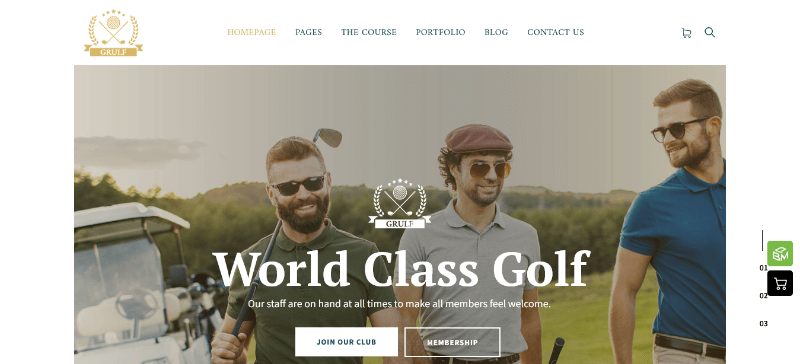
Grulf is a golf-first WordPress design for golf courses, golf clubs and sports organisations. Its current ThemeForest listing describes three homepage layouts, a demo setup wizard, a live Customizer preview and extensive colour and typography controls. It is built around WPBakery and lists compatibility with current WordPress 7.0 and WooCommerce 10 releases; the marketplace shows a last update of 9 September 2026.
That makes Grulf a practical starting point for a club that wants to showcase its course, facilities, club story, coaching services and pro-shop products without assembling the entire visual design from scratch. WooCommerce support is useful if you plan to sell branded clothing, equipment, accessories or gift items. Child-theme support is also a helpful foundation for controlled customisation.
Best for: Golf clubs and course operators that want a dedicated golf look, a familiar page builder and an online shop.
Buyer note: The listing does not identify a complete golf tee-sheet booking system as a core feature. Plan to connect a booking solution separately and test it with your preferred payment gateway. The author also notes that demo photos are not included in the download package, so budget for licensed course photography.
2. N7 – Golf Club Sports & Events WordPress Theme

N7 is aimed at golf clubs, personal trainers, golf coaches, sports centres, tournament organisers and sports stores. Its published feature set includes three premade homepages, Elementor editing, golf event management, golf court booking and a premade WooCommerce shop. It also lists integrations with tools such as The Events Calendar, Contact Form 7 and WooCommerce.
For a club that publishes competitions, coaching programmes and event announcements, N7 has a more activity-focused approach than a simple course brochure theme. You can build pages for upcoming tournaments, golf lessons, club announcements, equipment sales and membership enquiries. Elementor is a familiar visual editor for teams that want to adjust page sections without editing theme templates.
Best for: Golf clubs that publish regular events, training sessions and tournament information alongside their course pages.
Buyer note: The ThemeForest listing shows an update dated 15 October 2026, but its compatibility metadata lists older WooCommerce major versions. Do not assume the update date guarantees compatibility with your current shop stack. Ask the author to confirm your exact WooCommerce version and test event registration, booking and checkout on staging.
3. FairwayGreen – Golf Club WordPress Theme
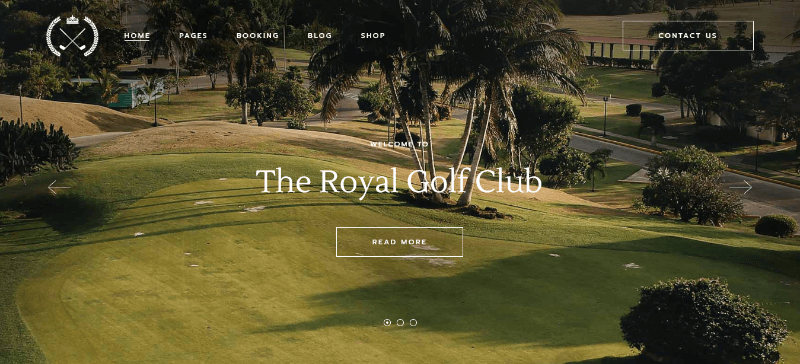
FairwayGreen is designed for golf club websites and comes with a large collection of layouts and inner pages. Its feature list includes Elementor compatibility, a user dashboard, one-click demo import, responsive and retina-ready layouts, WooCommerce compatibility, Slider Revolution and the Booked appointment-booking plugin. The listing also mentions Booked Calendar and Booked Appointments shortcodes.
The appointment feature is the key reason to consider FairwayGreen. It can provide a useful foundation for lesson enquiries, coaching appointments or other bookable club services. WooCommerce compatibility gives you another route for selling golf products or merchandise. Its range of layouts can also help a club separate course information, facilities, news, staff and contact details into focused pages.
Best for: Golf clubs that need a polished club presentation and appointment-style booking for coaching or services.
Buyer note: The marketplace lists 26 June 2025 as its last update. Before buying, verify the current status of the bundled Booked plugin, the support period, and compatibility with the WordPress and WooCommerce versions on your server. Appointment booking should not automatically be treated as a full golf tee-sheet solution.
4. Brentwood – Golf Course WordPress Theme

Brentwood is a golf course and country-club theme from ProgressionStudios. It includes WPBakery Page Builder, Slider Revolution and a one-click demo importer. Those tools are useful when you want to build a visual homepage around course photography, clubhouse facilities, membership benefits, events and calls to action. Its listing also shows WooCommerce compatibility, including WooCommerce 10.x, and a recent update dated 14 August 2026.
Brentwood is worth considering when the website’s primary job is to sell the experience of the venue: show the course, explain what makes the club distinctive, highlight dining or practice facilities and encourage visitors to enquire. The included page builder and slider can help a designer create a branded layout without starting with a blank canvas.
Best for: Golf courses and country clubs that prioritise a visual presentation and want a familiar WPBakery workflow.
Buyer note: Confirm the included versions and licence terms for premium plugins before relying on them for updates. Check whether the demo images are licensed for your use, and remember that a slider-heavy homepage still needs image optimisation and a clear booking or enquiry button.
5. Putter – Golf Course & Playing Ground WordPress Theme
Putter is a purpose-built golf course and playing-ground design from ThemeREX. Its feature list highlights three premade homepages, golf event management, golf court booking, a premade WooCommerce store and Elementor support. It also lists Events Calendar, Contact Form 7 and additional ThemeREX tools, with flexible header and footer editing.
Putter is a good candidate for a golf business that wants course pages, event announcements and a shop to sit within one consistent design. The WooCommerce store can help present golf clothing, balls, equipment, branded merchandise or gift products. Elementor support gives site owners control over page content and common layout areas.
Best for: Golf courses and clubs that want a more complete golf-oriented design with event and booking features visible in the product description.
Buyer note: The listing reports a 15 October 2026 update, but its compatibility field lists WooCommerce 8.x and earlier rather than clearly confirming WooCommerce 10. Ask the author for a current compatibility statement, then test booking, event registration and checkout on a staging site before going live.
6. Uplands – Golf Course WordPress Theme

Uplands is built around golf courses, clubhouses and golf professionals. It stands out because its listing advertises built-in booking and scheduling, a course guide, WooCommerce support, conversion forms, a drag-and-drop page builder and responsive layouts. It also lists compatibility with Elementor and The Events Calendar.
For a course operator, the course-guide feature is particularly relevant: visitors need more than a generic welcome page. They want to understand the course, facilities and services before they visit. Uplands can provide a structured starting point for those details, while booking and scheduling features may simplify enquiries for golf professionals or other services.
Best for: Golf courses, clubhouses and golf pros that want course information and scheduling features in a golf-specific design.
Buyer note: The marketplace lists 22 May 2026 as its last update and shows WooCommerce compatibility through 9.x in the compatibility field. Confirm whether the current release supports your WooCommerce version and whether the included booking tool handles tee-time rules, player counts, payments and cancellations—not merely appointment slots.
7. Hotel Leisure – Hotel, Resort & Leisure WordPress Theme
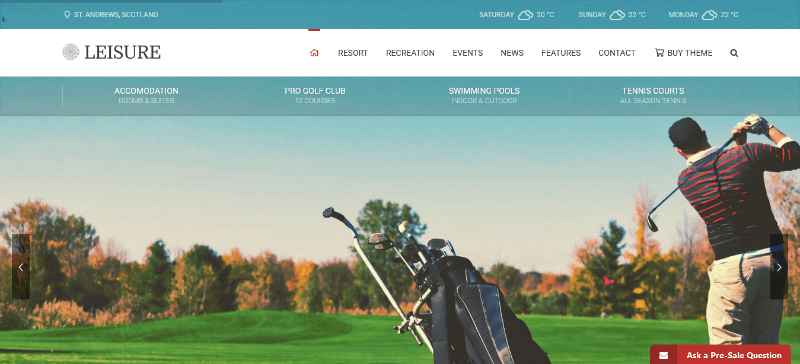
Hotel Leisure is not a golf-only theme, but its product description specifically identifies golf clubs, sports centres, resorts, hotels and other leisure businesses as suitable use cases. It is designed for image-led websites and includes WPBakery, Slider Revolution, form integration, customisation options, multiple page layouts and WooCommerce compatibility. The marketplace lists WooCommerce 10.x and a last update of 15 June 2026.
This type of design makes sense when golf is one part of a wider destination. A golf resort may need to promote accommodation, dining, spa facilities, weddings, packages and the course itself. Hotel Leisure’s broader hospitality focus can help bring those services together in a consistent visual experience.
Best for: Golf resorts, hotel-and-golf destinations, leisure clubs and venues that sell more than tee times.
Buyer note: Do not choose it solely because the listing mentions golf. Check that the demo structure suits your course, membership and booking content. A hotel room booking process and a golf tee sheet are different business workflows; you may need separate systems for each.
8. Big Slam – Sports Club WordPress Theme

Big Slam is a broader sports-club theme rather than a golf-specific design. Its demos focus on sports such as soccer and basketball, but the listing says it supports the SportsPress plugin, which covers several sports including golf. The theme also includes a drag-and-drop page builder, multiple blog, portfolio and gallery layouts, WooCommerce support and responsive design. Its marketplace details list WooCommerce 10.x and a 25 October 2026 update.
That makes Big Slam an option for a sports organisation that runs several activities or wants structured team, competition and results content. For a golf club, SportsPress may provide a starting point for sports data, while the theme handles the wider site presentation. However, you should plan to customise the terminology, page structure and visuals so that the finished website feels like a golf organisation rather than a basketball or soccer club.
Best for: Multi-sport organisations, golf associations or tournament communities that need a broader sports-content framework.
Buyer note: Golf-specific features are not the theme’s main selling point. Confirm exactly which SportsPress modules and golf workflows you intend to use, and build a realistic sample tournament page before committing.
9. Millside – Golf and Sport WordPress Theme
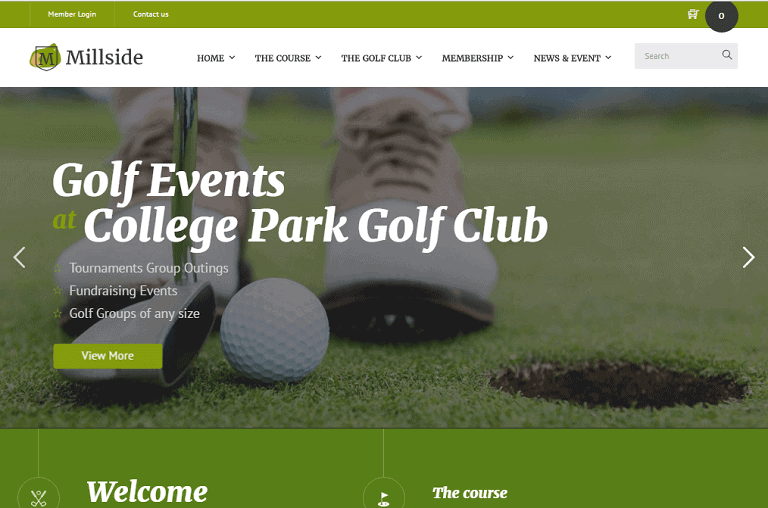
Millside is included because it is explicitly positioned as a golf-and-sport WordPress theme. Historical product information refers to event-calendar features, WooCommerce, Visual Composer and Slider Revolution. Its green-and-white visual direction may still appeal to buyers looking for a traditional golf-club presentation.
However, this is the entry on the list that needs the strongest caution. The available marketplace information shows a last update of 12 January 2018. That is a serious maintenance warning for a new production website in 2026, especially when current WordPress, PHP and WooCommerce releases have moved on substantially.
Best for: Reviewing an older golf-theme design concept or maintaining an existing legacy installation after compatibility has been independently verified.
Buyer note: We would not recommend purchasing Millside for a new live golf-club website unless the author can provide current support, a recent tested release and clear compatibility with your WordPress, PHP and WooCommerce stack. A visually appealing demo is not a substitute for a maintained product.
10. Illdy – Free Multipurpose WordPress Theme

Illdy is the free option in this collection. It is a responsive multipurpose WordPress theme built around the Customizer, with features such as a custom header, custom logo, custom menu, blog, portfolio, featured images, footer widgets and translation readiness. The WordPress.org directory lists version 2.4.0, an update on 2 October 2026 and more than 4,000 active installations.
Illdy is not a ready-made golf website template. Instead, it can be a starting point for a small golf coach, personal golf blog, local golf community or budget-conscious club that is comfortable creating its own course, membership, event and contact pages. You can review the official Illdy theme directory listing before installing it.
Best for: Beginners, personal golf blogs and small organisations that want a free design base and can add the business features they need.
Buyer note: Do not expect a built-in tee-time booking engine, golf-specific course layouts or a finished membership portal. Add appropriate plugins and test accessibility, shop templates and page-builder compatibility before using Illdy for a commercial club website. You can also browse more free WordPress themes if you want to compare other starting points.
Which WordPress golf theme should you choose?
There is no single WordPress theme that is right for every golf business. Match the theme to the main job your website must perform:
- Golf course or private club: Start with a golf-specific design such as Grulf, Brentwood, Uplands, FairwayGreen, N7 or Putter. Give priority to course pages, membership details, directions, contact information and a booking workflow.
- Golf coach or academy: Look closely at N7, FairwayGreen and Uplands. You need instructor profiles, lesson descriptions, appointment enquiries, schedules and clear calls to action.
- Golf tournament or sports association: N7 and Putter include event-oriented features. Big Slam may also suit a broader sports organisation using SportsPress, but it needs more golf-specific customisation.
- Golf resort or hospitality venue: Hotel Leisure may be a better structural fit if accommodation, dining and leisure services are as important as the course.
- Golf equipment or merchandise shop: Check WooCommerce compatibility, product-page layouts, payment gateways, shipping and stock management first. Grulf, Brentwood, Hotel Leisure and Big Slam list modern WooCommerce compatibility; verify the exact version for every candidate.
- Free golf website starter: Illdy can work when you are prepared to build the golf-specific pages and add the required booking, events and membership tools yourself.
The features a serious golf-club website should have
1. Tee-time booking that matches your course rules
A booking button is useful only when the system behind it reflects how your course works. Before choosing a theme, write down the booking rules: tee-time intervals, number of players per slot, 9-hole and 18-hole options, member and visitor rates, golf-cart rentals, deposits, payment options, cancellation windows and confirmation emails. Ask whether the theme’s advertised booking feature is a real booking engine, an appointment plugin or simply a styled contact form.
For appointment or bookable-product workflows, review the official WooCommerce Bookings availability documentation. A golf course may still require a specialist tee-sheet platform or custom integration. Test time zones, capacity limits, payment failures, rescheduling and refunds before accepting live bookings.
2. Membership information and member services
Make membership straightforward to understand. Explain the membership types, joining process, fees or enquiry route, guest rules, practice facilities, included benefits and renewal details. If existing members need private content, account access or online renewals, confirm which membership plugin or external club-management system will provide those functions. Do not assume a theme’s user dashboard is a complete membership-management platform.
3. Events, tournaments and golf lessons
Give visitors a clear way to discover competitions, social events, junior programmes, coaching sessions and corporate days. Each event page should explain the date, venue, eligibility, entry requirements, price, registration deadline and contact information. If you publish results or recurring fixtures, check that the event or sports plugin can maintain structured information without forcing you to edit every page manually.
4. Course guides, facilities and location details
Course pages should help a first-time visitor feel prepared. Include course photographs, hole-by-hole information where appropriate, course length and par details, practice areas, clubhouse facilities, dress code, accessibility information, parking, directions and contact details. If you publish course ratings or slope information, verify the figures with the course operator and keep them updated.
5. A useful pro shop and WooCommerce catalogue
If you sell balls, gloves, clubs, apparel, gift vouchers or branded merchandise, make sure the theme’s WooCommerce layouts are clear on mobile. Test category filters, product images, stock status, variation selection, cart, checkout, shipping, taxes and transactional emails. For products that need personalisation—such as branded apparel or gift messages—consider whether custom fields are required. This WooCommerce custom product fields guide explains the kind of product-page options that may be useful for a shop.
Build the golf website around a simple visitor journey
A good homepage makes the next step obvious. A first-time visitor may want to inspect the course, compare green fees, ask about membership or book a round. A regular member may be looking for the event calendar, course updates or a member login. The visual design should support these actions rather than bury them below a decorative slideshow.
For many clubs, a practical page structure looks like this:
- Home: course image, short value proposition, location and primary booking or enquiry button.
- The course: course overview, holes, facilities, gallery and visitor information.
- Green fees and memberships: clear prices or an enquiry route, membership benefits and visitor policies.
- Book a tee time: available slots, player options, prices, payment and cancellation policy.
- Golf academy: coach profiles, lesson types, schedules and booking details.
- Events and competitions: upcoming dates, registration and results.
- Pro shop: product categories, shipping and returns information.
- Contact and directions: phone, email, address, map, opening times and parking information.
Speed, accessibility and SEO: checks before you buy
Even a visually impressive golf WordPress design can become frustrating if it loads slowly, shifts around while images appear or makes booking forms difficult to use. Large course photographs and background videos are common reasons for a heavy homepage, so inspect the demo on a phone as well as a desktop.
Use Google’s current Core Web Vitals guidance as a practical performance target: a good user experience aims for an LCP of 2.5 seconds or less, INP of 200 milliseconds or less, and CLS of 0.1 or less, measured at the 75th percentile of page loads. These are user-experience thresholds, not a promise that choosing a particular theme will improve rankings. Test your own configured website with real images, plugins, hosting and booking forms using Google’s Core Web Vitals documentation.
Before purchasing, check the following:
- Mobile usability: navigation, menus, buttons, calendars, forms and checkout should be easy to use with a thumb.
- Image handling: use appropriately sized WebP or AVIF images where supported, compress hero photography and avoid loading several huge sliders above the fold.
- Accessibility: check text contrast, keyboard navigation, visible focus, form labels, descriptive link text and meaningful image alt text.
- Local SEO: publish accurate club name, address, phone, opening hours, directions and service-area information. Create useful pages for course, green fees, membership, lessons and events rather than repeating the same keywords on every page.
- Content quality: write specific, helpful details about your own course and club. Google’s guidance recommends people-first content that demonstrates real expertise and gives visitors enough information to complete their task.
- Software compatibility: WordPress currently recommends PHP 8.3 or greater, MariaDB 10.11 or greater or MySQL 8.0 or greater, and HTTPS. Confirm that your host and theme work together on a supported stack; see the official WordPress server requirements.
For the editorial side of SEO, prioritise useful, original course information, clear headings, descriptive image text and accurate contact details. Read Google’s people-first content guidance before publishing generic copy that could describe any golf club.
Commercial buyer checklist: what to verify on the live demo
Do not purchase a theme based on the homepage screenshot alone. Open its live demo and complete these checks:
- Inspect every key page: homepage, course, membership, events, contact, blog and shop.
- Try the mobile menu: check the navigation, hero buttons, text size, tables and footer on a small screen.
- Test the booking flow: select a date and time, choose player numbers, submit details, pay if supported, and test confirmation and cancellation messages.
- Check plugin dependencies: identify which features need Elementor, WPBakery, Slider Revolution, Booked, Events Calendar, WooCommerce or a separate membership plugin.
- Read the update history: check the last update, supported WordPress and WooCommerce releases, changelog and support forum.
- Check licence details: confirm whether bundled premium plugins receive direct updates, whether a separate licence is needed and what happens after the included support period.
- Check demo media: confirm whether images, videos, fonts and other assets are included or only shown in the preview.
- Test with your host: use a staging site with your intended PHP, database and plugin versions before moving to production.
- Plan customisation safely: use documented settings or a child theme for code changes. This WordPress child theme guide explains why custom changes should be separated from the parent theme.
- Plan maintenance: keep WordPress, themes and plugins updated, back up the site and periodically review its security. You can use the free WordPress security audit tool as one part of a wider review, and read the WordPress security plugins comparison for additional protection options.
When you are ready to install your choice, follow this WordPress theme installation guide. If you are replacing an existing design, review the practical considerations in this article about changing a WordPress theme before switching the live site.
Frequently asked questions about golf WordPress themes
What is the best WordPress theme for a golf club?
The right choice depends on the club’s main requirements. Golf-specific designs such as Grulf, N7, FairwayGreen, Brentwood, Putter and Uplands provide a more relevant starting point than a generic multipurpose theme. Compare their current compatibility, booking functions, event tools, shop support and update history before deciding.
Which golf WordPress theme includes tee-time booking?
N7, Putter and Uplands advertise golf booking features, while FairwayGreen includes the Booked appointment plugin and Uplands lists booking and scheduling. However, a golf tee sheet has specific rules that a general appointment calendar may not cover. Confirm player capacity, tee-time intervals, 9- and 18-hole options, payments, member pricing and cancellations with the vendor or booking-system provider.
Can I build a golf club website with a free golf WordPress theme?
Yes. A free multipurpose theme such as Illdy can provide the visual foundation, but it is not a ready-made golf-club solution. You may need separate plugins for bookings, membership, tournaments, forms and eCommerce. Compare the total cost and maintenance effort—not just the theme price. The free WordPress themes directory at aThemeArt is another place to explore general-purpose starting points.
Do golf WordPress themes include a booking system?
Some include or bundle booking-related plugins, while others only provide page layouts or forms. Read the feature list carefully. A contact form sends an enquiry; an appointment plugin schedules a service; a tee-sheet system manages course-specific time slots and availability. They are not interchangeable.
Can I sell golf equipment and memberships with WooCommerce?
WooCommerce can support an online shop for golf equipment, clothing, accessories and other products. Membership payments may need a suitable membership or subscription extension, depending on the pricing and renewal rules. Verify that the theme’s shop templates work with your current WooCommerce version and test the complete cart and checkout flow.
Does a premium golf WordPress theme improve Google rankings?
No theme can guarantee higher rankings. A well-built theme can make it easier to publish clear pages and deliver a usable experience, but search visibility also depends on content quality, site performance, technical SEO, local relevance, reputation and competition. Choose a theme that supports a useful website rather than buying one for an SEO claim.
Should I choose Elementor or WPBakery?
Choose the builder that your team already understands or is willing to maintain. Elementor offers visual drag-and-drop editing and is named in several themes in this list. WPBakery is bundled with options such as Grulf and Brentwood. Before buying, inspect the demo’s actual templates and check whether the builder licence and premium add-ons are included and kept updated.
Can I change my golf theme later without losing content?
Usually, standard WordPress posts, pages and media remain in the database when you switch themes. However, theme-specific shortcodes, custom post types, widgets and layout settings may not transfer cleanly. Keep business data in suitable plugins where possible, take a backup and test the change on staging first.
Final thoughts: choose a golf theme that supports the business
The best golf WordPress theme is not necessarily the one with the most dramatic slider or the largest number of demo pages. It is the one that helps your visitors find the course information they need, understand your membership or services, register for events, book the right experience and complete a purchase without friction.
For a dedicated golf-club design, compare Grulf, N7, FairwayGreen, Brentwood, Putter and Uplands first. Consider Hotel Leisure for a resort, Big Slam for a broader sports organisation and Illdy for a free build-it-yourself project. Treat Millside as a legacy option unless its author can demonstrate current compatibility and active support.
Before paying, confirm the software versions, plugin licences, update history and the exact booking workflow. Then build the website around useful course information, mobile-friendly navigation, clear calls to action and original content about your club. That is a much stronger foundation for a golf website than choosing a design based on appearance alone.
Editorial note: Product features and marketplace compatibility details were checked against the linked vendor listings on 1 November 2026. Theme prices, sales terms, plugin bundles and compatibility can change; confirm them on the live product page before purchase. U.S. golf participation statistics are attributed to the National Golf Foundation and should not be interpreted as global figures.