
Every designer has a favorite “what were they thinking?” website. Maybe it was a store with four hundred products crammed onto one screen. Maybe it was a homepage that played music, blinked in six colors, and still forgot to tell you what the company sells. These pages are funny, painful, and, most of all, useful. A bad website design shows you exactly which rules matter, because you can see what happens the moment they are broken.
In this guide, we walk through 25 bad website design examples that people love to point at. Some are genuinely hard to use. Some are ugly on purpose. A few are plain, old-fashioned, and still manage to work, which makes them the most interesting cases of all. After the list, we break down the most common mistakes, explain how bad websites hurt user experience and SEO, and give you a practical checklist to fix your own site.
If you want the opposite of this article, start with our roundup of good design inspiration sites. If you only came for the laughs, our list of useless websites is a fun companion read.
Introduction: Why Some Websites Have Bad Design
Nobody sets out to build a bad website. Yet the internet is full of them. Understanding why helps you avoid the same traps.
The site simply got old. Many bad looking websites were perfectly normal in 2005. The owner never redesigned them, so the layout, fonts, and image sizes now belong to another era. Browsers, phones, and visitor expectations moved on while the site stood still.
The site grew without a plan. A shop adds one banner, then another, then a pop-up, then a sidebar of offers. Nobody removes anything. After ten years, the page is a pile of decisions that never met each other.
The owner is not the visitor. The person who built the site knows where everything is. A first-time visitor does not. Navigation that feels obvious to the owner can feel like a maze to everyone else.
The design is intentional. Some sites are loud or plain on purpose. A few are art projects, a few are parodies, and a few simply decided that speed and text matter more than polish. These are not always failures, and they are some of the best teachers on this list.
There was no budget or no process. A site built by a relative, a template with no edits, or a patchwork of plugins can all end up looking and behaving poorly. If you are about to build a new site, a clean eCommerce website template or a well-made store theme gives you good structure from day one.
What Makes a Website Bad?
If you search for what makes a bad website, you will find a long list of opinions. In practice, most bad websites fail in one or more of six areas. We use these six areas throughout the examples below.
1. Outdated and visually cluttered designs
Tiny fonts, low-resolution images, clashing colors, and walls of text signal neglect. Visitors judge a page in a fraction of a second, and clutter tells them to leave.
2. Confusing navigation and poor layouts
If people cannot find your menu, your prices, or your contact page within a few seconds, the layout has failed. Hidden links, unclear labels, and too many menu items all create friction.
3. Poor mobile experience and responsiveness
Most web traffic now comes from phones. A page that needs pinching, zooming, and sideways scrolling is a website with bad UX, no matter how nice it looks on a desktop monitor.
4. Slow, intrusive, or distracting experiences
Auto-playing music, flashing banners, stacked pop-ups, and heavy images slow the page and annoy the visitor. Even a handsome page loses people when it loads like it is 1999.
5. Poor readability and accessibility
This is where bad contrast websites live. Light gray text on a white background, neon text on a bright image, and tiny tap targets exclude many visitors, including people with low vision. The Web Content Accessibility Guidelines (WCAG) set the standard here.
6. Ineffective calls to action and conversion design
Many bad ecommerce websites make the buy button hard to find, bury prices, or offer five competing actions on one screen. The visitor wants to act, but the design never tells them how.
A quick note before the list. “Bad” is not always the same as “broken.” Some of the sites below are cluttered and hard to scan. Others look plain or dated yet serve their audience well. We label each one honestly and point out what you can learn. Websites change often, so a site may look different by the time you visit.
25 Examples of Bad Websites
1. Arngren – The Classic Case of Product Overload

Arngren is a long-running Norwegian electronics retailer, and it is a favorite on almost every list of bad ecommerce websites. The homepage pushes a huge number of products, prices, and tiny photos into one dense page. There is almost no visual hierarchy, so nothing tells you where to look first.
What goes wrong: too many items, too little space, and no clear path from browsing to buying. A first-time shopper has to hunt for the product they came for.
Lesson: show fewer products per screen, group them with clear categories, and give every product room to breathe.
2. Ling’s Cars – Loud, Colorful, and Impossible to Ignore
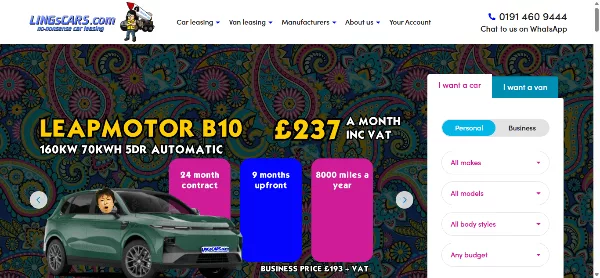
Ling’s Cars is a UK car leasing and sales site that is famous for its wild, colorful, almost chaotic look. Bright colors, big type, and busy pages break nearly every conventional rule of web design.
What goes wrong: readability suffers and the page overwhelms newcomers. Strong color clashes are a classic accessibility problem.
The twist: the personality is memorable and fits the brand. It works for one eccentric company, and it is a risky copy for everyone else.
Lesson: breaking the rules can build a brand, but only if the visitor can still complete their task.
3. Yale School of Art – When “Raw” Becomes the Design
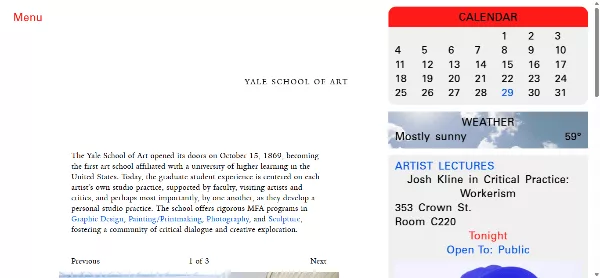
The Yale School of Art site is often cited as one of the most surprising examples of a prestigious institution with a stripped-down, almost unstyled look. Plain text, simple links, and very little polish make it feel more like a draft than a finished page.
What goes wrong: to many visitors it looks unfinished, and the plain presentation gives few cues about hierarchy or importance.
The twist: it is widely read as a deliberate, anti-polish statement from an art school. That choice is bold, and it is hard to pull off without a strong reason.
Lesson: minimal is not the same as careless. If you go plain, make sure headings, spacing, and links are still clear.
Check It Now ( Yale School of Art )
4. Penny Juice – A Time Capsule of Early Web Habits

Penny Juice is a regular entry on lists of old-school, hard-to-scan sites. It shows a dense, retro layout with many small elements competing for attention, the kind of page that was common in the early days of the web.
What goes wrong: small text, crowded blocks, and a layout that was never designed for phones. These are the habits that make outdated and visually cluttered designs so tiring.
Lesson: a layout that was fine twenty years ago can quietly turn into a liability. Audit your design every few years.
5. Nybrobildelar – A Fan’s Treasure Chest, a Designer’s Headache

The nybrobildelar site is built around a love of James Bond collectibles and memorabilia. The passion is obvious. The structure is a different story, with crowded pages and a layout that makes it hard to know where to start.
What goes wrong: great content hidden behind a busy interface. Fans may forgive it, but casual visitors will not.
Lesson: good content deserves good packaging. Clear sections and a simple menu would let the collection shine.
Check It Now ( nybrobildelar )
6. Best Electronics – The Small Shop Page That Does Too Much

Best Electronics is another store often grouped with cluttered electronics retailers. It reflects a common small-business pattern: every product, offer, and note is placed on the page because the owner does not want to hide anything.
What goes wrong: no focal point, small images, and a layout that makes comparison shopping difficult. This is a textbook case of ineffective calls to action and conversion design.
Lesson: hiding nothing often means finding nothing. Prioritize your best sellers and make the next step obvious.
Check It Now ( Best Electronics )
7. The World’s Worst Website Ever – Bad Design as a Teaching Tool
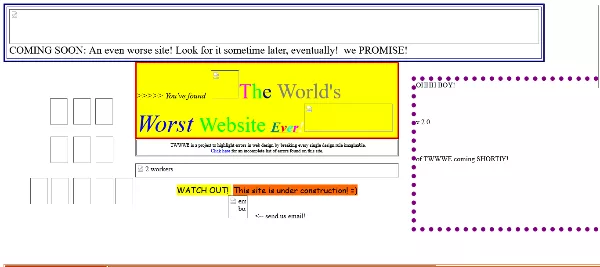
This one is bad on purpose. It is a parody that stacks nearly every classic web design mistake on one page, from clashing colors to distracting effects. Think of it as a reverse checklist.
What goes wrong: everything, by design. That is the point.
Lesson: reading a deliberately terrible page is a fast way to train your eye. After a few minutes, you will spot the same problems on real sites.
Check It Now ( The World’s Worst Website Ever )
8. Monkzone – A Hobby Site Frozen in Time

Monkzone belongs to the category of personal and hobby sites that have been online for a very long time and look like it. The layout, spacing, and typography reflect another era of the web.
What goes wrong: weak structure, dated styling, and a design that does not adapt well to modern screens.
Lesson: personal projects deserve a refresh too. Even a small update to spacing and font size can transform a page.
9. Chester Tourist – A Travel Page That Forgets the Traveler
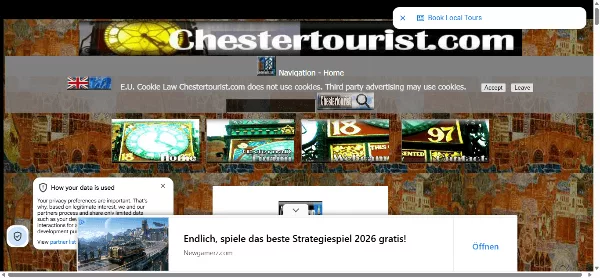
Tourism sites should feel inviting. Chester Tourist is regularly mentioned among examples where the layout is busy and the visual polish does not match the appeal of the destination.
What goes wrong: information is packed into narrow sections, and the page does little to inspire a visit. Tourist pages live or die on photography and clear itineraries.
Lesson: lead with great images and one clear action, such as “Plan your visit.” Let the details follow.
Check It Now ( Chester Tourist )
10. Patimex – When the Page Hides the Product
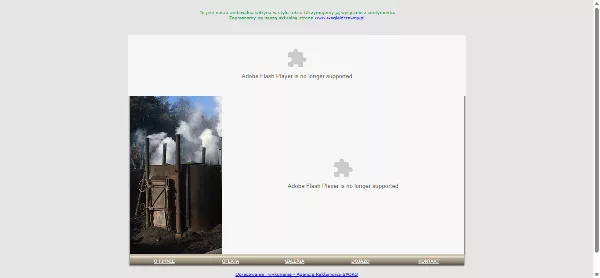
Patimex appears on lists of unpolished business sites. The page presents a lot of information with limited structure, which makes the main offer harder to understand.
What goes wrong: unclear priorities and a weak first impression. Within five seconds, a visitor should know who you are and what you do.
Lesson: write one clear headline that states your value, and build the page around it.
11. The Big Ugly Website – A Deliberate Masterclass in Bad Design
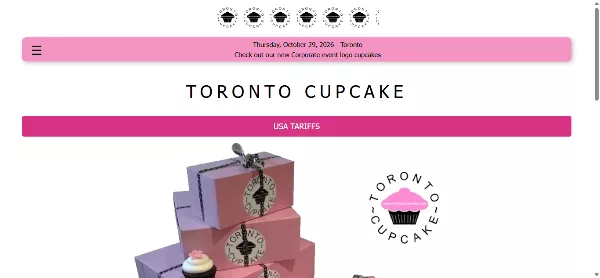
Some sites become famous for how bad they look. The Big Ugly Website leans all the way into that reputation. It is a chaotic collection of links, loud text, and zero visual hierarchy — built specifically to show what an ugly website looks like.
What goes wrong: overwhelming clutter, competing elements, poor readability, and a complete lack of structure. Everything fights for attention at once.
Lesson: When a page has no clear hierarchy or breathing room, even interesting content becomes hard to use. Ugly websites teach us why clean design and focus matter.
Check It Now ( The Big Ugly Website )
12. The Room – So Bad It’s Good
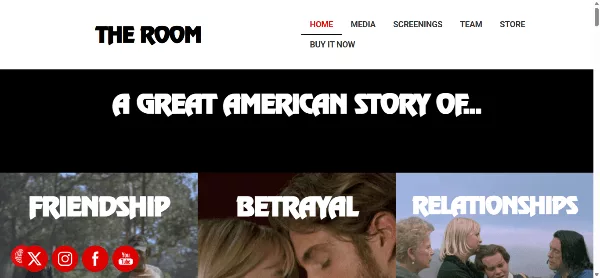
The Room is famous as a cult film, and its website leans into that identity. The look is quirky, unpolished, and full of the same awkward charm that fans love about the movie.
What goes wrong: by normal standards, the design is rough around the edges.
The twist: it fits the brand perfectly. When your audience loves the “so bad it’s good” spirit, the website can be part of the joke.
Lesson: design should match the audience. Just be sure the joke does not block the visitor’s goal.
13. Craigslist – Ugly, Plain, and Still Hugely Popular
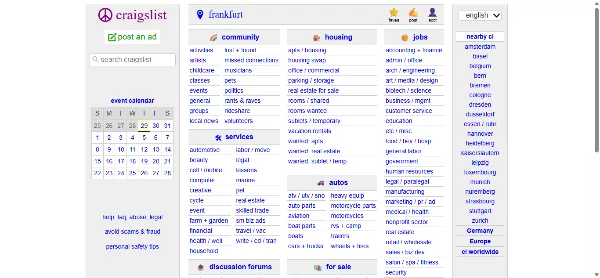
Craigslist is the best-known example of a popular website with bad design. It uses plain text, simple links, and almost no decoration. Designers have criticized it for years, yet people keep using it every day.
What goes wrong: it looks dated, and the visual hierarchy is minimal.
Why it still works: it is fast, predictable, and built around one job: finding and posting listings. Users know exactly what to do.
Lesson: utility can beat beauty, but only when the tool is genuinely useful and the structure is consistent.
14. Berkshire Hathaway – A Giant Company With a Minimal Homepage
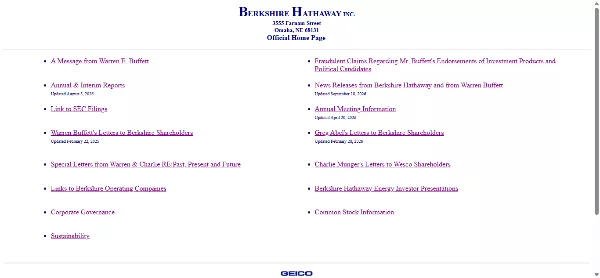
Berkshire Hathaway is one of the largest companies in the world, and its website looks like a simple document. The page relies on basic text, a handful of links, and very little visual styling.
What goes wrong: few visual cues and a look that feels frozen in an earlier era.
Why it still works: its audience, mainly investors, comes for shareholder letters and reports, not for graphics. The site delivers that content quickly.
Lesson: know your audience. Still, small improvements in readability and mobile layout cost little and help everyone.
Check It Now ( Berkshire Hathaway )
15. Hacker News – Fast, Orange, and Very Plain
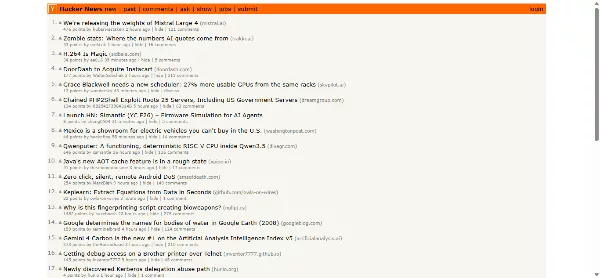
Hacker News is a community news site known for its orange header and text-first layout. It loads quickly and stays focused on conversation.
What goes wrong: small type and small tap targets can feel awkward on a phone, and the plain look gives little guidance to newcomers.
Why it still works: its users value speed and signal over decoration.
Lesson: performance is a design feature. But even a loyal audience benefits from larger touch targets and better spacing.
16. PNWX – A Specialist Site With a Specialist Look
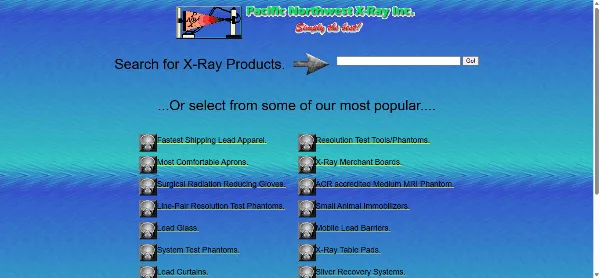
PNWX is a niche information site, and its look reflects an old-school, content-first approach. Dense data, plain links, and limited styling are typical of sites built by enthusiasts rather than design teams.
What goes wrong: it is hard to scan, and little guides a newcomer’s eye.
Lesson: even data-heavy pages need hierarchy. Headings, spacing, and grouping make dense information readable.
17. Haunted Happenings – Spooky Content, Cluttered Layout

Haunted Happenings is a directory-style site about haunted attractions and events. Directories tend to collect lots of listings, and without strong organization, the page becomes a crowd of links and images.
What goes wrong: too many options at once, and a layout that does not help visitors narrow things down.
Lesson: directories need filters, search, and clear categories. Without them, volume becomes noise.
Check It Now ( Haunted Happenings )
18. Liberty Games – A Hobby Shop That Needs Breathing Room
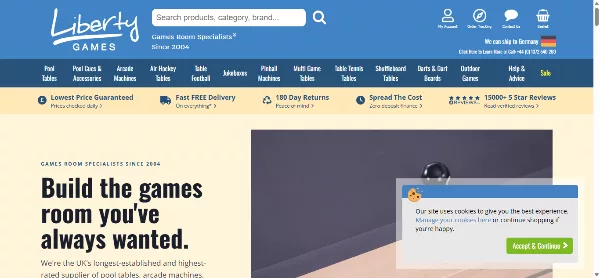
Liberty Games is a UK games retailer. Hobby shops often carry huge catalogs, and that is where design pressure begins. When every product competes for space, shoppers lose the thread.
What goes wrong: a dense layout where promotions and categories fight for attention.
Lesson: large catalogs need strong category pages, clean product cards, and a predictable checkout path. A modern template handles this kind of structure out of the box.
Check It Now ( Liberty Games )
19. Suzanne Collins Books – A Famous Author, a Modest Website
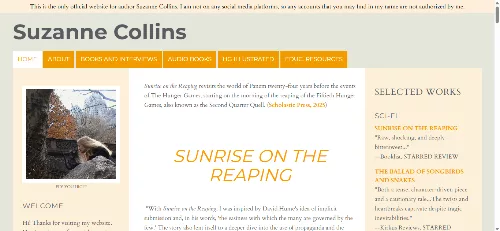
The author of one of the biggest young adult series of the last twenty years has a site that many visitors describe as basic. For a brand with such a huge audience, the page looks modest.
What goes wrong: it misses a chance to build excitement, share news, and guide fans to books, events, and newsletters.
Lesson: famous brands still need a clear homepage purpose. An author site should highlight the latest book and capture email subscribers.
Check It Now ( Suzanne Collins Books )
20. Paul Graham – Plain Text by Choice

Paul Graham, co-founder of Y Combinator, publishes essays on a site with almost no styling. It is plain text, simple links, and a short list of titles. It looks like it was built decades ago, because in many ways it was.
What goes wrong: the plain typography, fixed layout, and lack of polish can feel dated, especially on mobile.
Why it still works: the writing is the product, and the page never gets in its way. Readers come for ideas, not visuals.
Lesson: good content can carry a very simple design. If you publish long articles, read about CSS frameworks that give you a clean reading layout without the clutter.
21. Gates and Fences – A Product Catalog Stuck in the Past

Gates and Fences sells exactly what its name says. The site is often listed among dated small-business pages, with old-fashioned styling and a catalog layout that has not kept up with expectations.
What goes wrong: product photos are small, structure is limited, and the page does little to build trust.
Lesson: for physical products with a high price tag, large photos, clear specs, and visible contact options matter enormously.
Check It Now ( Gates and Fences )
22. Even Balance – Technical Product, Technical Look
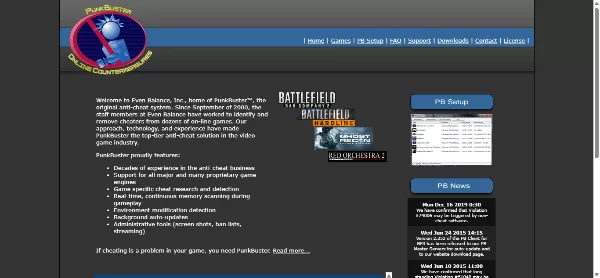
Even Balance is known for anti-cheat software used in online games. Its site follows a functional, utilitarian look that prioritizes information over presentation.
What goes wrong: the visual style feels dated, and the page offers little polish or storytelling.
Lesson: technical products still benefit from clear value statements, simple navigation, and visible download or support links.
23. Blinkee – Fun Products, Busy Presentation
Blinkee sells light-up party favors, glow sticks, and flashing accessories. The products are playful and energetic, but the website has often been cited for feeling overcrowded and visually noisy.
What goes wrong: too many competing elements, tight spacing, mixed visual styles, and limited breathing room for visitors trying to browse.
Lesson: Even fun, colorful products benefit from clearer structure and more space. A busy layout can make it harder for customers to focus and buy.
24. Drudge Report – A Wall of Headlines

The Drudge Report is a long-running news aggregator built around a dense page of headline links in a simple layout. It is one of the best-known examples of a popular site that ignores modern design trends.
What goes wrong: the page is hard to scan quickly, strong colors compete for attention, and it can feel overwhelming.
Why it still works: regular readers want a fast, text-first view of many stories at once.
Lesson: density is not always a flaw, but it requires a loyal audience and a very clear purpose.
Check It Now ( Drudge Report )
25. Vortex – A Name That Deserves a Better Front Door
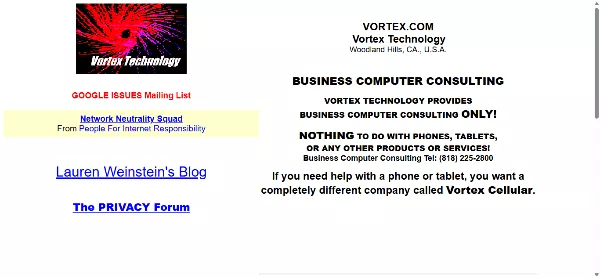
Vortex is frequently mentioned in collections of unusual or dated sites. Its look and structure show how a homepage can drift away from current expectations over time.
What goes wrong: unclear priorities, dated styling, and a layout that gives visitors few cues about where to go next.
Lesson: a short, regular redesign cycle prevents the slow decay that creates bad looking websites. When you rebuild, tidy the code too. A quick pass through an HTML beautify tool and a CSS formatter makes old markup far easier to clean up.
The Most Common Bad Website Design Mistakes
After looking at 25 examples, patterns appear. These are the mistakes that show up again and again on badly designed websites.
Too much on one screen
Arngren, Drudge Report, and several directory sites show what happens when everything is a priority. If everything is loud, nothing is clear. Use whitespace, size, and color to create a clear first, second, and third thing to look at.
Weak visual hierarchy
Visitors scan in an F-shaped or Z-shaped pattern. A page without strong headings, sensible spacing, and clear grouping forces them to read everything. They usually choose to leave instead.
Confusing navigation
Menus with too many items, vague labels like “Stuff,” and hidden links drive people away. Keep the main menu short, and put the most important pages first. The 10 usability heuristics from Nielsen Norman Group are a great reference for this.
Low contrast and tiny text
Pale gray on white is stylish, and unreadable for many people. Check your colors with the WebAIM contrast checker and aim for at least 4.5:1 for normal text.
No mobile layout
If your page does not adapt to a phone, you are turning away more than half of your potential audience. Responsive layouts are not optional anymore.
Slow loading and heavy pages
Uncompressed images, too many scripts, and bloated plugins slow everything down. Google measures this through Core Web Vitals, and visitors feel it long before any tool reports it.
Pop-ups, autoplay, and distractions
Music that starts without permission, full-screen overlays, and stacked banners interrupt people at the worst moment. Use them sparingly, and always make them easy to close.
Weak calls to action
If a visitor cannot tell what to do next, they will do nothing. One primary button per screen, with clear text like “Get a quote” or “Shop now,” beats five vague links.
Stock-photo sameness and low-quality images
Blurry, tiny, or irrelevant images make a business look careless. This is especially painful for bad photography websites, where the images are the product. A photographer’s portfolio with compressed, badly cropped photos undermines the whole brand.
Broken trust signals
Missing contact details, no privacy policy, no reviews, and no clear company information all make a site feel risky. This matters even more for bad review websites and online stores, where visitors must trust you with their money.
How Bad Website Design Affects User Experience and SEO
Design is not just about taste. It directly affects your traffic, your rankings, and your revenue.
The user experience cost
When a site is confusing, slow, or hard to read, people leave. They go back to the search results and click another link. They are less likely to return, recommend you, or buy from you. That is the real price of websites with bad UX.
The SEO cost
Google does not rate your site on beauty, but it does reward pages that people find useful and easy to use. Poor design can hurt in several ways:
- Weak engagement: when visitors leave quickly, it signals that the page did not satisfy their need.
- Poor Core Web Vitals: heavy images and scripts slow down loading, interactivity, and layout stability.
- Mobile problems: Google primarily uses the mobile version of a page for indexing, so a poor mobile layout can limit your visibility.
- Crawling trouble: messy navigation and hidden links make it harder for search engines to find your pages.
- Lost links and shares: nobody wants to recommend a site that looks untrustworthy.
The migration risk
Many owners redesign a site to fix these problems, then make things worse. A rushed move can break URLs, lose redirects, and wipe out years of rankings. This is the heart of bad website site migration SEO. Before you launch a new design, map every old URL to a new one with 301 redirects, keep your page titles and headings where possible, and follow Google’s guide to site moves with URL changes.
What if you find a harmful site?
Some readers search for how to report a bad website to Google. Bad design is not a reason to report a site. But if you find spam, phishing, or malware, you can use Google’s spam report form or the phishing report page. If you run a site and suspect hacking, act fast and follow a proper recovery plan.
How to Fix a Bad Website Design: How Could the Design Be Improved?
The good news: most bad design is fixable. You do not always need a full rebuild. Work through these steps in order.
Step 1: Know your goal
Decide the one main thing a visitor should do on each page: buy, call, subscribe, read, or book. Every design choice should support that goal.
Step 2: Cut the clutter
Remove anything that does not help the visitor. Delete extra banners, merge similar links, and cut sidebars that nobody uses. Then add whitespace so the remaining items can breathe.
Step 3: Fix your navigation
Keep the main menu to five to seven items. Use plain labels. Add a search box on larger sites, and make sure your logo links back to the homepage.
Step 4: Set a clear visual hierarchy
Use one large headline, short paragraphs, descriptive subheadings, and one clear primary button. Size, color, and position should tell visitors what matters most.
Step 5: Make it readable and accessible
Use body text of at least 16 pixels, strong contrast, and generous line spacing. Add alt text to images, and make sure buttons are large enough to tap. This also helps your SEO.
Step 6: Go mobile-first
Design for the smallest screen first, then expand. Test on a real phone, not just in a browser window.
Step 7: Speed it up
Compress images, remove unused plugins, use caching, and choose reliable hosting. If you are building a hosting business site, a ready-made hosting company website template can give you a fast, clean starting point. Clean code helps too, so run your markup through an HTML beautify tool and your styles through a CSS formatter.
Step 8: Strengthen your calls to action
Use action words, make buttons look like buttons, and place them where the visitor’s attention already is. One main action per screen is a good rule.
Step 9: Use proven structure
You do not have to invent a layout. A professional eCommerce website template or a polished store theme already solves product grids, filters, carts, and checkout. For dashboards and back-end tools, a clean admin panel UI keeps complex data organized. If you work in WordPress, following the WordPress theme standards keeps your design stable and compatible.
Step 10: Test with real people
Ask five people to complete a simple task on your site, such as “find the contact page” or “buy this product,” and watch silently. You will learn more in twenty minutes than from a month of guessing.
Bad Website Design Checklist
Use this checklist to audit your own site. Answer “yes” or “no” to each item. Every “no” is a chance to improve.
Layout and clarity
- Can a new visitor tell what you do within five seconds?
- Does each page have one clear main goal?
- Is there enough whitespace around text, images, and buttons?
- Does the page have a clear visual hierarchy with headings and subheadings?
Navigation
- Is the main menu limited to a handful of clear items?
- Can visitors reach any key page in three clicks or fewer?
- Does the logo link to the homepage?
- Is there a search option on larger sites?
Readability and accessibility
- Is body text at least 16 pixels?
- Does text meet recommended contrast ratios?
- Do all images have helpful alt text?
- Can the site be used with a keyboard?
Mobile and speed
- Does the layout adapt to phones and tablets without sideways scrolling?
- Are tap targets large enough?
- Do pages load quickly on a normal mobile connection?
- Are images compressed and scripts kept to a minimum?
Conversion and trust
- Is the main call to action obvious and clearly labeled?
- Are prices, contact details, and policies easy to find?
- Are pop-ups limited and easy to close?
- Do you show reviews, guarantees, or other trust signals?
SEO health
- Does every page have a unique title and meta description?
- Are URLs clean and consistent?
- Do you have 301 redirects in place after any redesign or migration?
- Are your Core Web Vitals in the “good” range?
Frequently Asked Questions
What is considered a bad website design?
A bad website design makes it hard for visitors to read, navigate, or complete a task. Common signs include clutter, tiny or low-contrast text, confusing menus, slow loading, and no mobile layout.
What makes a bad website?
A bad website usually fails in one or more of six areas: visual clutter, confusing navigation, poor mobile experience, slow or intrusive behavior, poor readability and accessibility, and weak calls to action.
Can a popular website have bad design?
Yes. Craigslist, Hacker News, and Drudge Report are all popular and plain. They succeed because they are fast and useful to a loyal audience. Most businesses cannot rely on that and should aim for clearer, friendlier design.
Is a plain website always a bad website?
No. A plain site can be excellent if it is fast, readable, and easy to use. A site becomes bad when plain turns into confusing, unreadable, or untrustworthy.
What are some examples of bad ecommerce websites?
Arngren, Best Electronics, and Liberty Games are often mentioned for crowded product pages. The common problem is too many items, small images, and no clear path to checkout.
Are there bad contrast websites?
Yes, many. Light gray text on white, neon text on busy images, and thin fonts on colored backgrounds are all common. Test your colors with a contrast checker and follow WCAG guidance.
Why do people say Zara’s website is so bad?
Fashion brands like Zara often choose a bold, minimal, image-first design. Some shoppers find the navigation, filtering, or layout less practical than a traditional store. Opinions differ, and the site is a good reminder that style should never replace clarity.
Is the Funimation website bad?
Funimation became a talking point when its service was folded into Crunchyroll. Moves between platforms often frustrate users when accounts, libraries, or apps change. It is a lesson in handling a migration with clear communication and careful planning.
What about the Bad Bunny website?
Artist and merch sites often face sudden spikes of traffic when new tours or products launch. Visitors then complain about slowness or crashes. Strong hosting, caching, and a queue system matter more than visual flourishes in these moments.
How does bad design affect SEO?
Bad design can lead to quick exits, poor Core Web Vitals, weak mobile usability, and crawling problems. Together, these make it harder to rank and convert.
How do I report a bad website to Google?
If a site is spam, phishing, or malware, you can use Google’s spam report and phishing report forms. Poor design alone is not a reason to report a site.
How could the design of a bad website be improved?
Start with a clear goal, remove clutter, simplify the menu, build a visual hierarchy, improve contrast and mobile layout, speed up the page, and test with real users. A good template can save time and money.
Should I redesign my site all at once?
Not always. A step-by-step refresh is safer for SEO. If you do a full redesign, plan your redirects and test on a staging site first.
Conclusion: What We Can Learn from Bad Websites
The 25 sites in this guide teach the same handful of lessons in different ways. Clutter hides your message. Confusing navigation sends people away. Small, faint text excludes readers. A slow page loses patience. A vague button loses sales.
At the same time, they show that design is always tied to purpose. Craigslist, Hacker News, and Paul Graham’s essays are plain, and they still work because they serve their audience quickly. Ling’s Cars and The Room are loud, and they work because the personality fits the brand. The danger is copying the look without understanding the reason behind it.
For your own site, the path is simple. Know your goal, remove what does not help, make the next step obvious, test on a phone, and watch real people use it. Start from solid foundations such as a quality startup website templates or a well-built landing page templates, and refine from there. For fresh ideas, browse our list of beautiful website examples, and keep the lessons of these bad examples in mind.
Every great website was once a draft. The difference is that great sites keep improving, and bad ones stay frozen. Pick one item from the checklist today and fix it.

