
A good Bootstrap WordPress eCommerce theme gives you two things at once: the predictable, mobile-first grid that millions of developers already know, and a real store engine (WooCommerce) that actually takes orders. That second half is where most “Bootstrap shop template” roundups fall short. They hand you pretty static markup and leave the cart, checkout, stock and payments for you to build.
This guide is different on purpose. Below you will find 15 Bootstrap-friendly WooCommerce themes with the details that matter before you spend money: price (where we could verify it on November 2, 2026), who each theme suits, what to test in the demo, and the warning signs we spotted. We also explain how a bootstrap woocommerce theme really works, how to pick between Bootstrap 3, 4 and 5, and where free basic Bootstrap WordPress themes make more sense than a premium bundle.
Short answer: If you want a working store with a Bootstrap-based codebase today, start with Prime Shopping Cart Pro (its public spec lists Bootstrap, Bootstrap Icons and Underscores in the stack). If you want a free start, test eMart or Envo Storefront. If you are an agency that wants a clean parent theme to extend, begin with a blank Bootstrap theme and a child theme, then compare it with the premium options below.
What You Will Learn in This Guide
- How a Bootstrap WooCommerce theme differs from a Bootstrap ecommerce template (and why the difference decides your budget)
- Which Bootstrap version to look for in 2026, and why Bootstrap 3 and 4 listings deserve extra scrutiny
- 15 themes compared with verified prices, update notes and “before you buy” warnings
- Free vs premium trade-offs, including blank starter themes for developers
- The WooCommerce compatibility checklist, with code you can paste into a child theme
Last verified: November 2, 2026. Prices, ratings and update dates change quickly on marketplaces, so treat the numbers here as a snapshot and confirm them on each listing before you buy.
Why Choose a Bootstrap eCommerce WordPress Theme?
Bootstrap is the most widely used CSS framework on the web by a wide margin. According to W3Techs CSS framework data (July 29, 2026), Bootstrap runs on 13.8% of all websites, which equals a 74.5% share among sites that use a known CSS framework. Tailwind, the framework most people talk about online, sits at 1.7% on the same measure. That reach matters for you because it means more developers who can maintain your store, more tutorials when something breaks, and far more plugin authors who test against Bootstrap-style markup.
For store owners, the practical benefits of a WordPress theme framework Bootstrap approach come down to six things:
- A proven responsive grid. Bootstrap’s 12-column grid and six breakpoints (from extra small up to extra extra large) mean product grids, filters and carts reflow predictably on phones, tablets and desktops. Mobile shoppers are where most of the traffic lands, so this is not a nice-to-have.
- Consistent components. Buttons, forms, modals, dropdowns, accordions and badges behave the same everywhere, which makes the cart drawer, the quick view popup and the checkout form feel like one product.
- Faster customization. If your developer already knows Bootstrap utilities, changing spacing, columns or visibility is a class change, not a custom CSS project.
- Easier hiring. “Bootstrap and WordPress theme” skills are common on freelance marketplaces, so you are rarely stuck with a niche framework nobody can support.
- Cross-browser stability. Bootstrap has years of browser testing behind it, which cuts the odd Safari or Android WebView bug that custom grids tend to ship with.
- Good documentation. The official Bootstrap grid documentation is clear enough that a store owner can read it and understand what their developer is doing.
The catch most roundups skip: templates are not stores
Search for “bootstrap ecommerce template” and you will mostly find static HTML packages. They look good in the demo, but a cart page in a static template is only a design. Nothing processes payments, tracks stock or emails receipts until someone builds that backend. We counted this in a recent competitor roundup: Colorlib’s list of 54 eCommerce templates includes 44 paid Bootstrap HTML templates, 6 paid WordPress themes, 2 free WordPress themes and 2 Astro templates. Only 8 of the 54 run on a real commerce engine.
A Bootstrap WordPress theme suits you if you…
- want a working store, not a mockup
- already use or plan to hire Bootstrap developers
- need a predictable grid for large catalogs
- plan to extend with a child theme
Look elsewhere if you…
- want a block-only, no-framework codebase
- need the smallest possible CSS footprint
- plan a fully headless storefront
- only need a landing page, not a shop
If you are still deciding between approaches, our guides on Bootstrap eCommerce templates and the Bootstrap shopping cart template cover the static HTML side in detail. This article stays focused on WordPress, where the cart actually works.
How to Choose the Right Theme
Picking a best Bootstrap WordPress theme is less about the demo and more about what sits under it. Use the five checks below in order. A theme that fails the first two checks rarely recovers on the rest.
1. Confirm the Bootstrap version
Not all Bootstrap is equal. The version a theme ships with affects security, speed and how long you can keep it. Here is the short version:
| Version | Key facts | Our advice |
|---|---|---|
| Bootstrap 3 | Released in 2013. Official support ended in 2019. Depends on jQuery. | Avoid for new stores. Accept only if you are maintaining an older site. |
| Bootstrap 4 | Flexbox grid, still needs jQuery. Official support ended on January 1, 2023. | Only buy if the vendor clearly plans a Bootstrap 5 migration. |
| Bootstrap 5 | Dropped jQuery as a dependency, added RTL support, utility API and (from 5.3) color modes. | The default choice for any new Bootstrap WordPress ecommerce theme. |
A simple way to verify: open the demo, view the page source, and search for “bootstrap”. The loaded file name, usually something like bootstrap.min.css, often includes a version comment at the top. If the vendor does not state the version anywhere, ask support before you buy.
2. Check that WooCommerce is first-class, not an afterthought
The theme should style the shop archive, product page, cart, checkout and My Account pages, not only the home page. Open the live demo, add a variable product to the cart, go through checkout and look for unstyled form fields or broken spacing. Our plain-English WooCommerce overview explains what each of those pages is responsible for if you are new to it.
3. Test speed on the real demo
Run the demo through PageSpeed Insights on mobile. Bootstrap itself is light (the full stylesheet is roughly 30 KB gzipped), but themes pile on sliders, icon fonts and builder scripts. Google’s PageSpeed Insights documentation explains how to evaluate loading speed, responsiveness and visual stability. Browse our list of the fastest WordPress themes to see what lean looks like.
4. Review the update and support record
Look for a visible changelog, a recent “last updated” date and compatibility notes for your WordPress and WooCommerce versions. A theme that has not been touched in two years is a risk, however good it looks. Our summary of WordPress theme standards lists what a well-maintained theme should meet.
5. Check licensing and total cost
Add up the real price: theme, any paid plugins it requires, support renewals and hosting. A cheap theme that needs $150 of add-ons is not cheap. Also check whether the license covers unlimited sites or one end product, a difference that matters to agencies and freelancers.
Starter themes: basic and blank Bootstrap options
If you are a developer, you may not want a finished design at all. A blank Bootstrap theme for WordPress gives you the framework and template structure with nothing to undo. Popular free starters include UnderStrap and WP Bootstrap Starter, both built to be extended through a child theme. These basic WordPress Bootstrap themes are ideal when you want to craft a bespoke WooCommerce layout. Read how to create a child theme in WordPress before you touch any parent theme files, so updates never overwrite your work.
15 Best Bootstrap eCommerce WordPress Themes
The themes below are all built for WooCommerce and use responsive, grid-based layouts that fit the Bootstrap way of working. We only confirmed a Bootstrap codebase where a vendor lists it publicly (each entry has a “Bootstrap check” line saying what we could and could not verify). Prices come from the live listings on November 2, 2026 where we could read them; everything else says “see listing” rather than guess.
| Theme | Best for | Price (Nov 2026) | Page builder |
|---|---|---|---|
| Prime Shopping Cart Pro | Fast launches, Bootstrap stack | $29 | Elementor |
| The7 Classic | Business site plus shop | $69 | Elementor, WPBakery |
| The8 Store Pro | Dark and light mode shops | $25 | Elementor |
| The9 Store Pro | Multi-category retail | $30 | Elementor |
| ToolsJet | Hardware and tools | See listing | See listing |
| Shopkeeper | Fashion, layout choice | See listing | See listing |
| Kingdom | Amazon affiliate stores | See listing | See listing |
| Merchandiser | General WooCommerce shops | See listing | See listing |
| The Hanger | Modern and classic fashion | See listing | See listing |
| Striz | Fashion stores | See listing | See listing |
| Envo Storefront | Free WooCommerce start | Free | Many (Elementor, Beaver Builder, Divi) |
| Pressmart | Elementor-built shops | See listing | Elementor |
| Kuteshop | Multipurpose, many demos | See listing | See listing |
| eMart | Free multipurpose start | Free (Pro available) | Elementor |
| Zbest | Blog plus shop combos | See listing | See listing |
1. Prime Shopping Cart Pro: Best Bootstrap WooCommerce Theme for Fast Store Launches
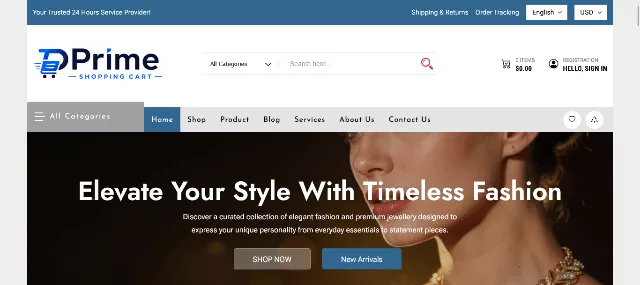
Prime is the one entry on this list where the vendor spells out a Bootstrap-based stack: the product page names Underscores, Bootstrap, Bootstrap Icons and jQuery as its foundations. That makes it the most direct answer to “which bootstrap woocommerce theme should I try first?” It is a lightweight WooCommerce theme built around a floating shopping cart, and it targets owners who want to launch quickly without wrestling with settings.
The bundle is generous. You get four bundled tools the vendor values at $59 in total: a theme options framework (Codestar), an advanced product search plugin, Ajax add to cart and variation swatches. On top of that sit 30+ custom widgets, five post formats (standard, image, gallery, video and audio) for lookbooks and news, and a choice between a compact mini cart and a fly-out cart. The conversion tools are the useful part: live search, wishlists, comparison, product video galleries, countdown timers for deals and a built-in currency converter for international shoppers.
Best for: fashion, electronics, furniture, jewelry, pet, tools and food stores, plus subscription and course shops. It suits small and medium catalogs where the goal is a clean, conversion-focused storefront rather than a huge multi-vendor build.
- Elementor compatible, with drag-and-drop layouts
- Developer-friendly: hooks and filters, child theme support and clear template hierarchy
- GPL licensed for unlimited websites, no footer branding restrictions
- Translation ready, documentation and video tutorials included
Before you buy: the listing shows a 5.00 average from five ratings. That is a small sample, so judge by the demo and docs rather than the stars. Priced at $29 at the time of checking, with free installation and demo setup for one domain on paid items per the vendor’s FAQ.
Bootstrap check: confirmed in the vendor’s public stack (Underscores, Bootstrap, Bootstrap Icons, jQuery). Confirm the exact Bootstrap version in the demo source if your project depends on it.
Check It Now (Prime Shopping Cart Pro)
2. The7 Classic: Best Multipurpose Theme for a Business Site Plus a Shop
The7 has been a ThemeForest heavyweight for 13 years, with 337,520 sales and a 4.75 rating across 9.3K reviews on the listing we checked. It is a multipurpose theme where the shop is one part of a larger marketing site, which makes it a strong pick if you sell products but also need services pages, a portfolio and a blog.
Here is the information that matters most before you buy: the ThemeForest listing is now titled The7 Classic. The author states it is the legacy marketplace release, and that new-generation development (The7 15, built on a block theme architecture) moved to a direct subscription model from July 22, 2026. Purchases made within the last 12 months can upgrade to The7 15 at no extra cost. The author also says The7 Classic still gets security and essential maintenance updates, but is no longer tested against new major versions of WordPress, PHP, Elementor, WPBakery and WooCommerce.
Best for: agencies and business owners who already know The7 and want to keep a stable stack, or anyone who values its large library of pre-made websites and long track record.
- Compatible with Elementor, WPBakery, WooCommerce 9.x and WPML according to the listing
- Regular License price listed at $69, with six months of support included
- Recent changelog entries show active security fixes
- One-click migration from The7 14 to The7 15 is available
Before you buy: decide whether you want the classic marketplace version or the new direct-subscription generation, because the long-term roadmap is with the latter. If you choose Classic, test major WordPress and WooCommerce updates on a staging site first, as the author recommends.
Bootstrap check: not listed in the marketplace specs. The theme ships with its own framework, so treat it as “Bootstrap-style” in layout behaviour and verify any Bootstrap class reuse in the demo source before you plan on it.
3. The8 Store Pro: Best Dark and Light Mode WooCommerce Theme

The8 Store Pro leans into a bold black design that makes product photography pop, and it includes a light mode if you prefer a brighter look. It targets stores selling watches, jewelry, boutique fashion, cosmetics, home decor, flowers and gifts, plus dropshipping and personal-brand shops.
Customization runs through Elementor with drag-and-drop layouts, along with controls for colors, typography, header and footer styles, layout, spacing and grid. A one-click demo import gets you to a working store quickly, and a WooCommerce LookBook module lets you build shoppable lookbooks to showcase collections. RTL support and WPML-ready translation files (.po included) make it practical for multilingual and right-to-left stores.
Best for: premium-feel boutiques and luxury categories where a dark canvas flatters the product.
- GPL licensed for unlimited sites
- PHP 7.4 or higher recommended, compatible with PHP 8 and above
- Bundled premium plugins and custom Elementor add-ons
- Full WooCommerce integration including variations, digital goods and inventory
Before you buy: $25 at the time of checking, with a 5.00 rating from five reviews. A reviewer on the listing praises the options panel and the bundled plugins, but test the dark layout with your own product photos, since white-background images can look boxy on black.
Bootstrap check: the public spec does not name Bootstrap. It is grid-based and responsive; look at the demo source if Bootstrap classes are a requirement.
4. The9 Store Pro: Best for Multi-Category Retail Stores

The9 Store Pro is a versatile storefront theme aimed at stores that sell across several categories, from electronics and gadgets to fashion, furniture, beauty products, tools and car parts. It is built for mobile commerce, with SEO-optimized code and integrations for WooCommerce cart, checkout and payment processing.
Developers get custom Elementor elements for building unique layouts, and the vendor highlights integrated product catalogs, customer accounts and inventory management. A reviewer on the listing says they imported the demo content and had the store ready in under ten minutes, which fits the “fast setup” promise, though your own timeline will depend on your catalog size.
Best for: general retailers and niche shops (butchers, florists, tech retailers, wedding dresses) that want one flexible template for different product types.
- WPML ready with .po and .mo translation files
- No footer copyright restrictions, GPL licensed for unlimited sites
- Includes a custom WooCommerce development toolkit
- Video guides and documentation available
Before you buy: priced at $30 with a 5.00 rating from five reviews at the time of checking. Check that the demo’s filters and product grids behave well with a catalog the size of yours.
Bootstrap check: Bootstrap is not named in the public spec. Treat as a responsive, grid-based theme and verify in the source if needed.
5. ToolsJet: Best Hardware and Tools Store WooCommerce Theme

ToolsJet is a WooCommerce theme from TemplateMonster designed for hardware, tools and equipment shops. Stores like these have a particular set of needs: large catalogs, spec-heavy product pages, brand and category filters, and buyers who compare similar items before ordering. A niche theme like this usually arrives with layouts that already suit those habits, so you spend less time reshaping a generic fashion template.
Best for: hardware stores, power tool retailers, building supply shops and equipment dealers.
- Niche layout built for tools and hardware catalogs
- WooCommerce-based, so cart, checkout and orders are handled by the plugin
- Check the demo for brand sliders, category menus and spec tables
Before you buy: TemplateMonster listings differ on license terms, update frequency and what is bundled (for example, which page builder). Confirm these on the product page and check what “Bootstrap” means for that package: some template-marketplace themes bundle Bootstrap, others only imitate its grid. If you sell tools, also read our guide to hardware WordPress themes for more options.
Bootstrap check: not verified for this listing. Check the demo source and documentation.
6. Shopkeeper: Best for Fashion Stores That Want Layout Choice

Shopkeeper is a long-running WooCommerce theme often picked for fashion and lifestyle stores. Third-party reviews describe light and dark color options, several product page layouts, unlimited headers, a portfolio and a full blog, which makes it a good fit for accessories, sports, furniture, bags and shoes as well as clothing.
The product page layouts are the real advantage. Different products need different pages: a single hero shot for one item, a gallery for another, a long-scroll story for a premium piece. Having several layouts lets you match the page to the product without custom code.
Best for: multi-category stores that want flexible product page layouts and a polished, editorial look.
- Light and dark style options
- Multiple product page layouts
- Blog and portfolio included, useful for content marketing
Before you buy: read the latest changelog and the comments section of the listing for compatibility notes with your WooCommerce version. Check which page builder and bundled plugins ship with the current release. For a broader list of paid and free shops, see our guide to the best free WooCommerce themes.
Bootstrap check: not verified on the marketplace listing. Verify in the demo source.
7. Kingdom: Best WooCommerce Theme for Amazon Affiliate Stores

Kingdom is built specifically for Amazon affiliate websites: shops where products are imported from Amazon and shoppers click through to buy there. The model is different from a standard store. You do not manage stock or checkout, so the theme concentrates on product presentation, comparison and the “buy on Amazon” click.
If this is your model, you need to look at how product import, price updates and affiliate links are handled, because that is where affiliate sites succeed or fail. Our guide to the Amazon affiliate plugin options explains the moving parts and what to compare.
Best for: affiliate marketers and review-style product catalogs.
- Designed around Amazon affiliate product listings
- Built on WooCommerce product structure
- Look for comparison tables, filters and clear affiliate buttons in the demo
Before you buy: check which import plugin the theme expects and whether that plugin is bundled or sold separately. Amazon’s affiliate program rules change, so confirm the theme author keeps the product-data features current. Avoid it if you plan to run a normal checkout store.
Bootstrap check: not verified. Check the demo source.
8. Merchandiser: Best for General-Purpose WooCommerce Shops

Merchandiser is a general eCommerce theme for WooCommerce. Themes in this category aim to be a safe all-rounder: a home page with featured products, a standard shop and product layout, and enough options to rebrand it for different niches.
The sensible way to assess a theme like this is to treat the demo as a test lab. Add products with variations, apply a coupon, change the quantity in the cart, check out as a guest and as a registered customer. Look for any step where the layout breaks or the form fields look unstyled. Those are the moments that decide whether the theme survives real traffic.
Best for: small and mid-size shops that want a conventional store layout.
- WooCommerce-focused layouts
- Check the demo for mega menu, product filters and quick view
- Confirm the update history and support window on the listing
Before you buy: check the “last update” date and compatibility versions. If a marketplace listing has not been updated in a long time, ask in the comments whether it works with your current WordPress and WooCommerce versions.
Bootstrap check: not verified. Inspect the demo’s loaded stylesheets.
9. The Hanger: Best for Modern and Classic Fashion Boutiques

The Hanger describes itself as a modern and classic WooCommerce theme, a pairing that suits boutiques wanting a refined, editorial feel without a heavy tech look. Fashion stores live and die by imagery, so check how the theme handles large product photography, hover effects and zoom.
If you sell clothing, accessories or footwear, compare it with our roundup of clothing store WordPress themes to see how a dedicated fashion layout stacks up against a general one. Look especially at size and color swatches on the product page, since variation selection is the part of a fashion store that most affects conversions.
Best for: boutique and premium fashion brands that want a timeless look.
- Modern and classic style direction
- Check for swatches, size guides and quick view in the demo
- Test the mobile product gallery for swipe and zoom behaviour
Before you buy: verify the version history on the listing and read recent buyer comments for support quality. Ask whether the theme supports the current WooCommerce Cart and Checkout blocks if you plan to use them.
Bootstrap check: not verified. Check the demo source.
10. Striz: Best Fashion eCommerce Theme for Image-Led Stores

Striz is a fashion eCommerce theme, so the design assumptions are tuned for clothing: tall product images, collection banners, lookbook-style homepages and bold typography. If your brand lives on photography, a purpose-built fashion layout saves a lot of tweaking compared with a general theme.
Pair the theme with a few conversion helpers. A WooCommerce side cart keeps shoppers browsing after they add an item, and a good product filter helps customers narrow a big catalog by size, color and price.
Best for: fashion labels, apparel resellers and accessory brands.
- Fashion-focused design and layouts
- Check the demo for lookbook pages, size charts and wishlist
- Test product galleries with your own tall and square images
Before you buy: look for the author’s changelog and a clear statement of the page builder used, so you know what to learn. Confirm what is bundled and what needs a separate license.
Bootstrap check: not verified. Check the demo’s code.
11. Envo Storefront: Best Free WooCommerce Theme From the WordPress Directory

Envo Storefront is a free, fast and clean responsive WooCommerce theme hosted in the official WordPress theme directory. It supports a long list of page builders, including Elementor, Beaver Builder, SiteOrigin, Thrive Architect, Divi, Brizy and Visual Composer, and it is SEO friendly, WPML ready and RTL ready.
The directory page gives you honest numbers. At the time of checking, version 1.2.3 was last updated on April 10, 2025, with more than 2,000 active installations and a 3.8 out of 5 rating (13 five-star reviews, one three-star and five one-star). That is a modest base, so test it carefully, but because the code is reviewed by the directory team and downloadable at no cost, the risk of trying it is small.
Best for: new store owners, testing an idea, and developers who want a free parent theme with page-builder flexibility.
- Free, with a ready-to-import demo
- Works with most popular page builders
- Minimum PHP version 5.6 listed (use a modern PHP on your server anyway)
- Translation ready, with many language packs available
Before you buy: nothing to buy, but the last update date is worth noting. Check that it works with your current WooCommerce version on a staging site. If you outgrow it, our overview of modern eCommerce WordPress themes shows paid upgrades.
Bootstrap check: the directory page does not name Bootstrap. It is a responsive free theme and a good basic option to pair with Bootstrap-style utilities if needed.
Check It Now (Envo Storefront)
12. Pressmart: Best Elementor-Ready WooCommerce Theme

Pressmart is positioned as a modern Elementor WooCommerce theme, so it is built for owners who want to design pages visually rather than edit templates. That makes it a natural pick if you or your team already live in Elementor and want store pages (shop, product, cart) that match the rest of the site.
Visual builders bring both speed and weight. Test the product page on mobile for load time and layout shift, and see if the theme’s Elementor widgets replace extra plugins or add to them. Our guide to the best WooCommerce Elementor themes compares what to expect from this style of theme.
Best for: teams that build in Elementor and want a visual workflow for WooCommerce pages.
- Elementor-centered design workflow
- Check for header and footer builders and product-grid widgets
- Test speed with Elementor enabled on the product template
Before you buy: confirm whether Elementor Pro is required for the full feature set and budget for it. Also check which bundled add-ons need separate licenses.
Bootstrap check: not verified. Check the demo for Bootstrap classes.
13. Kuteshop: Best Multipurpose WooCommerce Theme With Many Demos

Kuteshop is a multipurpose WooCommerce theme, a category known for shipping with many ready-made home page variations. That makes it appealing if you are not sure what the final design should look like, since you can browse, import one and adapt it.
The risk with theme packages that include many demos is bloat. Import only the demo you plan to use, remove unused plugins, and check how much CSS and JavaScript loads on a product page. A lean setup of a big theme often performs better than a full install of a small one.
Best for: agencies and owners who want lots of starting layouts, and shops with big catalogs that need mega menus and filters.
- Multiple homepage and layout options
- Check for mega menu, quick view and ajax filters in the demo
- Importing a single demo keeps the install cleaner
Before you buy: read recent comments, confirm the changelog and check which premium plugins are bundled versus sold separately.
Bootstrap check: not verified. Check the loaded stylesheets in the demo.
14. eMart: Best Free Multipurpose WooCommerce Theme From aThemeArt

eMart is a free, responsive multipurpose WooCommerce theme with Elementor support, bold layouts and smooth transitions. It is described as the “best friend of Elementor and WooCommerce,” is Gutenberg compatible, WPML ready (.po files included) and is GPL licensed for unlimited websites. A Pro version exists if you outgrow the free one, and a “Compare Free/Pro” link on the listing makes the differences easy to see.
The theme works for clothing, accessories, tools and electronics, with product pages that share details and descriptions clearly, contact forms, newsletter signups and social links. Adding a blog to share how-to content and your brand story is a quiet way to build trust and long-term customers.
Best for: first-time store owners and developers who want a free base before committing to a paid theme.
- Free, with a live demo
- Elementor and Gutenberg compatible
- Upgrade path to the Pro version
Before you buy: free to download. Read the free versus pro comparison so you know which features (for example advanced widgets) you would need to upgrade for.
Bootstrap check: not stated in the public spec. Verify in the demo if you need Bootstrap classes specifically.
15. Zbest: Best for Bloggers and Writers Who Also Sell Products

Zbest is a multi-concept WordPress theme that mixes a blog with a shop, aimed at writers and bloggers. That is a different shape from a pure store: the content leads and products support it. It suits authors selling books, creators selling prints or digital goods, and bloggers with merchandise.
If content is your engine, this type of theme can be smarter than a heavy store theme, because readers arrive through articles and the shop sits within the reading experience. Make sure the blog layout, reading width and related-post areas are as strong as the shop pages. Plan the product range around your content calendar, so each new article has a natural product to point to.
Best for: writers, bloggers and creators who sell a small range of products alongside their content.
- Blog and shop in one theme
- Check the demo for post layouts and product pages together
- Good for small, focused catalogs
Before you buy: this listing is on a smaller marketplace, so check the vendor’s update record, refund terms and support channels with extra care. Large catalogs are probably better served by a dedicated store theme.
Bootstrap check: not verified. Check the demo source.
Free vs. Premium eCommerce Themes
The honest answer to “should I pay?” is that free themes are fine for validating an idea, and premium themes are worth it once time becomes more expensive than the license. The table below shows where each approach tends to win, using the themes in this guide as examples.
| Factor | Free theme (eMart, Envo Storefront) | Premium theme (Prime, The8, The9, The7) |
|---|---|---|
| Upfront cost | $0 to download | $25 to $69 in the listings we verified |
| Setup speed | Demo import available, fewer ready-made layouts | More pre-built pages, widgets and bundled plugins |
| Features | Core store layouts, builder support | Live search, swatches, wishlists, countdowns, lookbooks |
| Support | Community forum or limited vendor help | Dedicated support and documentation, with limits per vendor |
| Updates | Depends on the author (Envo’s last update was April 10, 2025) | Usually more frequent, but check the changelog |
| Licensing | GPL, unlimited sites | Varies: GPL unlimited (aThemeArt) vs per-project licenses (marketplaces) |
| Best for | Testing, tight budgets, developers | Launching quickly, client work, conversion tools |
The real cost of “cheap”
A $29 theme is only cheap if it does not force $200 of extra plugins on you. Before you commit, list what your store needs (search, filters, swatches, wishlist, mega menu, multi-currency) and note whether each item is built in, bundled or sold separately. Prime, for example, bundles four tools the vendor values at $59 in total, while many free themes expect you to find and maintain those plugins yourself. Both can be right; the point is to compare the whole bill, not the sticker.
Marketplace licenses are not all the same
ThemeForest’s Regular License covers use by you or one client in a single end product that end users are not charged for, and the listed price includes a buyer fee. That is a different arrangement from GPL themes licensed for unlimited sites. If you build many stores for clients, check this before you standardize on one theme. Many agencies prefer GPL licensing for exactly this reason.
Free is a great place to start
If you are unsure about your niche, begin with a free theme, build the first version of the store, and only upgrade when you hit a specific limitation. When that day comes, run the paid candidates through the scorecard above so the upgrade is a decision, not a guess.
Essential Features to Look For
Every theme in this guide can look good in a demo. These are the features that separate a store that merely looks good from one that converts.
Storefront and navigation
- Mega menu or clear category navigation. Shoppers should reach any category in two clicks on desktop and mobile.
- Ajax live search. Results as the customer types reduce dead ends on larger catalogs.
- Layered product filters. Size, color, price and brand filters are essential beyond about 50 products.
- Sticky header with cart count. It keeps the basket visible during long scrolling sessions.
Product pages
- Variation swatches. Colors and sizes shown as buttons beat dropdowns on mobile.
- Gallery with zoom, lightbox and swipe. Product images are the biggest trust signal in a store.
- Quick view, wishlist and compare. They help shoppers decide without leaving the listing page.
- Product video and size guides. They reduce returns by answering questions before checkout.
Cart and checkout
- Mini cart or fly-out cart. Prime lets you choose between both styles, which is useful for testing.
- Clean, short checkout. Fewer fields mean fewer abandoned carts.
- Multi-currency and local payment support. Essential for international audiences.
- Countdown timers and deal badges. Use them honestly to create real urgency during genuine sales.
Under the hood
- Bootstrap 5 with no jQuery dependency in core. Lighter and easier to maintain.
- Child theme support, hooks and filters. So customizations survive theme updates. Our guide on installing a WordPress theme shows the safe way to set up your files.
- Translation and RTL readiness. The8, The9, Envo and eMart all list WPML or RTL support in their public specs.
- Accessibility. Keyboard navigation, visible focus states and good color contrast. The Home Office accessibility standard provides practical guidance for building accessible websites.
- Clean demo import and documentation. You should be able to reproduce the demo in under an hour.
A simple scorecard you can reuse
Score each theme from 0 to 2 on the criteria below, then add them up. Anything under 12 out of 16 deserves a second look.
| Criterion | 0 points | 1 point | 2 points |
|---|---|---|---|
| Bootstrap version | Unknown or v3 | v4 | v5 |
| WooCommerce pages styled | Shop only | Shop and product | Shop, product, cart, checkout, account |
| Mobile speed | Poor in PageSpeed | Average | Good |
| Update record | Over 12 months | Within 12 months | Within 3 months |
| Support | None | Forum only | Forum plus docs and video |
| Licensing clarity | Unclear | Single project | Clear, fits your use |
| Extensibility | No child theme | Child theme | Child theme plus hooks |
| Total cost | Many paid add-ons | A few add-ons | Mostly bundled |
Bootstrap and WooCommerce Compatibility
WooCommerce is the store engine behind almost half of all known eCommerce systems. W3Techs data from April 20, 2026 shows WooCommerce on 8.4% of all websites, a 49.3% share of the eCommerce systems it tracks, ahead of Shopify at 30.2% and PrestaShop at 3.1%. You can read the full breakdown in the W3Techs eCommerce systems report.
Because WooCommerce is so common, any theme that claims compatibility is judged against a wide range of extensions and checkout setups. Here is how the pieces fit when you use a Bootstrap-based theme.
Where Bootstrap and WooCommerce collide
Both Bootstrap and WooCommerce ship their own styles for buttons, forms and tables, and WooCommerce’s markup uses its own class names (such as .button and .woocommerce-* wrappers). A well-built theme maps one to the other. A weak one leaves you with mismatched buttons and squashed checkout fields. These are the usual trouble spots:
| Area | What goes wrong | How a good theme handles it |
|---|---|---|
| Buttons | WooCommerce buttons ignore Bootstrap button styles | Adds Bootstrap classes through filters or restyles the Woo classes |
| Forms and checkout | Fields look unstyled or misaligned | Overrides form templates or styles the Woo form rows |
| Product grid | Columns don’t match the Bootstrap grid | Rewrites the loop markup or uses a matching CSS grid |
| Tables (cart, orders) | Overflow on small screens | Wraps tables with responsive containers |
| Modals and quick view | JavaScript conflicts between plugins | Loads one modal system and tests with popular plugins |
| Select dropdowns | Select2 and Bootstrap styles clash | Styles the Select2 container to match |
Developer snippets: add support the right way
If your theme does not already do this, a child theme can declare WooCommerce support and the product gallery features. Only enqueue your own Bootstrap file if the parent theme does not already load one, or you will ship it twice.
add_action( 'after_setup_theme', function () {
	add_theme_support( 'woocommerce' );
	add_theme_support( 'wc-product-gallery-zoom' );
	add_theme_support( 'wc-product-gallery-lightbox' );
	add_theme_support( 'wc-product-gallery-slider' );
} );

add_action( 'wp_enqueue_scripts', function () {
	wp_enqueue_style(
		'child-bootstrap',
		get_theme_file_uri( 'assets/css/bootstrap.min.css' ),
		array(),
		'5.3.3'
	);
} );
To make WooCommerce’s add-to-cart buttons match Bootstrap on archive pages, add the Bootstrap classes through a filter:
add_filter( 'woocommerce_loop_add_to_cart_args', function ( $args ) {
	$args['class'] .= ' btn btn-primary';
	return $args;
} );
For anything bigger, copy WooCommerce templates into a woocommerce folder in your child theme rather than editing the plugin. The official guide to WooCommerce template structure and overriding templates explains which files to override, and the WordPress template hierarchy shows which template WordPress picks for each page.
Cart and Checkout blocks
Newer WooCommerce installations default to the Cart and Checkout blocks rather than the older shortcode-based pages. Not every older Bootstrap theme styles the blocks well. In your demo test, open both the cart and the checkout, resize the window to a phone width, and fill in every field. If the theme only handles the legacy shortcode, ask support whether block styling is planned.
A compatibility test you can run in 15 minutes
- Install the theme on a staging site with the latest WordPress and WooCommerce
- Import the demo, then add one simple, one variable and one digital product
- Add items to the cart from the archive page and the product page
- Apply a coupon, change shipping, and complete a test order with a sandbox payment gateway
- Check the My Account area, order emails and the thank-you page
- Run PageSpeed Insights on the home page, a category and a product page
- Check the console for JavaScript errors while using quick view and the cart drawer
Frequently Asked Questions (FAQs)
What is the best Bootstrap WordPress theme for eCommerce?
It depends on your goal. For a Bootstrap-based stack that is confirmed in the vendor’s public spec, Prime Shopping Cart Pro is our first pick. For a free start, try eMart or Envo Storefront. For a business site with a shop, The7 is a long-running option, but read the Classic versus The7 15 note first.
Can I use Bootstrap with WordPress and WooCommerce?
Yes. You can use a theme that already includes Bootstrap, or add Bootstrap to a child theme yourself. WooCommerce works on top of either, but you need to style its cart, checkout and account pages so they match the rest of your design.
Is there a free Bootstrap WooCommerce theme?
Yes, a few. Free WooCommerce themes such as eMart and Envo Storefront are available at no cost, and starters like UnderStrap and WP Bootstrap Starter give developers a blank Bootstrap base. Check each theme’s description to see whether Bootstrap is built in or whether you need to add it.
What is the difference between a Bootstrap ecommerce template and a WordPress theme?
A Bootstrap ecommerce template is usually static HTML, CSS and JavaScript: it shows you what a store could look like but has no cart logic. A WordPress theme with WooCommerce includes a working engine for products, orders and payments. In one 54-item roundup, 44 were static Bootstrap HTML templates and only 8 were WordPress themes.
Can I convert a Bootstrap HTML template into a WordPress theme?
You can, but it is a development project. A developer splits the HTML into template files (header, footer, loops), adds WooCommerce template overrides, and registers menus and widgets. For most small stores it is cheaper and faster to start from a WooCommerce theme that is already built.
Which Bootstrap version should my theme use?
Bootstrap 5. Version 3 stopped receiving official support in 2019 and version 4 in January 2023, and Bootstrap 5 removed the jQuery dependency. A theme still on version 4 should have a clear migration plan from the vendor.
Does Bootstrap slow down a WooCommerce store?
Not by itself. The full Bootstrap stylesheet is roughly 30 KB gzipped. Slowness usually comes from sliders, icon fonts, page-builder scripts, heavy product images and cheap hosting. Test the demo with PageSpeed Insights and pick a theme that loads scripts only where needed.
Do I need a child theme?
If you plan to change any code or templates, yes. A child theme keeps your edits safe when the parent theme updates. Settings changed in the Customizer or theme options panel usually do not need one.
What is a blank Bootstrap theme for WordPress?
A blank, or starter, theme contains the framework and the bare template structure with almost no design. Developers use it as a foundation to build a custom store layout, then extend it with a child theme. If you are not a developer, a ready-made theme is usually a better start.
How much does a Bootstrap WooCommerce theme cost?
From free to about $70 for the listings we verified: eMart and Envo Storefront are free, The8 Store Pro was $25, Prime Shopping Cart Pro $29, The9 Store Pro $30 and The7 Classic $69 on November 2, 2026. Remember to budget for hosting, premium plugins you may still need, and support renewals.
Is WooCommerce better than Shopify for a Bootstrap-style custom store?
If you want to control the code, WooCommerce is usually the better fit, because you own the theme files and can use a child theme to customize anything. Shopify is a hosted platform with its own theming system and a smaller selection of Bootstrap-based options. Both are widely used: W3Techs measured WooCommerce at 49.3% and Shopify at 30.2% of known eCommerce systems in April 2026.
Final Thoughts
A Bootstrap eCommerce WordPress theme is the sweet spot for owners who want a predictable responsive framework and a real store engine without building everything from scratch. The most important lesson from this guide is the difference between templates and themes: a pretty static Bootstrap shop template still needs a backend, while a WooCommerce theme gives you carts, orders and payments from the first day.
Here is how we would choose, based on what we could verify:
| If you… | Start with | Why |
|---|---|---|
| Want a Bootstrap-based stack and quick launch | Prime Shopping Cart Pro | Vendor lists Bootstrap in its stack, bundles four tools, $29 |
| Want a dark, premium boutique feel | The8 Store Pro | Dark and light modes, LookBook module, $25 |
| Sell across many categories | The9 Store Pro | Flexible multi-category storefront, $30 |
| Need a business site plus a shop | The7 Classic | Large library, but decide between Classic and The7 15 |
| Are testing an idea on a budget | eMart or Envo Storefront | Both free, with builder support |
| Are a developer who wants full control | A blank Bootstrap theme plus a child theme | No design to undo, easy to extend |
Whichever you pick, run the 15-minute compatibility test on a staging site, confirm the Bootstrap version in the demo source, read the changelog, and add up the real cost before you pay. A few careful minutes there save weeks later. Then choose a theme, import the demo, replace the content with yours and launch.
We update this list as listings change, so check back if you are reading it months from now. If you spot a price or detail that has moved, let us know in the comments and we will correct it.



Anand Roy
Very User-friendly Theme.
GHDSPORTS
Very nice and creative blog. Really very good one. Thank you for sharing. best regard