
Clients hire a security company based on trust, and they decide in a few seconds whether your website has earned it. A well-built cyber security WordPress theme gives you a credible foundation from day one: a confident dark or navy design, fast load times, clear service pages, and space for case studies, compliance badges and threat advisories. A generic or bloated theme does the opposite, and that is the last impression a security brand wants to make.
This guide compares the 8 best cyber security WordPress themes for IT security firms, penetration-testing teams, managed security providers, data protection consultants and security software start-ups. Whether you need a Security Company WordPress Theme, a Cybersecurity WordPress template for a SaaS landing page, or an Information security WordPress theme for an advisory blog, you will find a fit below. We also cover design, performance, privacy compliance for the USA, Canada, Argentina and Brazil, and where to find low-cost WordPress hosting that will not slow your site down.
Quick answer: If you want one safe pick, start with CyberGuard for an Elementor-based agency site, Firwl if you publish security news, whitepapers and events, and Cryptiva if you prefer the modern WordPress Site Editor over a classic page builder.
Why Your Theme Matters for a Security Website
Security is a trust business. Buyers comparing managed security providers, penetration-testing firms or compliance consultants rarely know enough to judge technical depth on a first visit, so they judge the website instead. Slow pages, broken mobile layouts, outdated styling and stock photos with hooded hackers all signal the opposite of professionalism.
A purpose-built WordPress cyber security theme removes a lot of that guesswork. Good ones ship with ready-made service pages, pricing tables, team and testimonial sections, FAQ blocks and demo layouts that already follow the conventions of the industry. That means you spend your time on the message (what you protect, how, and for whom) instead of fighting the layout.
There is also a practical reason: your own website is a public example of your standards. If a prospect runs a quick scan and finds outdated plugins, no HTTPS or a bloated page weighing several megabytes, you have lost credibility before the first call. Choosing a lean, regularly updated theme is the first step; the hardening section below covers the rest.
What to Look for in a Cyber Security WordPress Theme
Marketplace listings all promise the same things, so it helps to judge themes against a short, honest checklist. These are the criteria we used when shortlisting the themes in this roundup.
1. Speed and clean code
Security sites are often image-heavy (dashboards, network graphics, team photos) so a theme that loads half a dozen unused scripts will punish your Core Web Vitals. Look for minimal CSS, lazy loading and a lean option panel. If you want more options in this area, see our list of the fastest WordPress themes for benchmarks to compare against.
2. Regular updates and active support
An abandoned theme is a liability. Check the “last update” date on the listing, the changelog, the documentation and the support policy before you buy. For a security brand, an outdated theme is also a reputational risk.
3. Page builder or block editor you will actually use
Most cybersecurity WordPress themes still rely on Elementor, which is why our list leans that way. If you prefer native editing, a full-site-editing (FSE) block theme lets you design headers, footers and templates directly in the Site Editor. We explain the difference in our guide to WordPress block themes, and you can browse more builder-friendly options in our WordPress Elementor themes roundup.
4. Layouts that build trust
The best IT security company WordPress theme choices include service pages, pricing, team profiles, testimonials, case studies, FAQs and clear calls to action such as “Book a security assessment”. Dark layouts suit the industry, but contrast and readability matter more than aesthetics. If you like that look, our collection of dark WordPress themes has more ideas.
5. Privacy and compliance readiness
Security companies handle sensitive enquiries. Look for cookie-consent compatibility, GDPR-style tools, accessible forms and the freedom to add your own privacy and terms pages without hacking template files.
6. Multilingual support
If you serve the United States, Canada, Argentina and Brazil, you may need English, French, Spanish and Portuguese versions of the same site. Check for WPML or Polylang compatibility and translation-ready files. Our guide to multilingual WordPress themes explains what to look for in more depth.
Quick Comparison of the 8 Best Cyber Security WordPress Themes
Use this table for a fast overview, then read the detailed notes for each theme below. Features come from each item’s public listing and documentation, so always confirm the current version, price and compatibility on the item page before you buy.
| Theme | Best for | Editing approach | Standout features |
|---|---|---|---|
| CyberGuard | Security agencies, IT security consultants, managed security | Elementor | 10+ pre-built sites, 50+ Elementor elements, WPML and Polylang ready |
| Firwl | Security news, training, events and whitepapers | Page builder; Gutenberg or classic editor | Events calendar, whitepaper download manager, 6 demos |
| Cycure | Service-led cyber security companies | Elementor | 3 home demos, 14+ inner pages, Bootstrap 5, translation ready |
| Fortified | IT and cyber security providers with plans and pricing | Elementor plus bundled slider | Services post type, 6 pricing styles, 7 home layouts |
| Cyarb | Penetration testing, crypto and blockchain security | Elementor | WooCommerce ready, Redux options, theme dashboard |
| Fort | Data protection, cloud and blockchain security, training | Elementor | WPML, MetForm, WooCommerce, ThemeREX add-ons |
| Safer /a> | Start-ups mixing web protection and surveillance services | Elementor | 3 home pages, ACF Pro, Redux, Bootstrap 5 |
| Cryptiva | Teams that want a block theme and Site Editor | Full Site Editing with Gutenverse | Block patterns, styles and pages included |
The 8 Best Cyber Security WordPress Themes
1. CyberGuard – Best Overall for Security Agencies
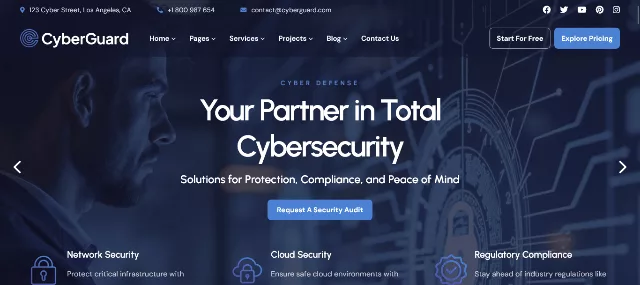
CyberGuard is a premium WordPress theme designed specifically for cyber security companies, IT security consultants and digital protection service providers. It is the most feature-complete option in this roundup and a safe default if you are building a full cyber security services website rather than a single landing page.
The package includes more than ten pre-built websites (five multi-page and five one-page), over thirty inner pages and more than fifty Elementor elements, so you can assemble service pages, team grids, pricing tables, process steps and testimonials without custom code. A mega menu plus a header and footer builder give you control over navigation, which matters on sites with many services such as penetration testing, network security monitoring, digital forensics and compliance.
- One-click demo import, Slider Revolution and the Booked appointment plugin included
- WooCommerce ready, with wishlist, quick view and compare, handy if you sell security products or training
- WPML, Polylang and RTL language support for multilingual sites
- Contact Form 7, Mailchimp (MC4WP) and Tidio chat compatibility, plus a child theme
Keep in mind: the listing marks it as not Gutenberg-optimized, so it is built around Elementor rather than the native block editor.
2. Firwl – Best for Security News, Training and Events
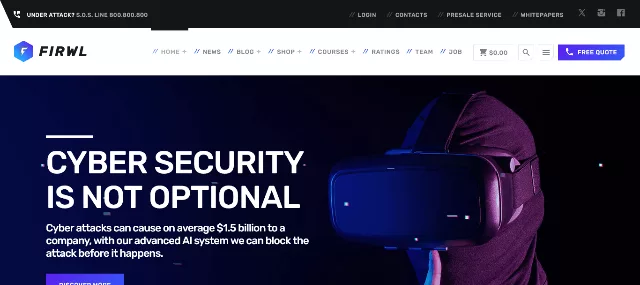
Firwl takes a different approach from most agency themes. It treats content as the main asset, which suits an Information security WordPress theme project built around advisories, research, webinars and downloadable reports. The listing highlights an A-grade speed result, an events calendar, a whitepapers download manager and six included demos.
Editors will like the post mosaic header, a three-slot layout for top stories, along with post lists, card grids and thumbnail lists driven by shortcodes. You can choose between the Gutenberg and classic editors, edit on the front end, override the sidebar style per post type, and build pricing tables in one to four columns. A bundled widgets plugin adds card and list archive widgets.
- Events calendar for courses, seminars and conferences
- Whitepapers download manager for lead-generation content
- Six demos and front-end visual editing
- Flexible pricing tables and per-page sidebar overrides
Keep in mind: it is more of a publisher’s theme than a flashy agency template. If your site is mostly service pages and brochure content, one of the Elementor options may feel faster to set up.
3. Cycure – Best Value for Service-Led Security Companies
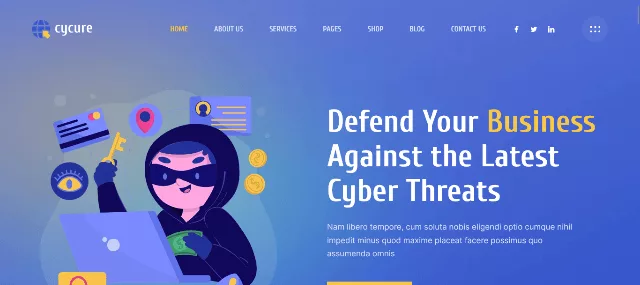
Cycure is a straightforward, modern Cybersecurity WordPress template for companies that want a clean, readable site without wading through dozens of options. It ships with three home demos and more than fourteen inner pages, which is enough for a typical service business: home, about, services, service details, team, blog and contact.
Under the hood it uses Bootstrap 5, includes more than twenty custom Elementor blocks and offers one-click demo import, a live preview in the WordPress Customizer, a post read-time feature and translation support through the options panel or PO files (for example with Loco Translate). Contact Form 7 and Mailchimp forms are supported, and WooCommerce compatibility is listed too. A child theme was added in a past update.
- Three home demos and 14+ inner pages
- 20+ custom Elementor blocks and Bootstrap 5 grid
- Translation-ready for Spanish, Portuguese or French versions
- Detailed documentation and one-click demo import
Keep in mind: the author lists it as built on Underscores with Elementor and not Gutenberg-optimized, and it has fewer demos than CyberGuard. Check the latest changelog before purchasing.
4. Fortified – Best for IT Security Providers With Plans and Pricing

Fortified is an IT security company WordPress theme built for businesses that sell clearly defined packages. It offers dedicated pricing pages and a Services custom post type, so every offering (vulnerability scanning, managed detection, security audits) can live on its own structured page and be listed in grids automatically.
The feature list is generous: seven home page styles, six about styles, six services styles, six pricing styles, plus team, testimonial and FAQ layouts. It was designed to load quickly with minimal CSS, includes demo import, Revolution Slider, WPML readiness, Contact Form 7 support and layouts for WooCommerce shop, cart and checkout pages. Recent changelog entries show new layouts and plugin updates have been added since the initial release.
- Services custom post type and multiple pricing page styles
- 7 home layouts for easy A/B variations
- WooCommerce shop, cart and checkout designs
- WPML-ready and Google Fonts typography options
Keep in mind: the theme is built on Bootstrap 4 and is not Gutenberg-optimized, so confirm its builder setup on the demo before committing to a content workflow.
5. Cyarb – Best for Penetration Testing, Crypto and Blockchain Security
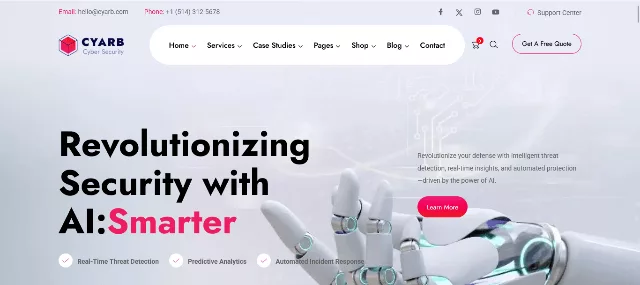
Cyarb is built for cyber security companies, penetration testing services, IT security consulting firms, ethical hackers and data protection agencies, with a particular nod to crypto and blockchain security brands. It also suits security software and SaaS platforms and information security blogs, so it works for both service sites and product sites.
A recent update added a theme dashboard and compatibility with the latest WordPress releases, and the theme is described as WooCommerce-compatible for selling security products or services directly from your site. Its Redux-based options keep global settings in one place, which makes it easier to keep a consistent look across many pages.
- Designed around pen-testing, IT security consulting and data protection use cases
- WooCommerce compatibility for selling products, tools or packages
- Theme dashboard and ongoing compatibility updates
- A good match for crypto, blockchain and Web3 security niches
Keep in mind: if you also want ideas for token-related projects, our guide to cryptocurrency WordPress themes compares themes built for that audience.
6. Fort – Best for Data Protection and Security Training
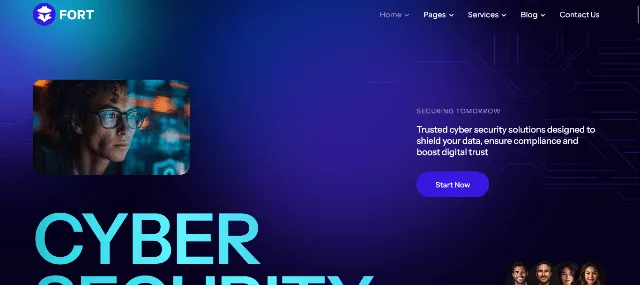
Fort is a polished Network security WordPress theme for companies working in data protection, cloud services and blockchain security. It integrates with Elementor and WooCommerce, supports multilingual sites through WPML, and handles forms with MetForm, a combination that works well for lead-generation sites in several languages.
It is a strong candidate if part of your business is training or awareness programs, since layouts are suited to courses, services and security consulting at once. ThemeREX add-ons extend the theme with extra widgets, and the visual style leans modern and slightly bolder than the more conservative corporate options on this list.
- Elementor, WooCommerce, WPML and MetForm integrations
- Modern look for cloud, blockchain and crypto-protection brands
- Suitable for security training and IT protection services
Keep in mind: ThemeREX themes lean on companion plugins, so audit the plugin list after demo import and remove anything you do not need to keep the site lean and secure.
7. Safer – Best for Web Protection and Surveillance Start-Ups
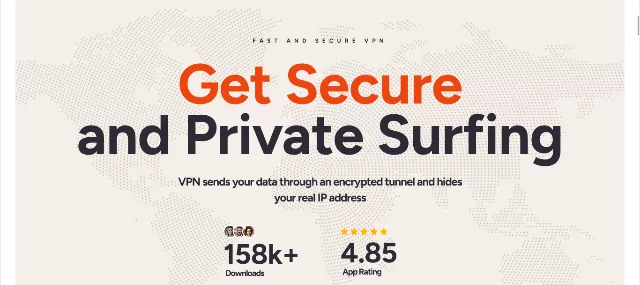
Safer is aimed at security companies that mix digital and physical protection: VPN, data protection, camera surveillance, web protection and cyber security management under one brand. The listing positions it for data security and ethical hacking services too, and its three home page variations give you a quick starting point for a landing-page-style site.
Technically, it is built with Elementor compatibility, Advanced Custom Fields Pro, Redux options, Bootstrap 5 and Sass, and documentation is available online. That stack suits developers who want to extend the theme with custom fields (for example for case studies or compliance certifications) without rebuilding it.
- Three home pages for quick launch
- Elementor, ACF Pro, Redux and Bootstrap 5 stack
- Good fit for hybrid physical and digital security brands
Keep in mind: ACF Pro is a separate commercial plugin in many setups, so check what is bundled and what you will need to license.
8. Cryptiva – Best Block Theme for Full Site Editing
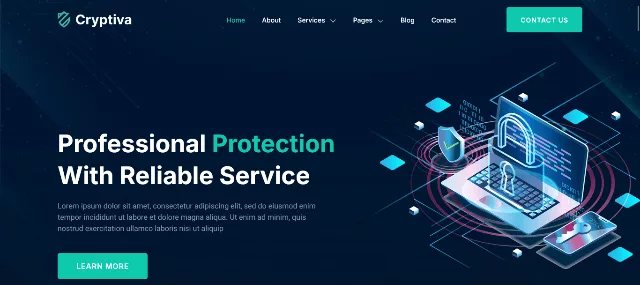
Cryptiva is the modern pick on this list. It is a full-site-editing block theme built for cyber security agencies and IT security providers, using the Gutenverse framework with the WordPress Site Editor. Instead of relying on a heavy third-party page builder, you edit templates, template parts, headers and footers directly with blocks.
The ThemeForest listing highlights an optimized FSE block theme with block patterns, styles and pages included. For teams that care about long-term compatibility, that approach is attractive because it follows the direction the WordPress core project has been moving in. A sister theme, Cytrix, takes the same approach if you want to compare designs.
- Native Site Editor workflow with block patterns and styles
- Built for cyber security services companies and IT security providers
- Potentially lighter than a page-builder stack, depending on your configuration
Keep in mind: block themes need a slightly different mindset than Elementor themes. If your team already works in Elementor, the learning curve may outweigh the benefits. Read our block theme guide before you decide.
Avoid “nulled” or pirated copies. Searching for a free download of a premium theme returns plenty of sites offering cracked files. For a security company this is the worst possible choice: nulled themes commonly ship with hidden backdoors and spam injectors, and you lose updates and support. Buy from the official marketplace, or start with a vetted free theme from the WordPress.org directory.
Pages and Layout Every Security Company Website Needs
Whichever theme you pick, the structure of your site matters as much as the theme itself. The wireframe below shows a conversion-focused homepage layout that works well with any of the themes above.
Core pages to build
Services
One page per service, such as penetration testing, vulnerability management, SOC monitoring, incident response and compliance consulting.
Industries
Healthcare, finance, e-commerce, government and SaaS pages help you rank for specific searches and speak to each buyer.
Case studies
Anonymized results with measurable outcomes are the strongest trust signal after certifications.
Resources
Advisories, guides, webinars and gated whitepapers build authority and capture leads.
About and team
Real people, certifications (CISSP, OSCP, CEH) and your company story make a faceless brand human.
Contact and booking
A short form, a calendar link and a clear response-time promise reduce friction for urgent enquiries.
WordPress Design Tips for a Trustworthy Security Brand
Good WordPress design for the security industry is about calm confidence rather than flashy effects. These rules of thumb apply to any WordPress website template you start from.
- Use a restrained palette. Navy, charcoal and deep blue paired with one bright accent (cyan or green) is the standard for a reason. Keep text contrast high; dark layouts still need WCAG-friendly contrast ratios.
- Prefer real over stock. Replace clichéd hacker photos with team portraits, office shots, product screenshots and simple custom illustrations or SVG graphics.
- Show proof near every call to action. Place certification badges, client logos and a short testimonial beside forms and buttons.
- Keep forms short. Name, work email, company and a message are usually enough. Long forms hurt conversions and raise privacy questions.
- Limit animation. Parallax and particle effects look impressive in demos, but they cost performance and can hurt accessibility. Use them sparingly or turn them off.
- Design for mobile first. Many initial enquiries (especially during an incident) start on a phone, so test click-to-call buttons and form usability on small screens.
Ranking and Compliance in the USA, Canada, Argentina and Brazil
If your target customers are in North and South America, a few small decisions on language, hosting and privacy can make a big difference to both rankings and trust. The table below summarizes the essentials; always confirm legal requirements with a qualified adviser for your situation.
United States
Language: English (en-US). There is no single federal privacy law, so follow applicable state laws such as California’s CCPA/CPRA. Add a clear privacy policy and cookie notice. Resources: CISA.
Canada
Languages: English and French (en-CA, fr-CA). Federal privacy law is PIPEDA, and Quebec has its own modernized rules. See also the Canadian Centre for Cyber Security.
Argentina
Language: Spanish (es-AR). Personal data is governed by Law 25.326, overseen by the AAIP. Use local wording, pricing and examples rather than a literal translation.
Brazil
Language: Brazilian Portuguese (pt-BR). Data protection falls under the LGPD, enforced by the ANPD. Consider hosting close to São Paulo for faster load times.
Practical SEO steps for each market
- Use hreflang tags (en-us, en-ca, fr-ca, es-ar, pt-br) so search engines show the right version to the right visitor. Multilingual plugins such as WPML or Polylang can output them for you.
- Localize, don’t just translate. Spanish for Argentina and Portuguese for Brazil use different vocabulary and formality from other regions. Mention local regulations, currencies and industries.
- Build local trust signals: local phone numbers, addresses where relevant, regional case studies and partnerships with local associations.
- Choose hosting with a nearby data center or CDN to improve speed in each market. Page speed is a ranking and conversion factor everywhere.
- Add structured data. Organization, Service and FAQ markup help search engines understand your pages. See the JSON tip in the next section.
- Earn relevant backlinks from industry blogs, security associations, directories and partners in each country.
Harden Your Site: The Theme Is Only One Layer
A great theme will not protect a poorly maintained site. Treat your website like any other asset you would audit for a client: layer your defenses.
A practical hardening checklist
- Keep everything updated: WordPress core, your theme and every plugin. Remove anything you do not use.
- Enable HTTPS everywhere. If you need help, follow our guide to installing an SSL certificate, then add security headers such as HSTS and a content security policy.
- Use multi-factor authentication for every administrator and editor, and limit login attempts.
- Run a web application firewall (from your host, a CDN or a plugin) and schedule malware scans.
- Back up daily to a separate location and test restores regularly.
- Disable the built-in file editor by adding this line to
wp-config.php:
define( 'DISALLOW_FILE_EDIT', true );For a deeper walkthrough, work through our WordPress security checklist. If something has already gone wrong, our guide on how to recover a hacked WordPress site walks you through cleanup. For application-level risks, the OWASP Top 10 and the NIST Cybersecurity Framework are worth bookmarking, and the WordPress Theme Handbook explains how well-built themes handle escaping and sanitization.
Add structured data (and keep it clean)
Structured data helps search engines understand your company, services and FAQs, and it can make your pages eligible for rich results. Most themes and SEO plugins output JSON-LD, but if you add your own, a single missing comma will break the whole block. Paste it into our free JSON minify and beautify formatter to validate and tidy it before publishing, then minify it for production. A simple Organization snippet looks like this:
{
  "@context": "https://schema.org",
  "@type": "ProfessionalService",
  "name": "Your Security Company",
  "url": "https://example.com/",
  "description": "Managed cyber security, penetration testing and compliance services.",
  "areaServed": ["US", "CA", "AR", "BR"]
}
Low-Cost WordPress Hosting for a Security Website
You do not need an expensive plan to launch a security site, but you do need the right features. Entry-level shared hosting is usually fine for a brochure-style site with moderate traffic, as long as the provider covers the basics.
What to look for in an affordable plan
- Free SSL certificate and automatic renewals
- Daily backups with easy one-click restore
- Built-in firewall and malware scanning
- Current PHP versions and server-level caching (see our comparison of Nginx vs LiteSpeed for how server software affects speed)
- Data centers or a CDN close to your audience, for example in North America and São Paulo for Brazil
- Staging environments and straightforward upgrades when you outgrow the plan
Well-known budget-friendly options include Hostinger WordPress hosting, SiteGround WordPress hosting and Bluehost WordPress hosting. Introductory prices, renewal rates and data-center locations change often, so compare current plans and read the renewal terms before you sign up for multiple years.
How to Choose the Right Theme (Step by Step)
- Define the goal. Lead generation for services, selling security products, publishing research, or all three? That decides between an agency theme (CyberGuard, Cycure), a publisher theme (Firwl) or a shop-friendly theme (Cyarb, Fortified).
- Pick your editing workflow. Elementor for visual page building, or a block theme such as Cryptiva for native editing.
- Preview demos on a phone and run each through a speed test before buying.
- Check the update history, support period, documentation and compatibility with the latest WordPress and PHP versions.
- Plan languages and regions early so your theme and plugins support translation and hreflang.
- Install on a staging site first. Our guide on how to install a WordPress theme covers the safest way to do it.
- Trim the demo. Import only the pages you need, delete unused plugins and sample content, and replace every placeholder image.
If your business is closer to physical security (guards, alarms, CCTV) than pure cyber, browse our list of security agency WordPress themes as well. Many companies combine both, and the layouts overlap.
Frequently Asked Questions
What is the best cyber security WordPress theme?
For most agencies, CyberGuard is the most complete choice thanks to its many demos and Elementor elements. Firwl is better for content-led sites, and Cryptiva is the best fit if you want a modern block theme. The best theme is the one that matches your services, your editor of choice and your budget.
Can I use these themes for an IT or network security company?
Yes. Themes such as Fortified, Fort and Safer are suited to IT security providers, network protection and managed services, and every theme in this list can be adapted with your own pages and content.
Are free cyber security WordPress themes safe?
Free themes from the official WordPress.org directory are reviewed and are generally a safe starting point. Avoid “nulled” copies of premium themes from unofficial sites, because they frequently contain malicious code.
Do I need Elementor to use a cyber security theme?
No. Most themes here use Elementor for convenience, but Firwl works with Gutenberg or the classic editor and Cryptiva is a full-site-editing block theme.
What pages should a cybersecurity website have?
At minimum: home, services (one page per service), industries, case studies, resources or blog, about and team, and a contact page with a clear call to action. Add privacy, cookie and terms pages.
How do I make my security website load fast?
Choose a lean theme, compress and lazy-load images, limit plugins, use caching and a CDN, and host on a provider with modern PHP and server-level caching. Test with a speed tool on both mobile and desktop.
Is low-cost hosting good enough for a security company site?
For a brochure or lead-generation site, yes, provided the plan includes free SSL, daily backups, a firewall and malware scanning. Upgrade when traffic, e-commerce or compliance needs grow.
How can I rank a security website in the USA, Canada, Argentina and Brazil?
Create localized content for each market, use hreflang tags, follow regional privacy rules, host close to your audience and earn backlinks from relevant local and industry sites.
Final Thoughts
The right cyber security WordPress theme will not do the selling for you, but it gives your expertise a professional stage. CyberGuard, Cycure, Fortified, Cyarb, Fort and Safer cover most agency and service use cases, Firwl shines for content and events, and Cryptiva points toward the block-editor future. Shortlist two or three, test the demos on mobile, and choose the one that matches how your team prefers to work.
Then do the work that no theme can do for you: keep everything updated, use HTTPS and multi-factor authentication, host on a reliable plan, and publish useful content for every market you serve. If you are building a broader portfolio of niche sites, you may also like our guides to security agency themes and Elementor themes.


