
A wedding website does more than share a date and an address. It sets the mood for the whole celebration, collects RSVPs, tells your love story and answers the questions guests would otherwise text you at midnight. The theme you choose decides how all of that looks and how easy it is to manage. That is why picking from the right wedding WordPress themes matters more than most couples, planners and venue owners expect.
This guide is for three groups: couples who want a personal wedding website WordPress theme, professionals who need a wedding planner WordPress theme to win clients, and venues or videographers who need a showcase that sells. We reviewed free and premium options, checked the features that matter for weddings (RSVP, galleries, maps, countdown timers, mobile layout, translation support) and narrowed the field to 12. Each entry says who it fits best, so you can skip straight to your use case.
What to Look for in a Wedding WordPress Theme
Pretty demos are easy to find. A theme that still works well after you add 200 photos, a guest list and a map is harder. Before you commit, check these points.
- Clear navigation. Guests should find the ceremony location, schedule, RSVP page, registry links and photos within two taps.
- Mobile-first design. Most guests open a wedding link on a phone, often while travelling. A wedding website WordPress template must read well on small screens.
- Built-in or easy RSVP. Some themes include an RSVP section; others pair with a form plugin. Either is fine as long as it works without code.
- Gallery and video support. Engagement shoots, venue tours and highlight films are the heart of most wedding sites.
- Page builder compatibility. Elementor, Gutenberg blocks or the theme’s own builder make it simple to add a schedule page or a hotel list.
- Speed. Big photos slow sites down. Test the demo with Google PageSpeed Insights before buying.
- Translation readiness. International guest lists need more than one language. See our guide to multilingual WordPress themes for options.
- Regular updates. A theme that is not updated at least once a year becomes a security and compatibility risk. Check the changelog.
Comparison Table: 12 Wedding WordPress Themes at a Glance
Use this table to shortlist quickly, then read the detailed reviews below.
| Theme | Best for | Type | Standout feature |
|---|---|---|---|
| Sydney | Couples and small businesses | Free + Pro | Large library of starter sites |
| Astra | Fast, flexible wedding websites | Free + Pro | Wedding invitation and photography templates |
| Divi | Wedding planners and event pros | Premium | Visual builder with wedding layouts |
| Neve | Love-story sites with a blog | Free + Pro | One-click wedding starter sites |
| The Aisle | Wedding planners | Premium | Venue map, pricing and gift registry sections |
| Solene | Planners with RSVP needs | Premium | RSVP, gift registry and WooCommerce |
| OneLove | Wedding blog or shop | Premium | Many home layouts, video slider |
| Sweetinz | One-page wedding websites | Premium | Couple timeline, countdown, groomsmen pages |
| Inspiro | Wedding video website | Free + Pro | Fullscreen video backgrounds |
| Lense | Wedding venue and photography | Premium | Horizontal-scrolling galleries |
| Catch Wedding | Budget-friendly couples | Free + Pro | Countdown timer and slider |
| Wedding Photography Studio | Simple, free wedding site | Free | Couple, schedule and album sections |
The 12 Best Wedding WordPress Themes
1. Sydney: Best All-Rounder for Couples and Small Businesses
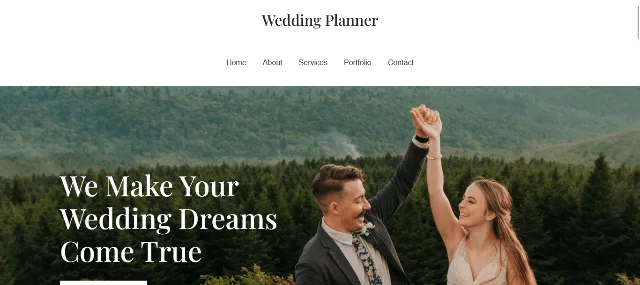
Sydney is a lightweight, flexible theme with a large library of ready-made starter sites you can edit by pointing and clicking. You can pick a layout, adjust fonts and build your own colour palette, which makes it easy to match your wedding colours. It plays well with form plugins, so adding an RSVP page takes minutes. If you are on a budget, the free version is a sensible place to start.
- Starter sites you can import quickly
- Works with popular page builders
- Free version available
- Some premium layouts need the Pro upgrade
- Not wedding-only, so you will customise sections yourself
2. Astra: Best for Fast, Flexible Wedding Websites

Astra is known for speed and a huge library of starter templates, including wedding invitation and wedding photography designs. Replace the demo images with yours, edit the text, and add an RSVP form so guests can reply online. It works with the WordPress Customizer, so changing colours and fonts is straightforward. Because it stays light, galleries load faster than on many heavier themes, which helps guests on slow hotel Wi-Fi.
- Very fast, clean code
- Wedding invitation and photography templates
- Beginner friendly
- Best templates sit behind the paid plan
- Needs a builder for advanced layouts
3. Divi: Best Wedding Planner WordPress Theme for Visual Editing
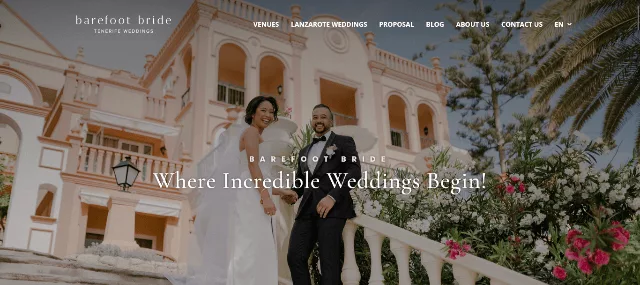
Divi ships with its own visual builder and a wide range of layout packs, including wedding, wedding planner and event designs. You edit the page directly on screen, which makes it ideal for planners who update packages, testimonials and portfolios often. If you want a wedding planner WordPress theme that you can reshape without hiring a developer, Divi is one of the strongest picks.
- Powerful visual builder
- Wedding and event layout packs
- Good for portfolios and service pages
- Learning curve for first-timers
- Content is tied to the builder if you switch later
4. Neve: Best for a Love-Story Site with a Blog
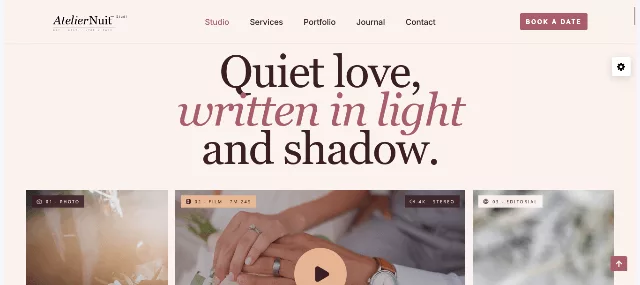
Neve offers one-click starter sites, including elegant wedding designs with a full-width header image for your favourite photo. It supports the main page builders and makes it simple to add a blog for travel updates, planning notes and your love story. The result feels personal rather than templated, and it stays quick on mobile.
- Easy starter-site import
- Strong builder compatibility
- Blog-friendly layouts
- Limited wedding-specific demos
- Some options require Pro
5. The Aisle: Best for Professional Wedding Planners
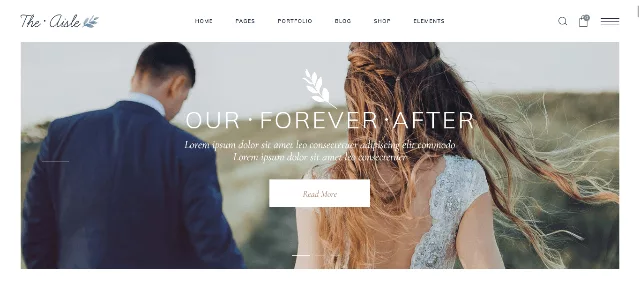
The Aisle was built with planners in mind. It includes many pre-designed home pages for photography, wedding announcements and invitations, along with sections for venue maps, pricing plans, gift registries and celebration details. If you want to present packages clearly and let couples see what you offer at a glance, this is a strong fit among best wedding planner WordPress themes. Check the latest update date on the product page before purchasing.
- Planner-focused sections
- Large collection of home pages
- WooCommerce compatible
- Demo import can be heavy on cheap hosting
- Older marketplace items need an update check
6. Solene: Best for Planners Who Need RSVP, Registry and a Shop
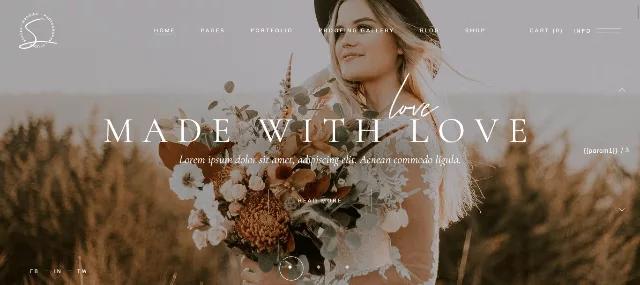
Solene covers the pages most wedding businesses need: galleries, photography, invitations, RSVP and announcements. It also supports a gift registry, venue locations on a map, mailing list integration and WooCommerce. WPML compatibility makes it a reasonable choice if you serve couples in more than one language. It suits planners who want one theme to handle both marketing and client interaction.
- RSVP and registry sections
- WooCommerce and mailing list support
- Translation and WPML ready
- Many options can feel busy at first
- Verify current version before buying
7. OneLove: Best for a Wedding Blog, Shop or Planning Agency
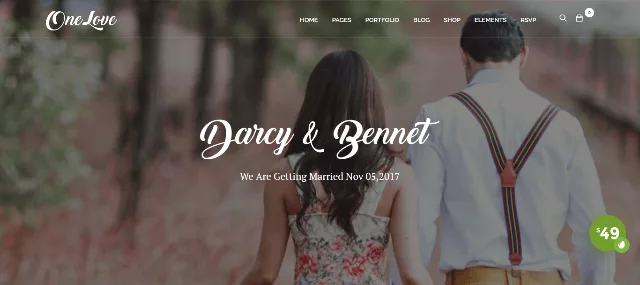
OneLove offers a large set of home layouts suited to a personal wedding website, a wedding blog, an anniversary page, a wedding shop or a planning agency. The feature list includes an RSVP form, photo galleries, a video slider and one-click demo import. If your project might grow from a single wedding site into a small business, OneLove gives you room to expand.
- Many layouts for different goals
- Video slider and galleries
- WPML compatible
- Feature-heavy, so trim what you do not use
- Check update history
8. Sweetinz: Best One-Page Wedding Website WordPress Theme
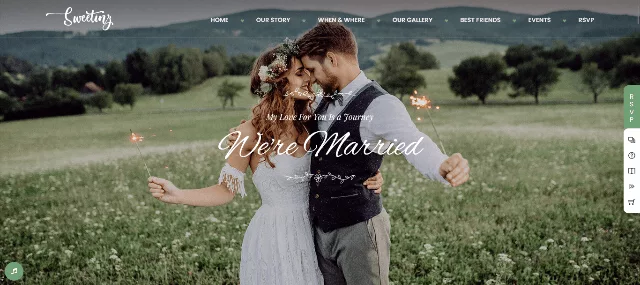
Sweetinz is a clean one-page theme with the sections couples ask for: location map, RSVP, couple timeline, countdown, gift registry, bridesmaids and groomsmen. Several colour schemes let you match your palette quickly. A single long page is perfect for an invitation-style site where guests only need the essentials.
- Everything guests need on one page
- Timeline and countdown sections
- Easy colour options
- One-page layout limits SEO depth for planners
- Verify update status
9. Inspiro: Best WordPress Theme for a Wedding Video Website
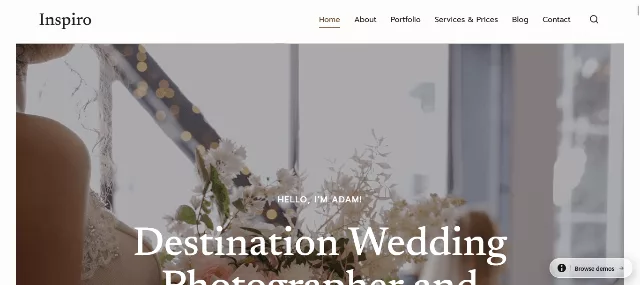
If you are searching for a WordPress theme for a wedding video website, Inspiro is a standout. It offers fullscreen video backgrounds, video and photo galleries and lightbox popups, so your highlight film is the first thing visitors see. It includes a one-click installer and ready-made layouts, one of which is built for weddings. Videographers can use it as a portfolio, and couples can use it to showcase their wedding film.
- Fullscreen video headers
- Lightbox galleries
- Built for photography and video
- Large video files need good hosting or an external player
- Fewer planner-specific sections
10. Lense: Best Wedding Venue and Photography Theme
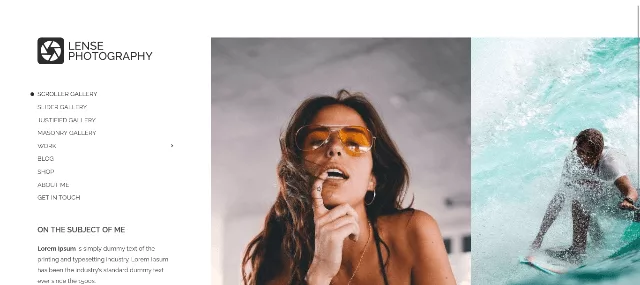
Searching for the best WordPress theme for a wedding venue? Lense puts imagery first. Its homepage features a horizontally scrolling photo gallery, with column, grid, scroller and slideshow options. Each gallery can have its own settings, which helps a venue present ceremony spaces, reception halls and gardens separately. Pair it with a booking or enquiry form and a clear location map to turn visitors into tour requests.
- Flexible gallery types
- Strong mobile experience
- Custom widgets and colours
- Photography focus means you add booking tools
- Less suited to text-heavy planner sites
11. Catch Wedding: Best Free Wedding WordPress Theme with Countdown
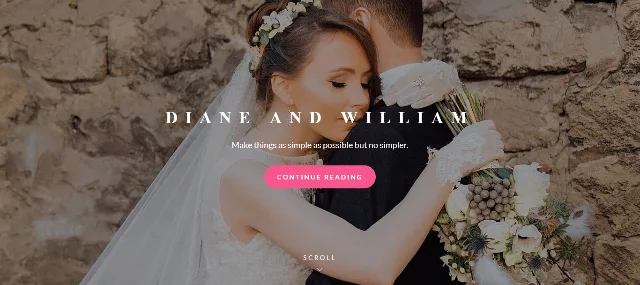
Catch Wedding is a free wedding theme with a minimal, eye-catching layout. It includes an image slider, a call-to-action area, a custom logo, social icons and a countdown timer, and it is translation ready with RTL and WPML support. The Pro version adds extras such as a guestbook. For a simple, honest wedding wordpress design that costs nothing, it is a reliable pick, and you can download it directly from the WordPress.org theme directory.
- Free and lightweight
- Countdown and slider included
- Translation ready
- Simple design with fewer demos
- Some extras need Pro
12. Wedding Photography Studio: Best Simple Free Theme for Your Story and Schedule
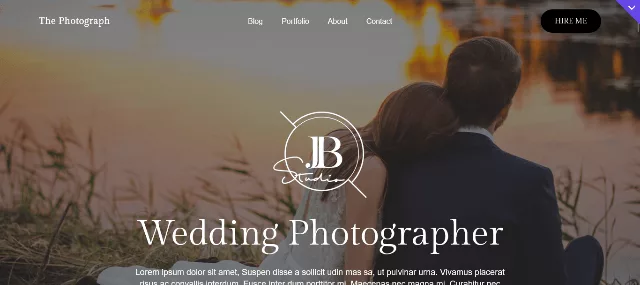
Wedding Photography Studio keeps things simple. It has a broad homepage slider and sections for the couple, their story, the wedding day schedule, family and friends and photo albums. It is responsive, supports multilingual plugins and works with WooCommerce, so you can sell a few items without switching themes. Download it from the official theme directory and test it before you commit.
- Free and easy to set up
- Clear story and schedule sections
- Multilingual plugin support
- Limited advanced customisation
- Design is on the quiet side
Wedding Websites for the USA, Germany, Switzerland, France and Austria
Many couples now plan weddings across borders: a ceremony in the Swiss Alps, a reception in Provence, relatives flying in from the United States. A few small choices make your site friendlier for each audience.
- Offer more than one language. A Hochzeitswebsite for German and Austrian guests, a site de mariage for French speakers and an English version for American guests are easy to run with a translation plugin such as WPML. Switzerland often needs German, French and sometimes Italian, so choose a theme that supports translation from the start. Our roundup of multilingual WordPress themes can help.
- Respect privacy rules. If you collect RSVPs, dietary requests or contact details, include a short privacy notice and a consent checkbox. This matters especially for guests in the EU and Switzerland, where data protection rules are strict.
- Use local formats. Write dates and times the way your guests expect, and show prices in the right currency (EUR, CHF or USD) if you sell anything.
- Keep maps and travel info clear. Add train and airport directions, parking details and accommodation options. Guests who travel far appreciate it.
- Tell search engines which language you serve. If you publish translated pages, follow Google’s guidance on localized versions of your pages so the correct page appears for each country.
- Choose fast hosting. Images load slowly for distant visitors. See our list of cheap WordPress hosting plans for affordable, reliable options.
Selling Wedding Products on Your Website
Planners, florists, dress boutiques and invitation designers often need a shop alongside their portfolio. Many of the themes above work with WooCommerce, so you can add products, deposits or digital downloads. If your main goal is selling, a store-focused theme may serve you better than a wedding showcase.
Take a look at our WordPress storefront theme, The9 Store Pro, or The8 Shop Pro if you plan to run a bridal or gift shop. To make the buying journey smoother, Prime Shopping Cart Pro helps keep the cart experience simple for shoppers. Florists can also explore our flower shop WordPress themes, and caterers can compare catering WordPress themes to complete the wedding vendor lineup.
Photographers who want a stronger portfolio can browse our photography WordPress themes, and anyone building a film showcase may like our guide to video header WordPress themes.
How to Build Your Wedding Website Step by Step
- Define the purpose. Is it for guests, for clients or for both? A couple needs RSVP and schedule pages. A planner needs services, pricing and a portfolio.
- Pick your theme. Use the table above. Try the free versions first where available.
- Install and activate it. If you are new to this, follow our walkthrough on how to install a WordPress theme.
- Import a starter site or demo. This gives you a working layout to edit instead of a blank page.
- Replace content. Add your photos, story, schedule, venue map and registry links. Compress images first to keep the site fast.
- Add an RSVP form. Use the theme’s built-in form or a form plugin. Test it yourself before sharing the link.
- Protect your site. Use strong passwords, keep WordPress and the theme updated, and run through a WordPress security checklist.
- Test on phones. Open every page on at least two devices and check buttons, maps and forms.
- Share the link. Put it on save-the-dates, invitations and social media.
Common Mistakes to Avoid
- Choosing looks over usability. A beautiful demo is useless if guests cannot find the schedule.
- Uploading huge photos. Resize and compress images before uploading. Large files slow the site and frustrate mobile users.
- Skipping the child theme. If you edit theme files directly, updates can erase your changes. Use a child theme when you customise code.
- Forgetting password protection. If you share private details like addresses or guest names, use a password-protected page.
- Ignoring accessibility. Use readable fonts, strong contrast and descriptive image text so every guest, including older relatives, can use the site.
- Neglecting backups. Back up before big changes, especially close to the wedding date.
Frequently Asked Questions About Wedding WordPress Themes
What is the best WordPress theme for a wedding website?
It depends on your goal. Sydney, Astra and Neve work well for couples, Divi and The Aisle suit planners, Lense suits venues, and Inspiro suits wedding video websites.
Are there free wedding WordPress themes?
Yes. Catch Wedding and Wedding Photography Studio are free, and Sydney, Astra, Neve and Inspiro all offer free versions. Free themes cover the basics, while premium options add layouts, support and advanced features.
Which is the best wedding planner WordPress theme?
Divi, The Aisle and Solene are strong choices. They offer service sections, galleries, pricing areas and contact tools that planners need to turn visitors into clients.
What is the best theme for a wedding venue website?
Choose a gallery-driven theme such as Lense, then add a map, availability enquiry form and virtual tour. Large, clear photos matter most.
Can I add an RSVP form to my wedding website?
Yes. Many wedding themes include RSVP sections, and others work with form plugins. Always test the form and confirm that you receive the replies.
Do I need a page builder?
Not always. Starter sites and the block editor are enough for many couples. A builder like Elementor or Divi helps if you want custom layouts.
Can I use WordPress for a multilingual wedding website?
Yes. Pick a translation-ready theme and use a translation plugin so guests can read the site in English, German, French or another language.
How much does a wedding WordPress website cost?
You can start free with a free theme, basic hosting and a domain. Costs rise with premium themes, plugins, professional hosting and any design help you hire.
Final Thoughts
The right wedding theme makes your site feel personal, loads quickly and keeps guests informed. Couples can begin with a free option like Catch Wedding or Wedding Photography Studio, or grow with Sydney, Astra and Neve. Planners will find more business-ready tools in Divi, The Aisle and Solene. Venues and videographers should look hard at Lense and Inspiro.
Whichever theme you choose, test it on mobile, keep your images light and make the RSVP and schedule easy to find. If you want more ideas, browse our guides to photography themes, multilingual themes and catering themes to round out your wedding project.


