
AI Sales Notifications for WooCommerce is a WooCommerce sales notification plugin that turns quiet product pages into a store that feels busy and trustworthy. It shows live sales popups built from your real orders, adds virtual (simulated) activity when you are just starting out, and uses AI to write the names, cities and message copy for you. Pick your own provider: ChatGPT, Claude, Gemini, Grok, DeepSeek, OpenRouter or any OpenAI-compatible endpoint.
If you are new to the platform, start with what WooCommerce is, then see where this plugin fits in our list of essential WooCommerce plugins.
Why a Sales Popup Plugin Helps Your Store Convert
Shoppers look for signs that other people already trust a store. A short message such as “Emma from London just purchased Wireless Earbuds” is classic social proof, and it adds a little urgency without a countdown timer. It is one of the lightest ways to support the strategies we cover in our guide to running an eCommerce business, and it works well beside tools like an add to cart popup or a WooCommerce floating cart.
Most free recent-sales popups stop at order replay and hand-typed name lists. AI Sales Notifications removes the manual work: generate hundreds of realistic first names, cities and message variations in a few clicks, then control exactly how often each visitor sees them.
Key Features
Real Sales Popups from WooCommerce Orders
Show recent purchases with customer first name, city, country, product image, linked product title, price and relative time (“3 minutes ago”). Filter by order status and time range, and exclude products you do not want promoted. Declared compatible with WooCommerce High-Performance Order Storage (HPOS).
Virtual Orders for New and Low-Traffic Stores
No orders yet? Build notifications from selected products, categories or your latest products, using lists of names, cities and countries. Optional geo-detect uses the visitor’s location so messages feel local.
Multi-AI Engine
Connect your own API key and let AI fill the lists and write the copy:
- OpenAI (ChatGPT)
- Anthropic (Claude)
- Google Gemini
- xAI (Grok)
- DeepSeek
- OpenRouter and custom OpenAI-compatible endpoints
Choose a tone (casual, formal, promotional or persuasive) and regenerate whenever you want a fresh feed. AI is optional: real and virtual notifications run without any API key. To see what else AI can do on your site, browse our roundups of ChatGPT WordPress plugins and WordPress chatbot plugins.
Custom Messages with Shortcodes
Write unlimited templates using {first_name}, {city}, {state}, {country}, {product}, {product_with_link}, {price}, {time_ago} and {number}.
Example: {first_name} from {city} just purchased {product_with_link}
New to shortcodes? Read our WooCommerce shortcodes guide.
Design Templates and Branding
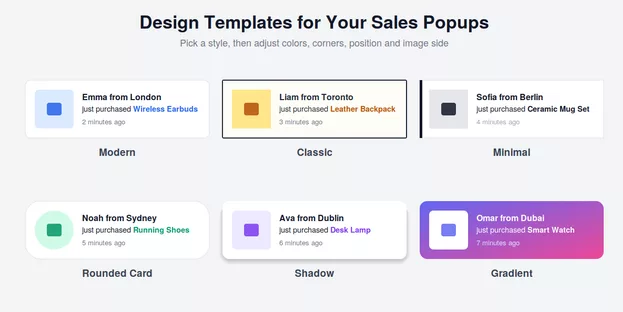
Choose modern, classic, minimal, rounded, shadow or gradient styles. Set the corner position, image side, colors, rounded corners, close button, sound and custom CSS so the popup matches your theme, whether that is a free WooCommerce theme or a premium WordPress eShop theme.
Timing and Frequency Controls
- Initial delay, optional random first delay, display duration and gap between popups
- Loop mode and a maximum number of notifications per page load
- Maximum notifications per visitor and per session, with a configurable session length
These limits keep the feed persuasive instead of annoying for returning shoppers.
Display Rules
Show or hide notifications on the homepage, shop, product, cart and checkout pages. On product pages, prioritize the current product, the same category, or all products.
Click Reports
See which notifications get clicked by product and date range, so you know which social proof actually drives interest and not just impressions.
License, Updates and Support
Activate your license under AI Sales Notify → License to receive updates and support from aThemeArt. The plugin follows WordPress coding standards, including nonces, capability checks and sanitization. For a wider hardening routine, use our WordPress security checklist.
How It Compares
Here is how AI Sales Notifications lines up against other popular options, based on each vendor’s public product page at the time of writing. “Not listed” means the feature is not mentioned on that page, not that it is impossible.
| Feature | AI Sales Notifications | PiWeb Live Sales Notification (free + Pro) | Xfinitysoft Sales Notifications (free + Pro) | YITH Live Push Notifications (premium) | ShopEngine Sales Notification (module) |
|---|---|---|---|---|---|
| Real order popups | Yes | Yes | Yes | Yes | Yes |
| Virtual orders | Yes | Yes | Yes | Yes (dummy orders) | Yes |
| AI-generated names, cities and messages | Yes, multi-provider | Not listed | Not listed | Not listed (names added manually) | Not listed |
| Visitor-location awareness | Yes | Pro only | Yes | Yes (geolocation filter) | Not listed |
| Per-session popup limit | Yes, plus per-visitor limit | Yes | Not listed | Yes | Not listed |
| Click reports by product | Yes | Analytics available | Not listed | Not listed | Not listed |
| Delivered as | Standalone plugin | Standalone plugin | Standalone plugin | Standalone plugin | Part of the ShopEngine suite |
Bottom line: if you only need a basic recent-orders popup, a free plugin may be enough. If you want AI-written content that stays fresh, control over how often each shopper sees alerts, and a license-backed update path from one standalone plugin, AI Sales Notifications is built for that job.
Who Is It For?
- New stores that need activity on the page before order volume grows
- Growing shops that want real-order popups with a polished design
- Store owners competing on trust, not just price (see how successful WooCommerce sites build it)
- Agencies adding conversion tools next to variation swatches, product search and a product filter
It pairs well with other aThemeArt tools such as Make an Offer for WooCommerce (see our comparison of WooCommerce make an offer plugins). Browse the full WordPress and WooCommerce plugin catalog for more.
Quick Start
- Purchase and download the plugin from this page.
- Install and activate it (the WooCommerce plugin must be active).
- Open AI Sales Notify → Settings.
- Enable real and/or virtual orders, then set your messages and design.
- Optional: add an API key under AI Engine and generate names, cities or messages.
- Activate your license under License.
Notifications load by AJAX after the page renders, so they do not block first paint. For best results, pair them with fast WooCommerce hosting and follow our on-page SEO guide for the rest of your store.
Frequently Asked Questions
Does the plugin work without AI?
Yes. AI is optional. Real and virtual notifications work fully without an API key.
Which AI providers are supported?
OpenAI (ChatGPT), Anthropic (Claude), Google Gemini, xAI (Grok), DeepSeek, OpenRouter and custom OpenAI-compatible endpoints. You use your own API key, and the provider bills you directly for usage.
Will it slow down my store?
Notifications are loaded asynchronously after the page is ready, so they do not block rendering. Good hosting and caching still matter for overall speed.
Can I use it on a brand-new store with no orders?
Yes. Turn on virtual orders and optionally generate names and cities with AI so the feed looks active from day one.
Is it compatible with HPOS?
Yes. Compatibility with WooCommerce custom order tables (HPOS) is declared.
Is it legal to show virtual orders?
Rules differ by country. Many regions have consumer-protection laws about misleading claims, so we recommend labeling virtual notifications as examples or recent activity rather than presenting them as specific real customers, and checking the rules where you sell. When showing real orders, consider your privacy policy, since first name and city are personal data in some jurisdictions.
How is this different from free sales notification plugins?
Free plugins typically cover real and virtual popups with manually entered lists. This plugin adds multi-provider AI generation, per-visitor and per-session limits, click reports and license-backed updates.
Get AI Sales Notifications for WooCommerce
Give every visitor a reason to trust your store. Add live sales popups, real or virtual, written and varied by AI, and keep control over exactly when and how often they appear.