
The best education WordPress themes give a school, university or online academy a fast, mobile-friendly website with course listings, teacher profiles, event calendars and (when you need it) a full learning management system. We compared 15 of the strongest options, from LMS-ready themes such as Edubin and WPLMS to classic campus designs such as Academica Pro and Kingster, so you can pick the right education WordPress theme in minutes instead of days.
Whether you run a kindergarten, a language school, a coaching academy or a full university, your website does three jobs at once: it earns trust with parents and students, it explains your programs clearly, and it turns visitors into enrollments. A weak WordPress theme for an educational website fails at all three. A good one makes them feel effortless.
This guide is built around real buying questions, not just a gallery of screenshots. Each review covers who the theme suits, how it handles courses, and what to double-check in the demo before you pay. At the end you’ll find a decision flowchart, a feature checklist, an LMS plugin compatibility table, SEO and accessibility tips for education sites, and a FAQ.
Quick-Pick Table: Education WordPress Themes Compared
Use this table to shortlist. Details, pros and trade-offs follow in each review. Pricing and bundled extras change often, so confirm on the product page before buying.
| # | Theme | Best for | Course / LMS approach | Model |
|---|---|---|---|---|
| 1 | Edubin | Online academies, universities, language schools | Works with 7 LMS plugins | Premium |
| 2 | Kingster | Universities, colleges, schools | Course post type with search filter | Premium |
| 3 | WPLMS | Full online course marketplaces | Built-in LMS | Premium |
| 4 | Astra | Beginners, fast sites, any builder | Pairs with LMS plugins | Free + Pro |
| 5 | Course Builder | eLearning software-style sites | LMS theme | Premium |
| 6 | Divi Edu | Schools that love visual design | Divi layouts for education | Premium |
| 7 | Efor | Coaches and course creators | Coaching and online-course layouts | Premium |
| 8 | Academica Pro | Classic university and college sites | Content-first, widget-driven | Premium |
| 9 | LMS | Training centers and academies | Education LMS theme | Premium |
| 10 | University | Campuses with events and courses | Course + event focus | Premium |
| 11 | Edumall | Course marketplaces and communities | LMS theme, Elementor | Premium |
| 12 | Eduma | Universities and online courses | LearnPress-based | Premium |
| 13 | Masterstudy | Paid and free courses with reviews | Own LMS, WooCommerce | Premium |
| 14 | Tutor Starter | Tutor LMS users on a budget | Tutor LMS | Free |
| 15 | Academia | Block-theme schools and academies | Course browser + LMS plugins | Free |
The Three Types of Education WordPress Theme
Before you compare designs, decide which of three categories you actually need. Most buyer’s remorse comes from picking the wrong category, not the wrong theme.
1. Institution themes (schools, colleges, universities)
These focus on presentation: departments, faculty directories, news, event calendars, admissions pages and photo galleries. Courses are usually a content type, not a full learning platform. Students don’t log in to watch lessons. Think Kingster, Academica Pro and University.
2. LMS themes (online academies and course marketplaces)
These bundle or integrate a learning management system, so students can enroll, watch lessons, take quizzes and earn certificates. Think WPLMS, Edubin, Eduma, Masterstudy and Edumall. If you plan to sell video courses, this is your category. Our guide to the best PHP learning management systems explains the engine side in more depth.
3. Flexible base themes (build it your way)
Lightweight themes such as Astra, Tutor Starter and Academia give you speed and freedom, then you add the LMS plugin, page builder and extras you need. This is the most future-proof route when you’re not sure what your academy will become.
How We Chose These Education WordPress Themes
We reviewed each theme against the criteria that matter most to an educational website, rather than raw popularity alone:
- Education fit: purpose-built demos for schools, universities, academies, kindergartens or online courses.
- Course handling: a clear way to list, filter and sell or enroll in courses, with or without an LMS.
- Builder and editor support: Elementor, Divi, WPBakery, the block editor or a clean Customizer.
- Performance: lightweight code and sensible asset loading, because slow pages lose parents and students.
- Plugin compatibility: WooCommerce, WPML, event calendars, forms and popular LMS plugins.
- Maintenance: recent updates, documentation and a support channel that actually answers.
Product details were checked against each theme’s public listing or the developer’s site. Because marketplaces update bundles and features regularly, treat the notes below as a starting point and confirm specifics on the live demo and product page. Our broader guide to WordPress theme standards explains the quality checks we apply.
The 15 Best Education WordPress Themes
1. Edubin: Best LMS-Ready Education WordPress Theme for Online Academies
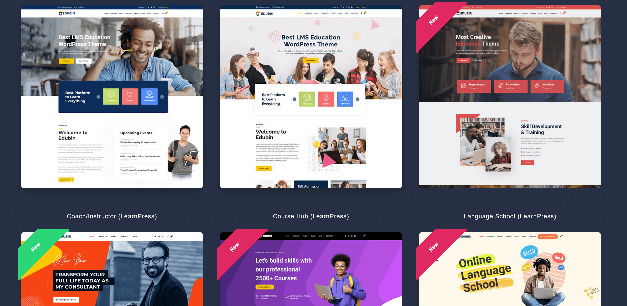
Edubin is one of the most flexible education WordPress themes on ThemeForest because it refuses to lock you into one learning system. According to its listing, it works with seven LMS plugins (LearnPress, LearnDash, Tutor LMS, LifterLMS, Sensei, Academy LMS and MasterStudy LMS), and the bundle includes three premium LMS plugins at no extra cost. That means you can test a platform, then switch later without redesigning your site.
The demo library is the other big draw. The listing advertises 30+ ready-made demos and highlights layouts for an online academy, a university, a language school, corporate training, career coaching, a course marketplace and a kindergarten. Elementor handles page editing, WooCommerce is supported for selling, Zoom integration covers live classes, and RTL plus WPML support helps multilingual or right-to-left audiences. At the time of writing the author, pixelcurve, shows a recent update (October 2026) and a strong review score, which matters for a theme you’ll depend on for years.
- Works with 7 LMS plugins; 3 premium LMS plugins bundled
- 30+ demos including university, language school and kindergarten layouts
- Elementor, WooCommerce, WPML, RTL and Zoom support
- Frequent updates and documentation
Best for: academies that want the freedom to choose or change their LMS. Watch out: bundled premium plugins update through the theme, so check the support policy if you need direct plugin-author licenses.
2. Kingster: Best Education WordPress Theme for Universities and Colleges
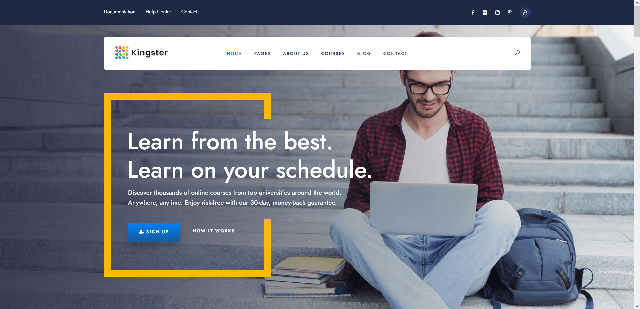
Kingster is built for institutions that need to look established. Its name on ThemeForest says it all: an education WordPress theme for university, college and school. It ships with multiple demos, a dedicated course post type with a search filter, many header styles and a powerful admin panel, which gives admissions teams a quick way to publish programs and let applicants filter them.
It also includes the pieces a campus site always ends up needing: an advanced demo importer, SEO-ready markup, parallax effects, Slider Revolution, WooCommerce support for paid events or merchandise, and WPML for international applicants. Colorlib’s roundup describes it as having 7 demos and 19 headers, and a Colorlib reader thread recommends it for scheduled on-site classes, a smart use case if your students attend in person instead of logging in to a portal.
- Course post type with search filter
- Multiple demos, many header options and a demo importer
- WooCommerce and WPML support
- Classic, trustworthy university look
Best for: universities, colleges and private schools with large content libraries. Watch out: it is institution-first, so add an LMS plugin if you want online lessons and quizzes.
3. WPLMS: Best Education WordPress Theme with a Built-In LMS
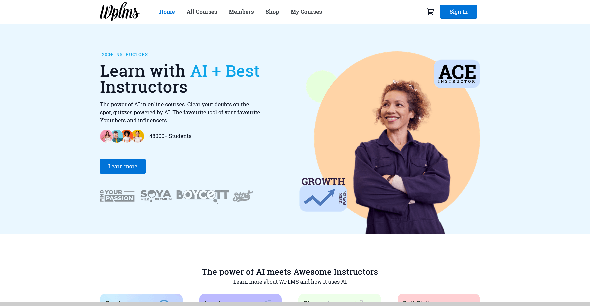
WPLMS is the theme to choose when your website is your product. Instead of bolting a plugin onto a design, it provides a complete learning management system inside the theme: course creation, quizzes with multiple question types, grading, student tracking, payments and instructor tools. It also works with BuddyPress and bbPress, so you can add forums and member communities.
That depth is why it’s a common answer for test-prep sites, safety-training providers and marketplaces where several instructors publish their own courses. It also works for offline classes: you can list courses with a description and a “contact us” button instead of an online checkout. The trade-off is lock-in. Because the course system lives inside the theme, switching themes later is harder than with a plugin-based LMS.
- Built-in course builder, quizzes, grading and student tracking
- BuddyPress and bbPress support for communities
- Paid courses, memberships and instructor features
- Code-free setup for most tasks
Best for: course marketplaces, test prep and training companies. Watch out: it’s overkill for a simple school brochure site.
4. Astra: Best Lightweight Education WordPress Theme for Beginners
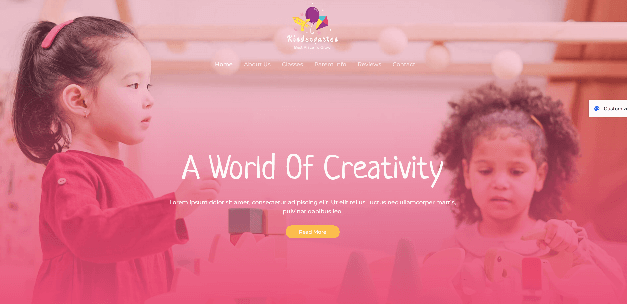
Astra isn’t an education-only theme, but it’s one of the most practical bases for an education website. It’s fast, works with Elementor, Beaver Builder and the block editor, and its Starter Templates library includes education-focused designs you can import and edit. Because the theme itself stays light, your course pages, images and LMS plugin get more of the performance budget.
Pair Astra with an LMS such as Tutor LMS, LearnDash or LifterLMS, and WooCommerce for payments, and you have a stack that scales from a single online workshop to a full academy. The free version covers most small projects; the Pro version unlocks extra header, layout and WooCommerce options.
- Fast, lightweight and beginner-friendly
- Education starter templates and one-click import
- Works with major page builders and LMS plugins
- Free version plus Pro upgrade
Best for: first-time builders and tutors who want speed and room to grow. Watch out: you assemble the learning features yourself through plugins.
5. Course Builder: Best eLearning Software-Style Education Theme
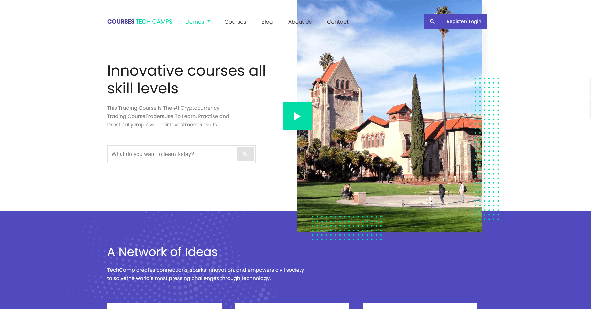
Course Builder positions itself as a WordPress learning management system theme and eLearning software package, which makes it a solid option for teams that want a complete course platform in one purchase. The idea is to give instructors structured course pages, lessons and quizzes without stitching together several separate products.
Before you buy any LMS theme, test the instructor workflow on the demo: how many clicks to add a lesson, attach a video, create a quiz and publish? A theme that looks great but slows your teachers down will cost you more than the license fee. Confirm payment gateways, certificate options and mobile behavior in the demo as well.
- Learning management system theme for eLearning
- Structured courses, lessons and quizzes
- Suited to training providers and course creators
Best for: course creators who want an all-in-one eLearning setup. Watch out: verify the current feature list and update history on the listing page.
Check It Now ( Course Builder )
6. Divi Edu: Best Visual Builder Design for School Websites
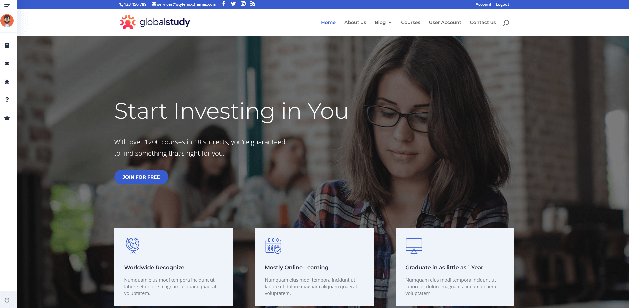
Divi Edu is an education-focused design available through the Elegant Themes marketplace, built for the Divi theme and its visual builder. If you or your staff want to design pages by clicking and dragging rather than writing code, this is a friendly route. You edit text, images and sections live, and you can reuse blocks across the whole school site.
It suits schools, tutoring centers and small colleges that want a polished look without a developer. Because it depends on Divi, you’ll need an active Divi license, and you’ll add an LMS or course plugin separately if you want online lessons. If you’re weighing Divi against other approaches, our guide to Elementor addons shows how the page-builder ecosystem compares.
- Education layouts for the Divi visual builder
- Drag-and-drop editing with live preview
- Reusable sections for programs, staff and events
Best for: design-led school sites managed by non-developers. Watch out: requires Divi, and LMS features come from plugins.
7. Efor: Best Coaching and Online Courses WordPress Theme

Efor is aimed at coaches, mentors and independent educators rather than large institutions. Its focus is a personal brand site that sells knowledge: program pages, testimonials, lead capture and course listings in a friendly, conversion-minded layout. That’s a different job from a university site, and Efor’s design reflects it.
If your academy is built around one expert, think personal trainers, language tutors, business coaches or exam mentors, a theme like Efor can get you to a credible launch quickly. For more ideas in this niche, see our roundup of coaching WordPress themes.
- Coaching and online-course oriented layouts
- Testimonial, program and call-to-action sections
- Good fit for personal-brand academies
Best for: coaches and solo course creators. Watch out: check how the demo handles student logins and gated content before assuming it replaces a full LMS.
8. Academica Pro: Best Classic University WordPress Theme
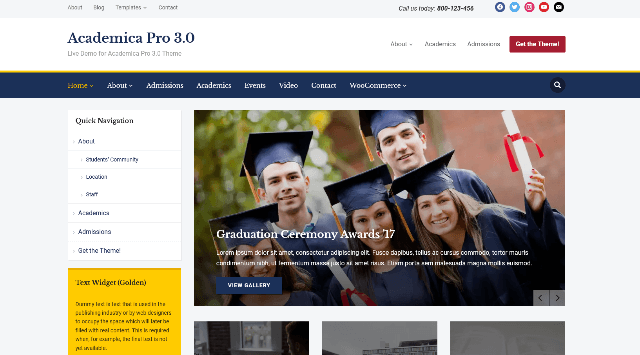
Academica Pro from WPZOOM takes a calm, content-first approach to education design. It’s a clean, classic theme suited to universities, schools, online courses and academic publications. According to Colorlib’s review, it’s fully responsive and highly customizable, with unlimited homepage variations, a featured slider and 12 custom widgets.
That makes it a good choice when your priority is publishing: department news, research highlights, faculty profiles and announcements. It’s less of a course-selling machine and more of a trustworthy front door. Pair it with a forms plugin for admissions inquiries and an events calendar for open days.
- Clean, classic academic design
- Featured slider and 12 custom widgets
- Highly customizable homepage layouts
Best for: universities, journals and schools focused on content and credibility. Watch out: add plugins for LMS and payments if you need them.
Check It Now ( Academica Pro )
9. LMS: Best Education LMS WordPress Theme for Training Centers
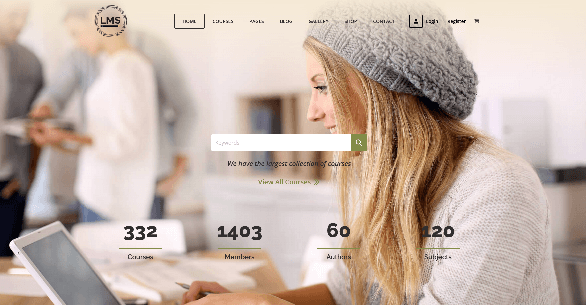
This long-running ThemeForest theme is sold as an education LMS WordPress theme, which signals its core idea: manage courses, lessons and learners from WordPress without adding a separate platform. Training centers, academies and corporate-learning teams are the natural audience.
Long-running themes have a double edge. They’re usually battle-tested, with many buyer questions already answered in the comments, but they can also carry older design habits. Check the last update date, the PHP and WordPress versions it supports, and how the demo looks on a phone before you commit.
- Education LMS theme for courses and learners
- Established product with a long buyer history
- Good fit for training providers
Best for: training centers that want a straightforward course-and-learner setup. Watch out: review the update log and mobile demo carefully.
10. University: Best Education, Event and Course Theme for Campuses
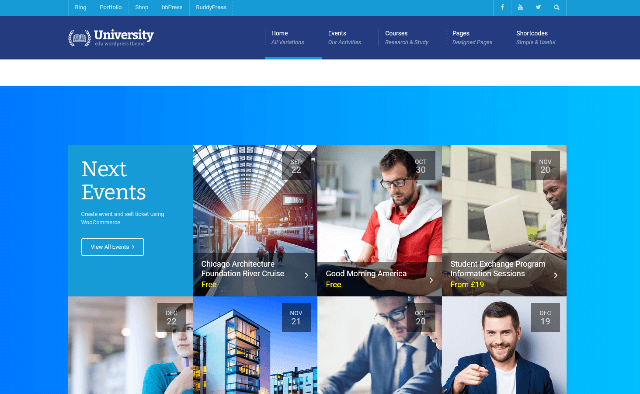
University is described on ThemeForest as an education, event and course theme, and that three-way combination is exactly what a busy campus needs. Prospective students look for programs, parents look for open-day dates, and alumni look for events. A theme that treats all three as first-class content keeps your navigation simple.
Use it when your calendar matters as much as your catalogue: workshops, seminars, admissions days and short courses. If your events involve paid seats, connect it to WooCommerce, then read our section on selling courses and seats for practical add-ons.
- Education, event and course content types
- Suited to campuses, institutes and workshop series
- Helpful for open days and seminar schedules
Best for: institutes that run frequent events alongside courses. Watch out: confirm event-ticketing options in the demo.
11. Edumall: Best Elementor LMS Theme for Course Marketplaces
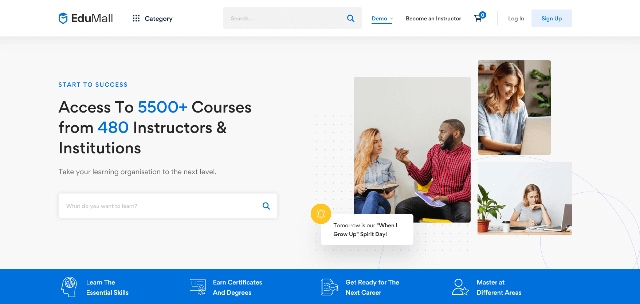
Edumall is built for people who want to launch a course business quickly and customize it visually. It works with Elementor, so you can restyle the supplied layouts without code. Colorlib’s review highlights features such as BuddyPress, analytics, certificates, reviews, email notifications and a blog module, and notes that you can monetize with paid membership plans.
That feature mix points to a community-driven learning platform rather than a static school site: students leave reviews, earn certificates and receive notifications, while you track performance and sell access. If you’re planning a marketplace where multiple instructors publish, Edumall deserves a close look.
- Elementor-based customization
- Certificates, reviews and email notifications
- BuddyPress and analytics support
- Membership and paid-course options
Best for: course marketplaces and community-led academies. Watch out: feature-rich themes need good hosting; see our list of the fastest WordPress themes for performance context.
12. Eduma: Best LearnPress Theme for Universities and Online Courses
Eduma, from ThimPress, is a long-time favorite because it sits on LearnPress, one of WordPress’s most popular free LMS plugins. That keeps your core learning engine open and portable while the theme supplies the design: course grids, instructor pages, events and a drag-and-drop curriculum tool.
It’s a strong pick for universities and online schools alike. Colorlib also notes that its event option can suit scheduled in-person classes better than a standard course section, a handy trick for workshops that run on repeating dates.
- Built around LearnPress
- Course search, curriculum tools and event options
- Works for universities and online academies
Best for: schools that want a proven LearnPress setup. Watch out: some advanced LearnPress add-ons are sold separately.
13. Masterstudy: Best Education Theme for Paid and Free Courses
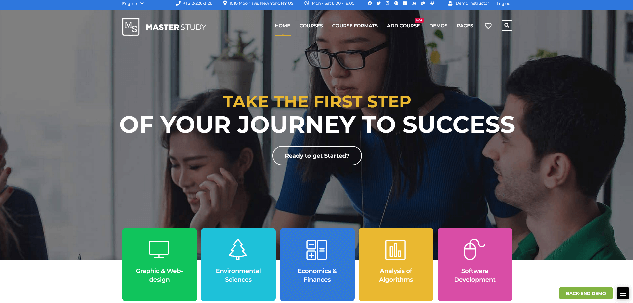
Masterstudy is custom-built for e-learning programs. It lets you create both free and paid courses, works with WooCommerce for pricing and checkout, and includes extended teacher profile templates and a student review system. Its theme options panel offers many configuration choices, and it integrates with WPBakery for page layouts.
It’s a sensible middle path: more structure than a bare base theme, less complexity than a full marketplace platform. If you want to try a mix of free lead-magnet lessons and paid advanced courses, Masterstudy’s model fits well.
- Free and paid courses with WooCommerce checkout
- Teacher profiles and student reviews
- Theme options panel and WPBakery integration
Best for: small and mid-size online schools. Watch out: WPBakery-based editing feels different from Elementor or the block editor.
14. Tutor Starter: Best Free Education WordPress Theme for Tutor LMS
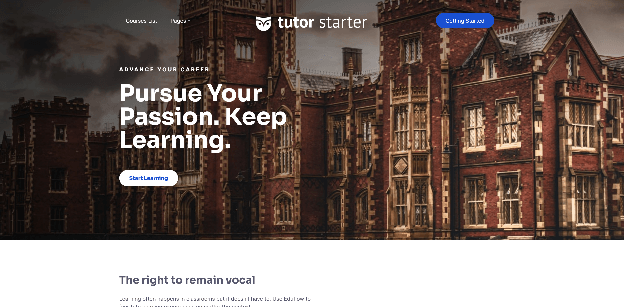
Tutor Starter is a free theme made to pair with Tutor LMS, the popular course plugin. If budget is tight, it’s one of the smartest ways to start: you get a clean, Elementor-friendly design and a proven LMS without paying for a premium theme.
Free doesn’t mean basic here. Colorlib reports that it loads fast and performs well on mobile, which supports both the student experience and your search rankings. Start free, validate your course idea, then upgrade your design or plugins as revenue arrives. Our guide to free WordPress themes lists more no-cost starting points.
- Free theme designed for Tutor LMS
- Optimized for Elementor
- Fast, mobile-friendly performance
Best for: new course creators validating an idea on a small budget. Watch out: advanced marketplace features may need Tutor LMS Pro.
Check It Now ( Tutor Starter )
15. Academia: Best Free Block Theme for Schools and Academies
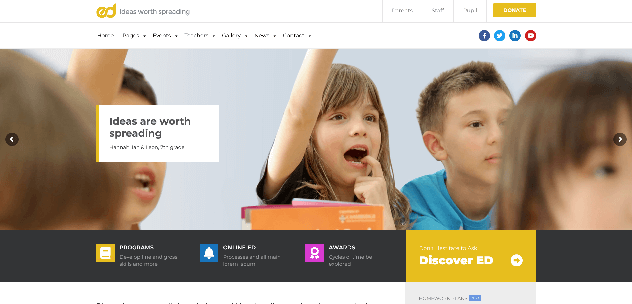
Academia is a free block theme from the Colorlib team, designed for schools, universities, academies and online course providers. It’s edited entirely in the Site Editor, so there’s no page builder to learn. Its course browser lets visitors search by name, filter by subject and level, and sort results, and it keeps working without JavaScript because the server renders the results.
Courses can come from its own library plugin or from Tutor LMS, LifterLMS, Sensei or LearnDash if you already use one. Six starter sites cover an online academy, a university, a school, a coding bootcamp, a language school and an arts studio. For schools that want a modern, future-proof editing experience, it’s a compelling free option. Not sure what block themes are? Our guide to WordPress block themes explains the difference.
- Free, GPL-licensed block theme
- Course browser with search, filters and sorting
- Works with Tutor LMS, LifterLMS, Sensei and LearnDash
- Six starter sites for different school types
Best for: schools and academies that want a free, modern, builder-free setup. Watch out: as a newer theme, its community and add-on ecosystem are smaller than long-established names.
Must-Have Features in an Education Website Template
Whatever theme you choose, an education website template should cover the following. Use it as a scoring sheet while you test demos.
| Feature | Why it matters | What to check in the demo |
|---|---|---|
| Course listing and filters | Applicants must find programs fast | Search by subject, level, price or date |
| Teacher and faculty profiles | Builds trust and credibility | Bio, credentials, social links, course list |
| Events calendar | Open days, exams and workshops | Calendar view, RSVP or ticket option |
| Admissions and enquiry forms | Turns visitors into leads | Works with your forms plugin; spam protection |
| LMS compatibility | Quizzes, progress, certificates | Styled lesson pages, not just a plain plugin look |
| WooCommerce support | Sell courses, books or seats | Styled cart, checkout and account pages |
| Multilingual and RTL | International students and parents | WPML or Polylang; an RTL demo |
| Mobile performance | Most students browse on phones | Run the demo through PageSpeed Insights |
| Accessibility | Required for many institutions | Keyboard navigation, contrast, alt text, focus states |
Two extras are easy to overlook. First, translation and RTL readiness: if your audience speaks Arabic, Urdu or Hebrew, check our list of RTL WordPress themes and the multilingual WordPress themes guide. Second, editor compatibility: modern block-based editing keeps your site easier to maintain, so see our overview of Gutenberg-compatible themes.
Which Education WordPress Theme Is Right for You?
Answer three questions and you’ll land on the right category in under a minute.
LMS Plugins and Theme Compatibility
Many buyers confuse a theme with a learning management system. A theme controls how your site looks. An LMS controls what students can do: enroll, track progress, take quizzes and receive certificates. Some themes include an LMS (WPLMS), others are built around one plugin (Eduma with LearnPress, Tutor Starter with Tutor LMS), and others work with several (Edubin, Academia).
The most common LMS plugins are Tutor LMS, LearnPress, LearnDash, LifterLMS and Sensei. If you’re undecided, choose the LMS first, then pick a theme that styles it well. As one Colorlib answer puts it, a plugin-based LMS lets you move between themes later, while an in-theme LMS makes switching harder. That is the key trade-off.
| Approach | Pros | Cons |
|---|---|---|
| LMS built into theme (WPLMS) | One package, tight design integration | Harder to switch themes later |
| Theme + one LMS plugin (Eduma, Tutor Starter) | Focused, well-tested pairing | Tied to that plugin’s ecosystem |
| Theme works with many LMS plugins (Edubin, Academia) | Maximum flexibility | More choices to evaluate up front |
For a head-to-head view of platform choices, read Teachable vs WordPress, which explains when a hosted course platform beats your own WordPress site and when it doesn’t.
Selling Courses, Workshops and Seats with WooCommerce
You don’t need a heavy LMS to sell education. Many tutors, language schools and driving instructors simply sell time slots, workshop seats and course bundles through WooCommerce, which works with most themes in this list. Colorlib’s reader answers confirm that WooCommerce can sell both online and in-person classes. We cover the booking side in our guide to WooCommerce course booking.
Two small additions make education stores far more flexible:
- Let students propose a price. Corporate buyers, scholarship applicants and bulk-seat purchasers often want to negotiate. A price Negotiation for WooCommerce tool lets visitors send an offer on a course or bundle, and you accept, counter or decline from the dashboard. See also our overview of WooCommerce make an offer plugins.
- Collect the details each course needs. With Product Options for WooCommerce you can add fields such as preferred session time, student name, T-shirt size, study-material format or certificate name directly on the product page, so every order arrives complete. For more background, read our post on custom fields in WooCommerce.
Running a driving school or specialist academy? Our curated driving school WordPress themes and kindergarten WordPress themes go deeper on those niches, and teacher WordPress themes suits individual educators.
SEO, Speed and Accessibility for Education Websites
A beautiful theme still needs to be found. Here’s how to give your education site an edge in search and for every learner who visits.
Target the questions parents and students actually search
Education searches are intent-rich: “nursery near me”, “online coding course for beginners”, “MBA admissions requirements”. Build separate, specific pages for each program, location and audience, with clear headings, fees, schedules and an obvious next step. Thin, generic “our courses” pages rarely rank.
Use structured data
Schema markup helps search engines understand your institution and courses. At a minimum, add EducationalOrganization markup for your school and Course markup for individual programs. Most SEO plugins can output the basics; our comparison of Rank Math vs Yoast SEO helps you choose one, and the beginner’s guide to WordPress on-page SEO covers titles, headings and internal links.
Protect Core Web Vitals
Slow pages frustrate students on mobile data. Test your chosen demo with PageSpeed Insights and read Google’s explanation of Core Web Vitals. Compress images, limit sliders, avoid auto-playing hero videos, and choose quality hosting. Our cheap WordPress hosting roundup helps when budget matters.
Design for accessibility
Many schools and universities have legal or policy duties to be accessible, and it’s simply good practice. Aim for the WCAG guidelines: strong color contrast, descriptive alt text, keyboard-friendly menus, visible focus outlines and captions on video lessons. Test the demo with only your keyboard before you buy.
Keep student data safe
Education sites collect names, emails and sometimes payment details. Use HTTPS, keep themes and plugins updated, limit admin accounts and run a reputable security plugin. See our guide to the best WordPress security plugins and our WordPress security checklist.
How to Launch Your Education Website in 7 Steps
- Define your model. Brochure site, in-person classes, online courses or a marketplace? Use the flowchart above.
- Pick your theme and LMS together. Confirm compatibility on the product page, not just the demo.
- Choose hosting. Video courses and many students need more resources than a basic plan.
- Install and import a demo. Follow our step-by-step how to install a WordPress theme guide, and use a child theme if you’ll customize code.
- Add content. Courses, instructor bios, fees, schedules, policies and testimonials.
- Connect payments and forms. WooCommerce, enquiry forms, email confirmations and legal pages.
- Test, then launch. Check mobile layout, load speed, accessibility and every enrollment path as a real student would.
Common Mistakes When Choosing an Education WordPress Theme
- Buying an LMS theme for a brochure site. You’ll pay for complexity you never use.
- Buying a pretty theme and expecting an LMS. Check whether lessons, quizzes and progress tracking are actually included.
- Ignoring mobile. Parents often enquire from their phones. Test on a real device.
- Skipping the update history. A theme not updated in a year may break with new WordPress releases.
- Forgetting multilingual needs. Adding translation later is harder than choosing a ready theme now.
- Importing every demo page. Delete unused pages and plugins to keep the site lean and secure.
Frequently Asked Questions About Education WordPress Themes
What is the best education WordPress theme?
There’s no single winner. Edubin and WPLMS lead for online course platforms, Kingster and Academica Pro suit universities and schools, and Astra, Tutor Starter or Academia are strong flexible bases. Match the theme type to your model first.
Do I need an LMS plugin for my education website?
Only if students must log in, track progress, take quizzes or earn certificates. For a brochure-style school website with course descriptions and enquiry forms, an institution theme is enough.
Is there a free education WordPress theme?
Yes. Tutor Starter and Academia are free options in this list, and Astra has a capable free version. Free themes are great for starting out; upgrade when you need extra demos, support or features.
Can I use an education theme for in-person classes only?
Yes. Many themes, including LMS themes, can list on-site courses with schedules and a “contact” or “reserve” button instead of online checkout. Events-based themes work especially well for repeating class dates.
Which theme is best for a school or kindergarten?
Look for friendly design, event calendars, gallery and parent communication features. Browse our dedicated kindergarten WordPress themes guide for more child-focused options.
Can I sell courses with WooCommerce?
Yes. WooCommerce works with most themes here and can sell online courses, workshops and in-person seats. Add Product Options for WooCommerce to collect course-specific details and price negotiation to handle bulk or discounted enrollments.
Are education WordPress themes good for SEO?
The best ones use clean code, responsive layouts and fast loading. Pair your theme with an SEO plugin, add Course and EducationalOrganization schema, and publish genuinely helpful program pages.
How do I choose between a premium and free theme?
Choose free if you’re validating an idea or have a small site. Choose premium when you need ready-made demos, bundled features and dedicated support. Either way, check the update history and documentation.
Final Thoughts: Pick the Theme That Matches Your Learners
The right education WordPress theme is the one that fits how your students learn and how your team works. If students log in to learn, start with Edubin, WPLMS, Eduma or Masterstudy. If your priority is presenting a trustworthy institution, shortlist Kingster, Academica Pro or University. If you want maximum flexibility on a small budget, begin with Astra, Tutor Starter or Academia and grow from there.
Whatever you choose, test the demo on your phone, read the update log, confirm LMS and WooCommerce compatibility, and plan your SEO from day one. Do that, and your new site won’t just look like a school. It will fill classrooms.
Want to keep exploring? Compare more niches in our guides to portfolio WordPress themes and WordPress templates, or learn how to create a WordPress website from scratch.