
If you are stuck on Joomla or WordPress, you are not alone. Both are free, open-source and built on PHP, and both have been around for close to twenty years. The difference is in who they are built for, how much work they ask of you, and what happens when your site grows.
This guide compares Joomla vs WordPress (and brings in Drupal, because most people end up weighing all three) across ease of use, SEO, security, cost, ecommerce, multilingual sites and long-term support. It uses fresh 2027 data, includes a scorecard and a decision flow, and ends with a clear recommendation for each type of project.
Quick answer: Choose WordPress for blogs, business sites, stores and most first-time site owners. Choose Joomla if you need multilingual content, user groups and access levels built into the core and you are comfortable with a steeper learning curve. Choose Drupal for large, complex platforms with custom content models and a developer team. If you are unsure, WordPress is the lowest-risk starting point.
Joomla vs WordPress vs Drupal at a glance
| Factor | WordPress | Joomla | Drupal |
|---|---|---|---|
| Best for | Blogs, business sites, marketing sites, stores | Multilingual sites, member portals, structured sites | Large, complex platforms, government, universities |
| Learning curve | Gentle | Moderate to steep | Steepest |
| Themes and plugins | Largest library by far | Smaller extension directory | Large module ecosystem, developer-oriented |
| Multilingual | Via plugins | Built into core | Built into core, needs technical setup |
| User roles and access | Basic roles; more via plugins | Granular access levels in core | Very granular permissions and workflows |
| Ecommerce | WooCommerce and many others | HikaShop, J2Commerce, VirtueMart | Drupal Commerce and custom builds |
| Typical launch cost | Lowest | Moderate | Highest |
| Developers available | Very many | Fewer | Fewer, often specialist |
Market share and versions in 2027
Popularity is not the same as quality, but it matters for practical reasons: more users means more themes, more plugins, more tutorials and more people who can fix your site at short notice. According to W3Techs, WordPress runs roughly 59% of websites with a known CMS and around 40% of all websites. Joomla sits at under 2% and Drupal at about 1%.
If you want the long version of those numbers, see our breakdown of the percentage of websites using WordPress, and our list of Fortune 500 companies using WordPress.
Current versions you should know about
- WordPress 7.x is the current major line, and its block editor and Site Editor are now the default way to build.
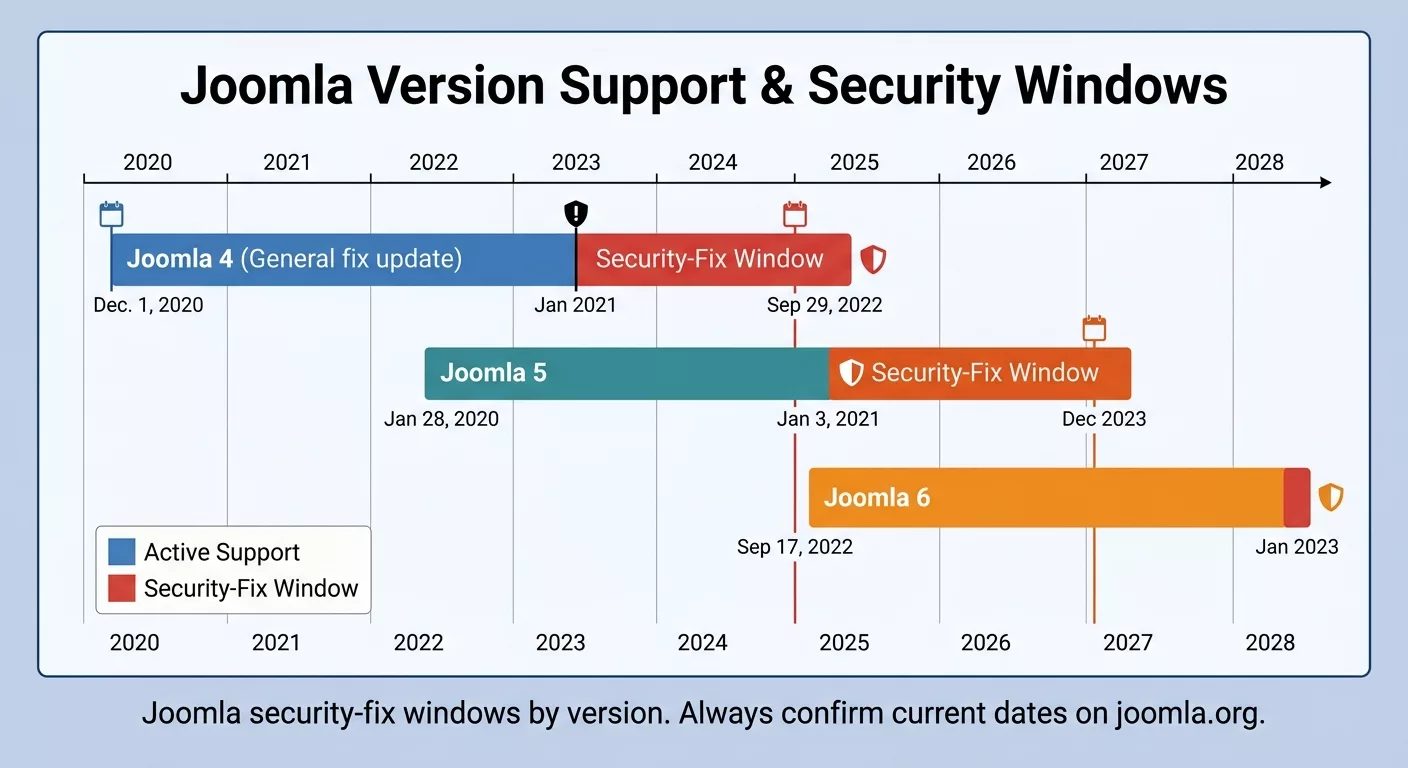
- Joomla 6 shipped in October 2025. It needs a modern PHP (8.3 minimum, 8.4 recommended) and a current database server, so check your host before you commit.
- Joomla 5.4 is the long-term support release, and Joomla 4 has already reached end of life.
What are WordPress, Joomla and Drupal?
WordPress
WordPress began as blogging software and grew into a general-purpose CMS. Its strength is that it is easy to start and easy to extend: install it, pick a theme, add plugins and publish. New to it? Our guide on what WordPress is covers the basics, and how to create a WordPress website walks through a first build. You can also download WordPress itself from WordPress.org.
Joomla
Joomla was designed as a full-site CMS from the start. Its core includes multilingual content, user groups with access levels and custom fields, which WordPress usually handles with plugins. The trade-off is a more technical admin and a smaller ecosystem. The official site is Joomla.org, and beginners can start with the Joomla beginner tutorials.
Drupal
Drupal is the most developer-oriented of the three. It shines for structured content, strict permissions and editorial workflows, which is why governments, universities and large publishers use it. It rewards planning and experienced developers, and it can feel like overkill for a small site. See Drupal.org for the official project.
Ease of use: WordPress vs Joomla
This is the category where most people decide. WordPress is built around two simple ideas, posts and pages, and almost every task is a variation on creating one of them. The dashboard is familiar, the editor is block-based and visual, and many hosts install it in one click.
Joomla has a steeper start. Everything lives under Articles and is organized with categories, menus and modules, which gives you structure but takes planning. The admin uses more development terms, and installing extensions involves more steps. If you have built websites before, Joomla feels logical. If this is your first site, it can feel like a lot.
Drupal is harder still for non-technical users. Editors can work comfortably once a developer has built the site properly, but the setup itself usually needs specialist skills.
Verdict: WordPress wins on ease of use, Joomla is moderate, Drupal is the most complex.
Themes, plugins and customization
WordPress can be almost anything because of its ecosystem. There are thousands of free themes and plugins in the official directory, and many more premium ones. You can change the whole look with a theme, add forms, SEO, ecommerce, bookings or memberships with plugins, and design visually with the Site Editor or a page builder.
- Browse our picks of free WordPress themes and the fastest WordPress themes.
- Learn how to install a WordPress theme and how to change your WordPress theme safely.
- Not sure which plugins you need? Start with our list of must-have WordPress plugins.
- Want to know what makes a theme well built? Read about WordPress theme standards.
Joomla is also highly customizable. Its Extensions Directory lists several thousand extensions, and templates are one category. You place content in template positions using modules, and you can assign different templates to different parts of the site, which is genuinely handy. The catch is that the choice is smaller, premium options are fewer, and getting a polished result usually takes more technical effort.
Drupal customizes at the architecture level, with custom content types, fields, views and workflows. It is the most flexible of the three in a technical sense, and also the one that needs the most development time.
Built-in features: multilingual, access control, custom fields
This is where Joomla earns its place in the comparison. Out of the box it ships with:
- Multilingual content management with language associations.
- User groups and access levels that control who sees and edits what.
- Custom fields for articles and other content.
- Workflows for content approval (improved further in recent releases).
WordPress reaches the same place with plugins. Multilingual sites typically use a plugin such as WPML or Polylang, custom fields come from Advanced Custom Fields, and extra user roles from membership or role-management plugins. This works well and is widely used, but it means more moving parts. If you are building a multilingual site on WordPress, see our guide to multilingual WordPress themes and, for several sites under one install, WordPress multisite networks.
Verdict: if your site needs deep multilingual and permission features from day one, Joomla (or Drupal) has a real built-in advantage. For everyone else, the plugin route on WordPress is perfectly good.
SEO: Joomla or WordPress?
Neither platform gives you a built-in ranking advantage. What matters most is the quality of your content, your site speed, your site structure and the links you earn. Both can rank very well.
- WordPress: edit each permalink freely, and add Yoast SEO, Rank Math or All in One SEO for titles, meta descriptions, schema, redirects and sitemaps. Most marketers can run SEO without touching code.
- Joomla: includes search-friendly URLs, URL rewriting (which needs mod_rewrite on the server) and meta fields for each article in core. Advanced features like schema or redirect management usually come from extensions.
- Drupal: excellent when the content architecture is planned well, with strong taxonomy and URL control, but it needs more setup.
For a practical walkthrough of the WordPress side, read our beginner’s guide to WordPress on-page SEO and our comparison of the best platforms for SEO.
Verdict: a tie on capability, with WordPress ahead on how easy SEO is to execute.
Ecommerce
WordPress has the biggest ecommerce ecosystem thanks to WooCommerce, which comes with a huge range of payment gateways, shipping tools, themes and extensions. If you are curious how it works, read what WooCommerce is, then browse essential plugins for WooCommerce and the best free WooCommerce themes.
Joomla stores are possible with HikaShop, J2Commerce and VirtueMart. One practical warning: check that the store extension supports the Joomla version you plan to run. Some extensions lag behind new major releases, so confirm compatibility before you commit.
Drupal can run serious commerce, especially when the store needs custom architecture, but it typically takes more development work than a WooCommerce build.
Weighing other platforms too? See our ecommerce platforms comparison and our primer on what an ecommerce business is.
Verdict: WordPress with WooCommerce is the practical choice for most small and mid-size stores.
Security
Security is often argued like a brand rivalry, and the truth is more boring. WordPress, Joomla and Drupal all have dedicated security teams and regular releases. Real-world compromises mostly come from the same few causes:
- Outdated core, plugins, extensions or themes.
- Abandoned or poorly coded third-party add-ons.
- Weak or reused admin passwords and no two-factor login.
- Cheap or badly configured hosting.
- Running an end-of-life version, such as Joomla 3.
WordPress is the biggest target because it is the biggest platform, and its enormous plugin library means plugin quality varies. Joomla has strong access control, which helps on sites with many user roles. Drupal is often preferred by organizations with strict review processes. In every case, the winning habit is the same: keep everything updated, install fewer and better add-ons, and keep backups.
Use our WordPress security checklist to harden a site, and if the worst happens, follow our guide to recover a hacked WordPress site. For developers, sanitizing, escaping and validating is the foundation of secure theme and plugin code.
Verdict: no CMS is secure on its own. Choose the one your team can keep updated and maintained.
Speed and performance
Out of the box, neither WordPress nor Joomla has a meaningful speed advantage. Speed depends on hosting, caching, image optimization, the quality of your theme or template, and how many add-ons you load. A lean WordPress site on good hosting is fast, and a bloated Joomla site is slow, and vice versa.
To speed up either platform, start with the server. These guides help: Nginx vs LiteSpeed, optimizing performance with Nginx, installing Nginx, PageSpeed, MariaDB and PHP, and our roundup of cloud hosting providers. If you run a store, see the fastest WooCommerce hosting.
Cost
All three platforms are free to download. The real cost of a website is everything around the software:
| Cost area | WordPress | Joomla | Drupal |
|---|---|---|---|
| Software | Free | Free | Free |
| Hosting | Widest choice, one-click installs common | Needs a host with current PHP and database versions | Often needs stronger hosting for large builds |
| Design | Huge free and premium theme market | Fewer templates | Usually custom design |
| Features | Free and paid plugins for nearly everything | Smaller extension pool, some paid | Often custom development |
| Development and maintenance | Most developers, so usually the lowest | Fewer specialists, can cost more | Usually the highest |
The takeaway: WordPress is usually the cheapest to launch and maintain, mainly because of competition and choice. Joomla can be affordable when you have the skills in-house. Drupal is typically the most expensive because it is chosen for complex projects. If you plan to hire help, see our list of WordPress development agencies and our guide to getting a web development quote.
Community, support and hiring
WordPress has the biggest community, the most tutorials, the most freelancers and agencies, and the widest range of hosting support. Almost any problem you hit has been solved and written up somewhere. When something breaks, our guide to common WordPress errors can save you hours.
Joomla has a dedicated and helpful community, official documentation and a professional directory, but it is smaller, so finding a specialist at short notice can be harder and sometimes pricier. Drupal has a strong, technical community, with expertise concentrated in agencies and enterprise teams.
Scorecard: WordPress vs Joomla vs Drupal
How to choose: WordPress, Joomla or Drupal?
Choose WordPress if…
- You are building a blog, business site, portfolio, course site or online store.
- You want to launch quickly and manage content yourself without a developer.
- You want the biggest choice of themes, plugins, hosts and freelancers.
- Budget matters and you want the lowest cost to launch and maintain.
Choose Joomla if…
- You need multilingual publishing, user groups and access levels in the core, from day one.
- You are building a member portal, association or intranet-style site.
- You or your team already know Joomla, or enjoy a more technical admin.
- You are happy with a smaller extension ecosystem.
Choose Drupal if…
- Your site is really a platform, with custom content types, workflows and integrations.
- You have, or can hire, experienced Drupal developers.
- Governance, permissions and scalability matter more than launch speed.
WordPress: pros
- Easiest to learn
- Largest theme and plugin library
- Best ecommerce ecosystem
- Most developers and tutorials
WordPress: cons
- Plugin quality varies
- Too many plugins can slow a site
- Multilingual and advanced roles need plugins
Joomla: pros
- Multilingual and access control built in
- More structure out of the box
- Different templates for different site areas
Joomla: cons
- Steeper learning curve
- Smaller ecosystem and community
- Harder and sometimes costlier to hire for
- Extensions can lag behind new major versions
Also worth a look: the PHP foundations behind these systems are covered in our guide to the best PHP frameworks, and if you want to see what a well-built WordPress site looks like, browse the best WordPress website examples and the most famous WordPress websites.
Switching from Joomla to WordPress
Plenty of site owners start on Joomla and later move to WordPress for the ecosystem, the easier editing or lower maintenance costs. A safe migration follows this order:
- Back up your Joomla files and database.
- Build a staging copy of the new WordPress site, ideally on your own machine first. Our guide to running WordPress on localhost helps here.
- Import content (articles, categories, users and media) with a migration tool or plugin, then spot-check it.
- Rebuild the design with a modern theme and re-create your menus. See free WordPress themes for a starting point.
- Map and redirect every old URL with 301 redirects so you keep your rankings and links.
- Re-submit your sitemap in Google Search Console and watch for crawl errors for a few weeks.
The verdict
For most people searching Joomla or WordPress, the answer is WordPress. It is easier to learn, cheaper to run, backed by the largest ecosystem and supported by far more professionals. Joomla remains a solid, actively maintained option for sites that need built-in multilingual and access-control features and teams that are comfortable with a technical admin. Drupal is the specialist choice for complex platforms.
The best CMS is the one your team can build, secure and maintain with confidence. Ready to start with WordPress? Pick a design from our best-selling WordPress themes or free WordPress themes, then follow our guide to creating a WordPress website.
Frequently asked questions
Which is better, Joomla or WordPress?
For most websites, WordPress. It is easier to learn, has a far larger library of themes and plugins, and many more developers available to hire. Joomla is a good fit when you need built-in multilingual publishing, user groups and access levels from day one and your team can handle a steeper learning curve.
Is Joomla harder to use than WordPress?
Yes, for most beginners. Joomla’s admin uses more development terminology and asks you to plan categories, menus and modules up front. WordPress is built around posts and pages, and many hosts install it in one click.
Is Joomla or WordPress better for SEO?
Neither has a built-in ranking advantage. Joomla includes search-friendly URLs and meta fields in core, while WordPress adds the same controls through SEO plugins such as Yoast SEO, Rank Math or All in One SEO. Content quality, speed and links matter far more than the CMS.
Is Joomla more secure than WordPress?
Not inherently. Both have active security teams and regular releases. Most real-world compromises come from outdated software, abandoned add-ons, weak passwords and poor hosting. Running an end-of-life version such as Joomla 3 is a bigger risk than the choice of CMS.
Joomla vs WordPress vs Drupal: which is best for a large, complex website?
Drupal is usually the strongest option for large sites with custom content models, strict workflows and heavy integrations, but it needs experienced developers. Joomla sits in the middle. WordPress can scale well too, especially with good hosting and caching, and is the practical choice for most business sites.
Is Joomla still relevant in 2027?
Yes. Joomla 6 is actively developed and Joomla 5 and 6 receive security fixes. Its market share is small, around 1.6% of sites with a known CMS, so there are fewer extensions, tutorials and freelancers than for WordPress.
Can I migrate from Joomla to WordPress?
Yes. Migration tools and plugins can move articles, categories, users and media into WordPress, but you will usually need to rebuild the design, re-create menus and set up 301 redirects to protect your rankings. See the migration steps above.
Which is cheaper, Joomla or WordPress?
Both are free to install. WordPress projects are usually cheaper overall because there are more themes, plugins and developers, which keeps design and maintenance costs down. Joomla development and maintenance can cost more because specialists are harder to find.
Sources and further reading: W3Techs CMS usage statistics, Joomla.org, Joomla Extensions Directory, WordPress Plugin Directory, Drupal.org. Market share and version details change often, so check the sources for the latest numbers.



